
Arduino-Based Ultrasonic Water Level Monitoring System with LCD Display and Automatic Pump Control
View and Edit Project In Cirkit Designer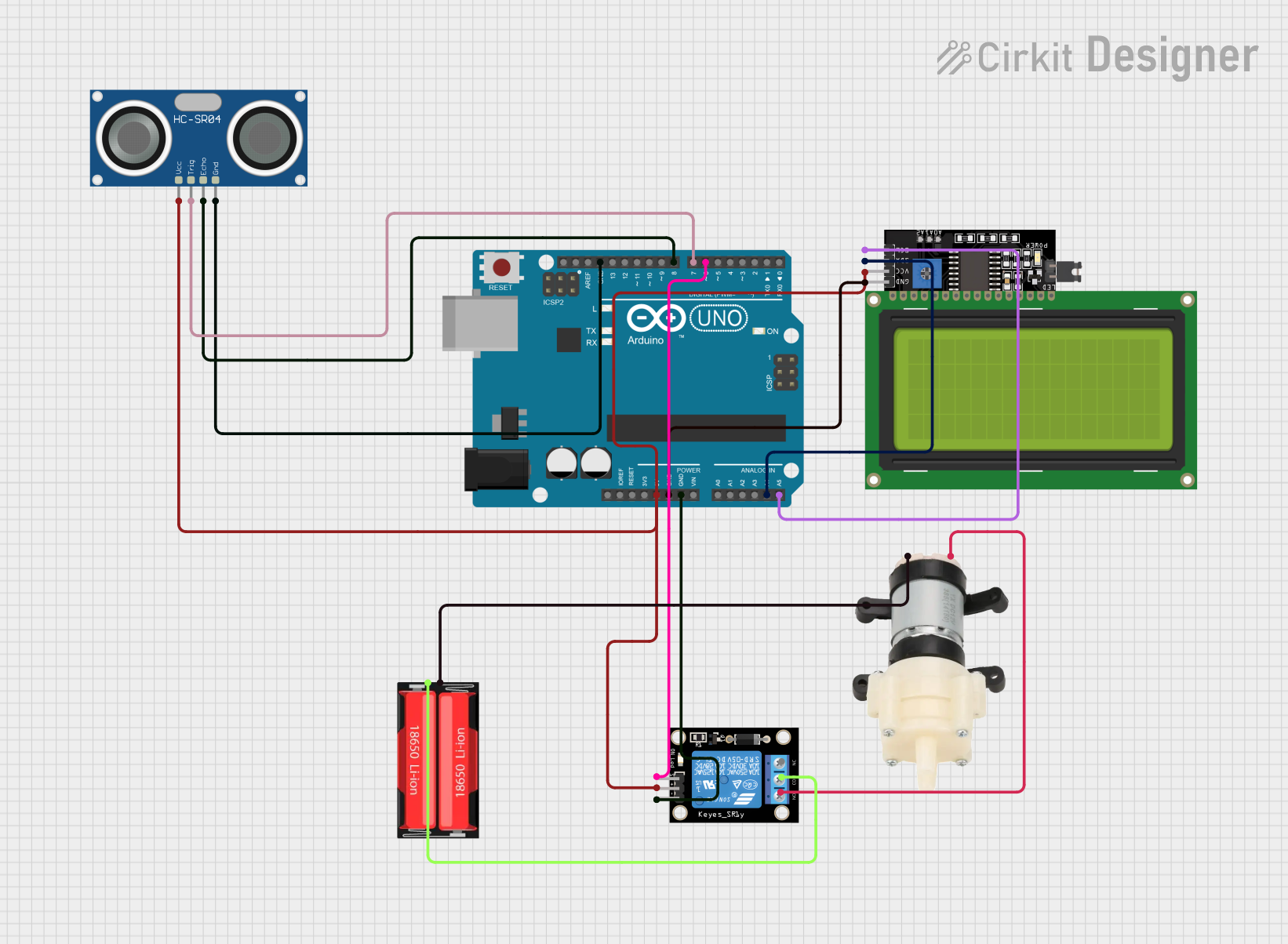
Circuit Documentation
Summary
This circuit is designed to monitor the water level in a tank using an HC-SR04 Ultrasonic Sensor and display the water level on an LCD Display. It also controls a Mini Diaphragm Water Pump via a KY-019 Relay module. The entire system is managed by an Arduino UNO microcontroller.
Component List
HC-SR04 Ultrasonic Sensor
- Description: Measures distance using ultrasonic waves.
- Pins: VCC, TRIG, ECHO, GND
Arduino UNO
- Description: Microcontroller board based on the ATmega328P.
- Pins: UNUSED, IOREF, Reset, 3.3V, 5V, GND, Vin, A0, A1, A2, A3, A4, A5, SCL, SDA, AREF, D13, D12, D11, D10, D9, D8, D7, D6, D5, D4, D3, D2, D1, D0
LCD Display 20x4 I2C
- Description: 20x4 character LCD display with I2C interface.
- Pins: SCL, SDA, VCC, GND
Mini Diaphragm Water Pump
- Description: Small water pump for liquid transfer.
- Pins: Positive (+), Negative (-)
KY-019 Relay module 1 channel
- Description: Relay module for switching high-power devices.
- Pins: S, 5V, GND, NC, COM, NO
18650 Li-Ion
- Description: Rechargeable lithium-ion battery.
- Pins: Positive, Negative
Wiring Details
HC-SR04 Ultrasonic Sensor
- VCC connected to 5V on Arduino UNO
- TRIG connected to D7 on Arduino UNO
- ECHO connected to D8 on Arduino UNO
- GND connected to GND on Arduino UNO
Arduino UNO
- 5V connected to VCC on HC-SR04 Ultrasonic Sensor, VCC on LCD Display 20x4 I2C, and 5V on KY-019 Relay module
- GND connected to GND on HC-SR04 Ultrasonic Sensor, GND on LCD Display 20x4 I2C, and GND on KY-019 Relay module
- D7 connected to TRIG on HC-SR04 Ultrasonic Sensor
- D8 connected to ECHO on HC-SR04 Ultrasonic Sensor
- A4 connected to SDA on LCD Display 20x4 I2C
- A5 connected to SCL on LCD Display 20x4 I2C
- D6 connected to S on KY-019 Relay module
LCD Display 20x4 I2C
- SDA connected to A4 on Arduino UNO
- SCL connected to A5 on Arduino UNO
- VCC connected to 5V on Arduino UNO
- GND connected to GND on Arduino UNO
Mini Diaphragm Water Pump
- Positive (+) connected to NO on KY-019 Relay module
- Negative (-) connected to Negative on 18650 Li-Ion
KY-019 Relay module 1 channel
- S connected to D6 on Arduino UNO
- 5V connected to 5V on Arduino UNO
- GND connected to GND on Arduino UNO
- COM connected to Positive on 18650 Li-Ion
- NO connected to Positive (+) on Mini Diaphragm Water Pump
18650 Li-Ion
- Positive connected to COM on KY-019 Relay module
- Negative connected to Negative (-) on Mini Diaphragm Water Pump
Documented Code
#include <LiquidCrystal_I2C.h>

// Initialize the LCD display
LiquidCrystal_I2C lcd(0x27, 16, 2);

// Define connections to sensor
#define TRIGPIN 7  // Trigger pin
#define ECHOPIN 8  // Echo pin
#define RelayPin 6  // Relay pin

float duration;
float distance;
int waterLevelPer;

// Set Water Level Distance in CM
int emptyTankDistance = 20;  // Distance when tank is empty
int fullTankDistance = 10;    // Distance when tank is full

// Set trigger value in percentage
int triggerPer = 10;  // Alarm/pump will start when water level drops below this percentage

void setup() {
  // Set up serial monitor
  Serial.begin(9600);

  // Set pin modes for sensor connections
  pinMode(ECHOPIN, INPUT);
  pinMode(TRIGPIN, OUTPUT);
  pinMode(RelayPin, OUTPUT);
  digitalWrite(RelayPin, HIGH); // Ensure relay is off initially

  lcd.init();
  lcd.backlight();

  lcd.setCursor(0, 0);
  lcd.print("Water Level");
  lcd.setCursor(0, 1);
  lcd.print("Monitoring...");
  delay(2000);
  lcd.clear();
}

void measureDistance() {
  // Set the trigger pin LOW for 2us
  digitalWrite(TRIGPIN, LOW);
  delayMicroseconds(2);

  // Set the trigger pin HIGH for 20us to send pulse
  digitalWrite(TRIGPIN, HIGH);
  delayMicroseconds(20);
  digitalWrite(TRIGPIN, LOW);

  // Measure the width of the incoming pulse
  duration = pulseIn(ECHOPIN, HIGH);

  // Determine distance from duration
  distance = (duration * 0.017); // Convert to cm

  // Clamp distance to ensure it doesn't exceed boundaries
  distance = constrain(distance, fullTankDistance, emptyTankDistance);

  // Calculate water level percentage
  waterLevelPer = map((int)distance, emptyTankDistance, fullTankDistance, 0, 100);
  waterLevelPer = constrain(waterLevelPer, 0, 100); // Clamp to 0-100%

  // Print result to serial monitor
  Serial.print("Distance: ");
  Serial.print(distance);
  Serial.println(" cm");
  Serial.print("Water Level: ");
  Serial.print(waterLevelPer);
  Serial.println("%");

  // Control the relay based on water level
  if (waterLevelPer <= triggerPer) {
    digitalWrite(RelayPin, LOW); // Turn on relay (pump)
  } else if (waterLevelPer >= 100) {
    digitalWrite(RelayPin, HIGH); // Turn off relay
  }

  // Update LCD
  updateLCD();
}

void updateLCD() {
  lcd.clear();
  lcd.setCursor(0, 0);
  lcd.print("WLevel:");
  lcd.setCursor(7, 0);
  lcd.print(waterLevelPer);
  lcd.setCursor(10, 0);
  lcd.print("%");

  lcd.setCursor(0, 1);
  lcd.print("Motor:");
  lcd.setCursor(6, 1);
  lcd.print(digitalRead(RelayPin) == LOW ? "ON " : "OFF");
}

void loop() {
  measureDistance();
  delay(1000); // Measure every second
}
This code initializes the LCD display, sets up the pins for the ultrasonic sensor and relay, and continuously measures the water level in the tank. If the water level drops below a certain percentage, the relay is activated to turn on the water pump. The water level and pump status are displayed on the LCD and printed to the serial monitor.