
Arduino UNO Water Level Sensor with Piezo Buzzer Alert System
View and Edit Project In Cirkit Designer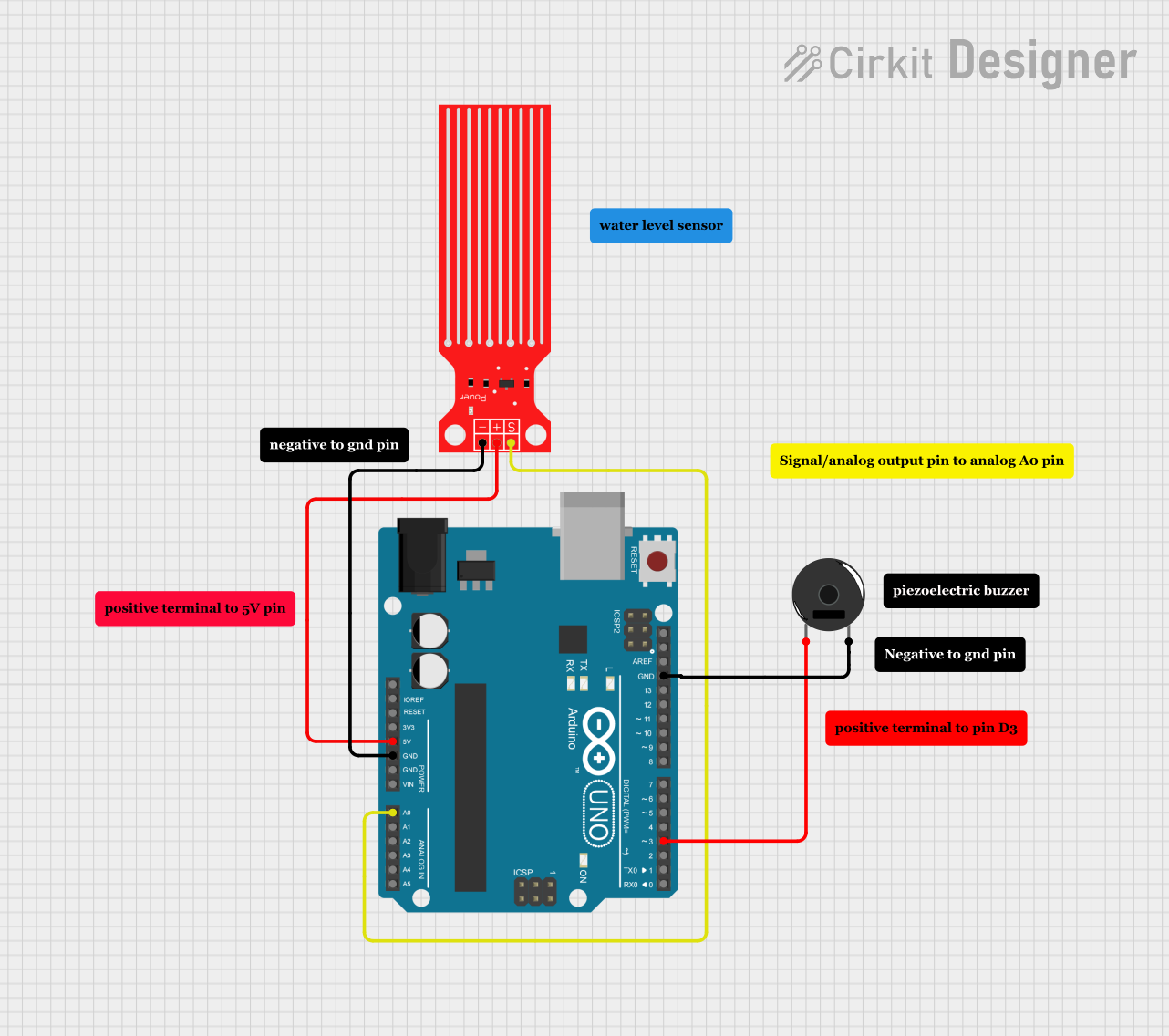
Circuit Documentation
Summary
This circuit is designed to monitor water levels using a water level sensor and provide audible feedback through a piezo buzzer. The core of the circuit is an Arduino UNO microcontroller, which reads the sensor data and controls the buzzer based on the water level.
Component List
Arduino UNO
- Description: A microcontroller board based on the ATmega328P.
- Pins: UNUSED, IOREF, Reset, 3.3V, 5V, GND, Vin, A0, A1, A2, A3, A4, A5, SCL, SDA, AREF, D13, D12, D11, D10, D9, D8, D7, D6, D5, D4, D3, D2, D1, D0
Water Level Sensor
- Description: A sensor used to detect the level of water.
- Pins: SIG, VCC, GND
Piezo Buzzer
- Description: An electronic device that produces a sound when a voltage is applied.
- Pins: pin 1, pin 2
Comment
- Description: Placeholder for comments in the circuit design.
- Pins: None
Wiring Details
Arduino UNO
- 5V: Connected to VCC of the Water Level Sensor.
- GND: Connected to GND of the Water Level Sensor and pin 2 of the Piezo Buzzer.
- A0: Connected to SIG of the Water Level Sensor.
- D3: Connected to pin 1 of the Piezo Buzzer.
Water Level Sensor
- VCC: Connected to 5V of the Arduino UNO.
- GND: Connected to GND of the Arduino UNO.
- SIG: Connected to A0 of the Arduino UNO.
Piezo Buzzer
- pin 1: Connected to D3 of the Arduino UNO.
- pin 2: Connected to GND of the Arduino UNO.
Code Documentation
// Pin Definitions
const int waterSensorPin = A0;  // Pin connected to the water sensor's signal (S) pin
const int buzzerPin = 3;        // Pin connected to the buzzer

void setup() {
  pinMode(waterSensorPin, INPUT);  // Set the water sensor pin as input
  Serial.begin(9600);              // Start serial communication for debugging
}

void loop() {
  int sensorValue = analogRead(waterSensorPin);  // Read the water sensor value
  Serial.println(sensorValue);  // Print the sensor value to the Serial Monitor for debugging

  // Determine frequency or beep pattern based on sensor value
  if (sensorValue < 630) {
    noTone(buzzerPin);  // Turn off buzzer
  } else if (sensorValue >= 630 && sensorValue < 638) {
    tone(buzzerPin, 200, 500);  // Level 1: Low frequency
    delay(500);
  } else if (sensorValue >= 638 && sensorValue < 646) {
    tone(buzzerPin, 300, 500);  // Level 2
    delay(500);
  } else if (sensorValue >= 646 && sensorValue < 654) {
    tone(buzzerPin, 400, 500);  // Level 3
    delay(500);
  } else if (sensorValue >= 654 && sensorValue < 662) {
    tone(buzzerPin, 500, 500);  // Level 4
    delay(500);
  } else if (sensorValue >= 662 && sensorValue < 670) {
    tone(buzzerPin, 600, 400);  // Level 5: Faster beeps
    delay(400);
  } else if (sensorValue >= 670 && sensorValue < 678) {
    tone(buzzerPin, 700, 400);  // Level 6
    delay(400);
  } else if (sensorValue >= 678 && sensorValue < 686) {
    tone(buzzerPin, 800, 300);  // Level 7
    delay(300);
  } else if (sensorValue >= 686 && sensorValue < 694) {
    tone(buzzerPin, 900, 300);  // Level 8
    delay(300);
  } else if (sensorValue >= 694 && sensorValue < 702) {
    tone(buzzerPin, 1000, 300); // Level 9
    delay(300);
  } else if (sensorValue >= 702 && sensorValue < 710) {
    tone(buzzerPin, 1100, 200); // Level 10: Higher pitch, faster beeps
    delay(200);
  } else if (sensorValue >= 710 && sensorValue < 718) {
    tone(buzzerPin, 1200, 200); // Level 11
    delay(200);
  } else if (sensorValue >= 718 && sensorValue < 726) {
    tone(buzzerPin, 1300, 150); // Level 12
    delay(150);
  } else if (sensorValue >= 726 && sensorValue < 734) {
    tone(buzzerPin, 1400, 150); // Level 13
    delay(150);
  } else if (sensorValue >= 734 && sensorValue < 742) {
    tone(buzzerPin, 1500, 100); // Level 14
    delay(100);
  } else if (sensorValue >= 742 && sensorValue < 750) {
    tone(buzzerPin, 1600, 100); // Level 15
    delay(100);
  } else {
    tone(buzzerPin, 2000, 100); // Level 16: Maximum frequency, very fast
    delay(100);
  }
}
This code reads the water level sensor value and adjusts the buzzer's tone and frequency based on the sensor reading. The higher the water level, the higher the frequency and the faster the beeps from the buzzer.