
Arduino UNO Based RFID Access Control with 433MHz RF Communication
View and Edit Project In Cirkit Designer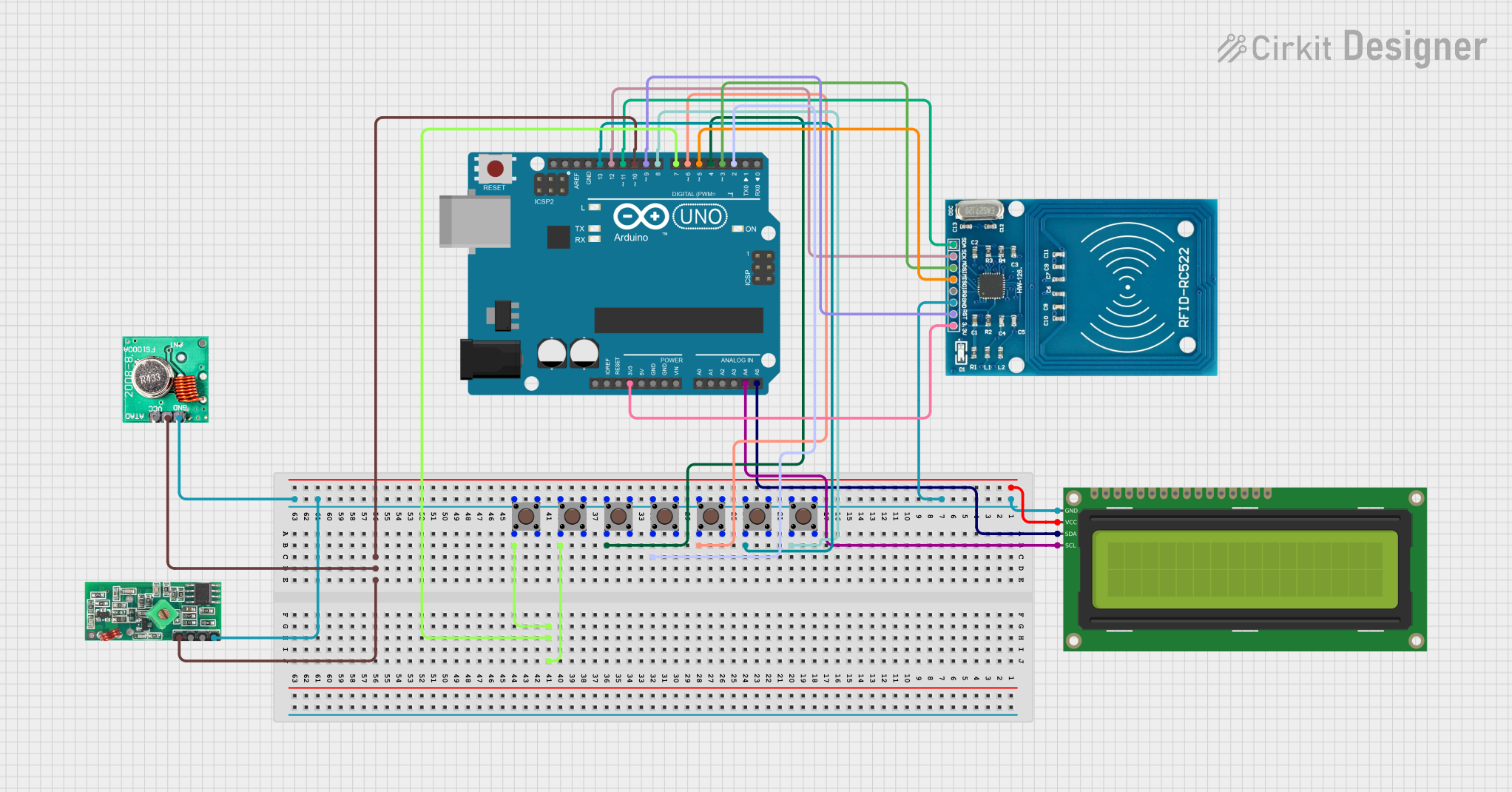
Circuit Documentation
Summary
This circuit integrates various components including an Arduino UNO, multiple pushbuttons, an FS1000A 433MHz RF Transmitter, a 433 MHz RF Receiver Module, an RFID-RC522 module, and a 16x2 I2C LCD display. The Arduino UNO serves as the central microcontroller unit, interfacing with the RFID module for tag reading, controlling the RF communication modules, and displaying information on the LCD. The pushbuttons are used for input, likely to trigger or control different functions within the circuit.
Component List
Arduino UNO
- Microcontroller board based on the ATmega328P
- It has 14 digital input/output pins, 6 analog inputs, a 16 MHz quartz crystal, a USB connection, a power jack, an ICSP header, and a reset button.
Pushbutton
- A simple switch mechanism for controlling some aspect of a machine or a process. Buttons are typically made out of hard material, usually plastic or metal.
FS1000A 433MHz RF Transmitter
- A simple wireless transmitter that operates at 433 MHz frequency, used for short-range communication.
433 MHz RF Receiver Module
- A wireless receiver that operates at 433 MHz, designed to work with the FS1000A transmitter for RF communication.
RFID-RC522
- An RFID reader/writer module that operates at 13.56 MHz, commonly used for contactless communication and identification.
16x2 I2C LCD
- A liquid crystal display capable of displaying 16 characters per line across 2 lines, with an I2C interface for communication.
Wiring Details
Arduino UNO
3.3Vconnected to RFID-RC522 VCC (3.3V)5Vnot connectedGNDconnected to the common ground netA4 (SCL)connected to 16x2 I2C LCD SCLA5 (SDA)connected to 16x2 I2C LCD SDAD2connected to Pushbutton (instance 107c2e2d-974c-40be-8f0e-2a170b5ddf8a) Pin 2 (in)D3connected to RFID-RC522 MOSID4connected to Pushbutton (instance 1089d1c5-54b2-4e8d-abb9-64211e8b926b) Pin 2 (in)D5connected to RFID-RC522 MISOD6connected to Pushbutton (instance c80045a4-7f72-4911-8609-cc321934f878) Pin 2 (in)D7connected to Pushbuttons (instances c3f3ebb0-c6d5-4de0-abe8-39ee15f65e3c and ae07cbab-8962-41b1-ab1a-34e1492ea046) Pin 2 (in)D8connected to Pushbutton (instance 611181e9-3e04-4d66-980e-f9adaeeace2f) Pin 2 (in)D9connected to RFID-RC522 RSTD10connected to FS1000A 433MHz RF Transmitter VCCD11connected to RFID-RC522 SDAD12connected to RFID-RC522 SCKD13connected to Pushbutton (instance f912dbde-eb5e-4669-9843-73340f328f21) Pin 2 (in)
Pushbuttons
Pin 1 (in)connected to common ground netPin 2 (in)connected to various digital pins on the Arduino UNO (D2, D4, D6, D7, D8, D13)Pin 3 (out)connected to common ground netPin 4 (out)not connected
FS1000A 433MHz RF Transmitter
DATAnot connectedVCCconnected to Arduino UNO D10GNDconnected to common ground netANTnot connected
433 MHz RF Receiver Module
VCCconnected to Arduino UNO D10DATAnot connectedGNDconnected to common ground net
RFID-RC522
VCC (3.3V)connected to Arduino UNO 3.3VRSTconnected to Arduino UNO D9GNDconnected to common ground netIRQnot connectedMISOconnected to Arduino UNO D5MOSIconnected to Arduino UNO D3SCKconnected to Arduino UNO D12SDAconnected to Arduino UNO D11
16x2 I2C LCD
GNDconnected to common ground netVCCnot connectedSDAconnected to Arduino UNO A5SCLconnected to Arduino UNO A4
Documented Code
Arduino UNO (sketch.ino)
void setup() {
  // put your setup code here, to run once:

}

void loop() {
  // put your main code here, to run repeatedly:

}
Arduino UNO (documentation.txt)
No additional documentation provided for the code.