
Arduino UNO-Based Temperature-Controlled Fan System with L298N Motor Driver and Battery Power
View and Edit Project In Cirkit Designer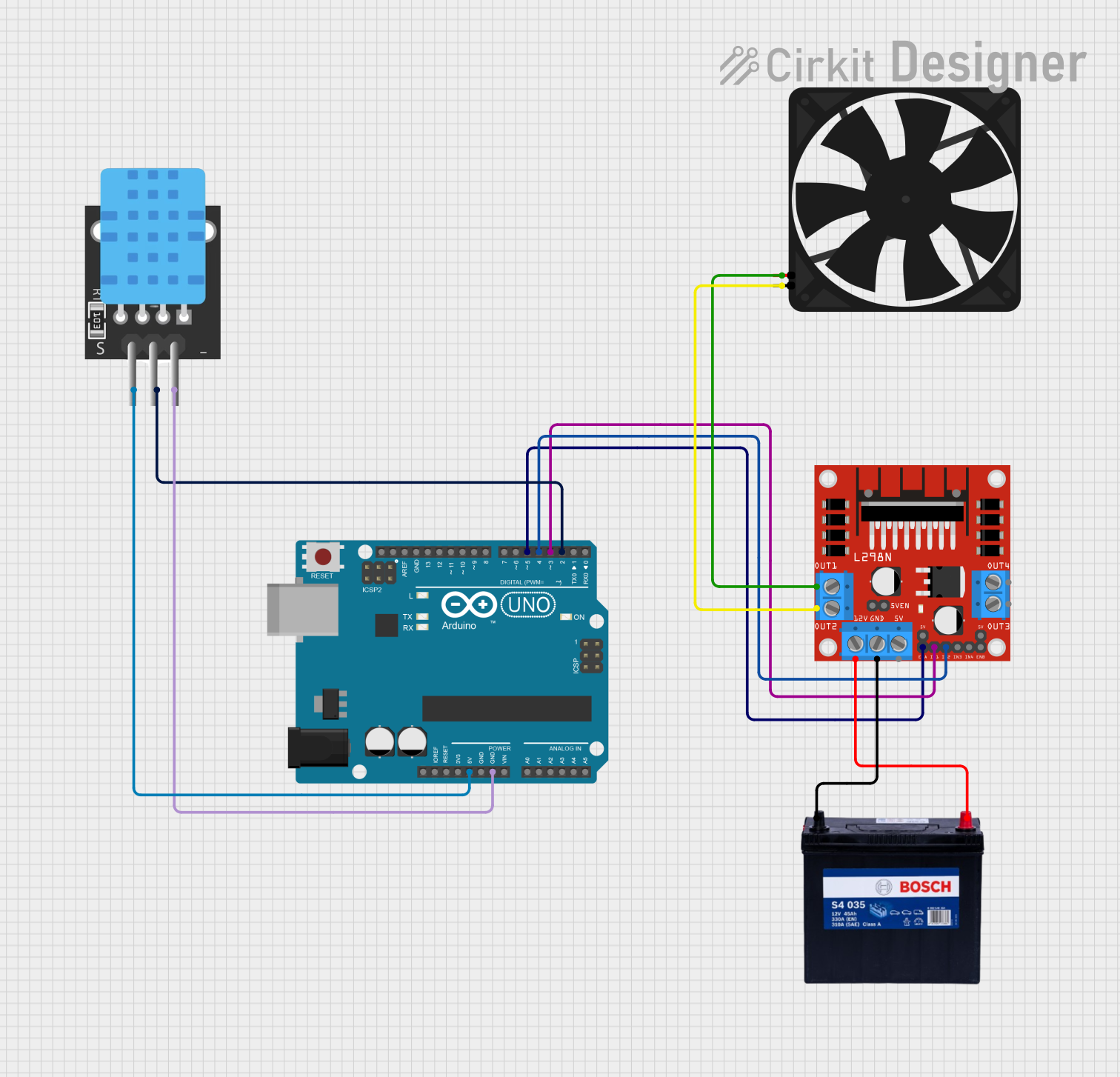
Circuit Documentation
Summary
This circuit involves an Arduino UNO microcontroller, an L298N DC motor driver, a temperature sensor (TEMP), a fan, and a 12V 200Ah battery. The Arduino UNO controls the motor driver, which in turn controls the fan. The temperature sensor provides input to the Arduino, which can be used to control the fan based on temperature readings.
Component List
Arduino UNO
- Description: A microcontroller board based on the ATmega328P.
- Pins: UNUSED, IOREF, Reset, 3.3V, 5V, GND, Vin, A0, A1, A2, A3, A4, A5, SCL, SDA, AREF, D13, D12, D11, D10, D9, D8, D7, D6, D5, D4, D3, D2, D1, D0
L298N DC Motor Driver
- Description: A dual H-Bridge motor driver module that allows speed and direction control of two DC motors.
- Pins: OUT1, OUT2, 12V, GND, 5V, OUT3, OUT4, 5V-ENA-JMP-I, 5V-ENA-JMP-O, +5V-J1, +5V-J2, ENA, IN1, IN2, IN3, IN4, ENB
TEMP
- Description: A temperature sensor.
- Pins: 5V, D3, GND
Fan
- Description: A DC fan.
- Pins: GND, 5V
12V 200Ah Battery
- Description: A 12V battery with a capacity of 200Ah.
- Pins: GND, 12V
Wiring Details
Arduino UNO
- 5V: Connected to TEMP (5V)
- GND: Connected to TEMP (GND)
- D5: Connected to L298N DC Motor Driver (ENA)
- D4: Connected to L298N DC Motor Driver (IN2)
- D3: Connected to L298N DC Motor Driver (IN1)
- D2: Connected to TEMP (D3)
L298N DC Motor Driver
- ENA: Connected to Arduino UNO (D5)
- IN2: Connected to Arduino UNO (D4)
- IN1: Connected to Arduino UNO (D3)
- OUT1: Connected to Fan (5V)
- OUT2: Connected to Fan (GND)
- 12V: Connected to 12V 200Ah Battery (12V)
- GND: Connected to 12V 200Ah Battery (GND)
TEMP
- 5V: Connected to Arduino UNO (5V)
- GND: Connected to Arduino UNO (GND)
- D3: Connected to Arduino UNO (D2)
Fan
- 5V: Connected to L298N DC Motor Driver (OUT1)
- GND: Connected to L298N DC Motor Driver (OUT2)
12V 200Ah Battery
- 12V: Connected to L298N DC Motor Driver (12V)
- GND: Connected to L298N DC Motor Driver (GND)
Documented Code
Arduino UNO Code (sketch.ino)
void setup() {
  // put your setup code here, to run once:

}

void loop() {
  // put your main code here, to run repeatedly:

}
Additional Documentation (documentation.txt)
This documentation provides a comprehensive overview of the circuit, including a summary, detailed component list, wiring details, and the code used in the microcontroller.