
Arduino UNO-Based Ultrasonic Distance Sensor with I2C LCD Display and Buzzer Alert
View and Edit Project In Cirkit Designer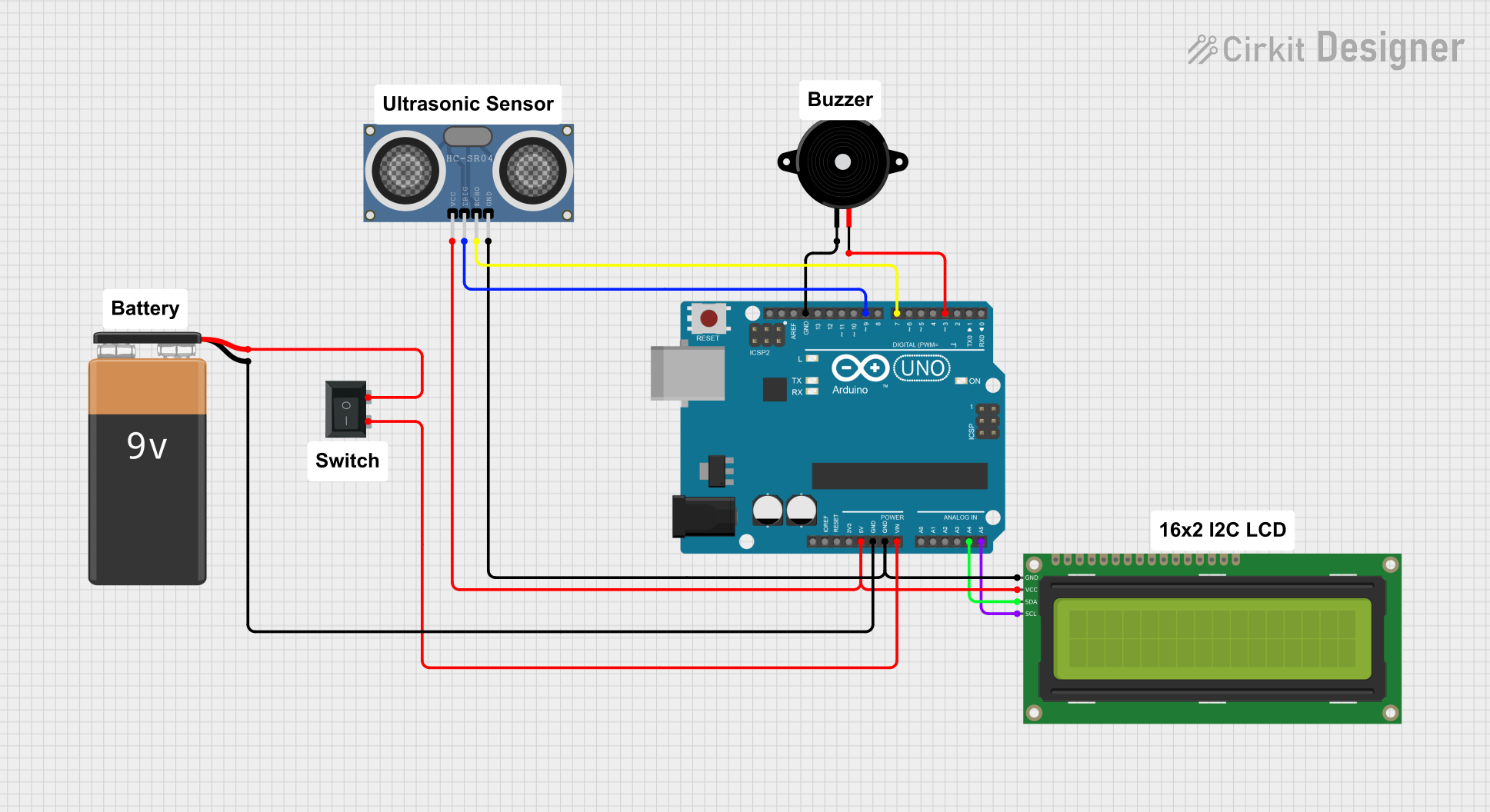
Circuit Documentation
Summary
This circuit is designed to measure the distance of an object using an HC-SR04 Ultrasonic Distance Sensor and display the distance on a 16x2 I2C LCD. Additionally, a Piezo Speaker is used to provide an audible warning if the object is too close. The entire system is controlled by an Arduino UNO, powered by a 9V battery through a Rocker Switch.
Component List
Arduino UNO
- Description: A microcontroller board based on the ATmega328P.
- Pins: UNUSED, IOREF, Reset, 3.3V, 5V, GND, Vin, A0, A1, A2, A3, A4, A5, SCL, SDA, AREF, D13, D12, D11, D10, D9, D8, D7, D6, D5, D4, D3, D2, D1, D0
16x2 I2C LCD
- Description: A 16x2 character LCD display with I2C interface.
- Pins: GND, VCC, SDA, SCL
HC-SR04 Ultrasonic Distance Sensor
- Description: A sensor used to measure distance by using ultrasonic waves.
- Pins: VCC, TRIG, ECHO, GND
Piezo Speaker
- Description: A small speaker that produces sound when a voltage is applied.
- Pins: pin1, pin2
9V Battery
- Description: A standard 9V battery used to power the circuit.
- Pins: -, +
Rocker Switch (SPST)
- Description: A single-pole single-throw switch used to control the power supply.
- Pins: 1, 2
Wiring Details
Arduino UNO
- 5V: Connected to VCC of HC-SR04 Ultrasonic Distance Sensor and 16x2 I2C LCD.
- GND: Connected to GND of HC-SR04 Ultrasonic Distance Sensor, 16x2 I2C LCD, and pin1 of Piezo Speaker.
- Vin: Connected to pin2 of Rocker Switch.
- A4: Connected to SDA of 16x2 I2C LCD.
- A5: Connected to SCL of 16x2 I2C LCD.
- D9: Connected to TRIG of HC-SR04 Ultrasonic Distance Sensor.
- D7: Connected to ECHO of HC-SR04 Ultrasonic Distance Sensor.
- D3: Connected to pin2 of Piezo Speaker.
16x2 I2C LCD
- VCC: Connected to 5V of Arduino UNO.
- GND: Connected to GND of Arduino UNO.
- SDA: Connected to A4 of Arduino UNO.
- SCL: Connected to A5 of Arduino UNO.
HC-SR04 Ultrasonic Distance Sensor
- VCC: Connected to 5V of Arduino UNO.
- GND: Connected to GND of Arduino UNO.
- TRIG: Connected to D9 of Arduino UNO.
- ECHO: Connected to D7 of Arduino UNO.
Piezo Speaker
- pin1: Connected to GND of Arduino UNO.
- pin2: Connected to D3 of Arduino UNO.
9V Battery
- -: Connected to GND of Arduino UNO.
- +: Connected to pin1 of Rocker Switch.
Rocker Switch (SPST)
- 1: Connected to + of 9V Battery.
- 2: Connected to Vin of Arduino UNO.
Code Documentation
Arduino UNO Code
#define trigPin 9
#define echoPin 7
#include <Wire.h>
#include <LCD.h>
#include <LiquidCrystal_I2C.h>

#define I2C_ADDR 0x27 // Define I2C Address, change the current address to your I2C address

#define BACKLIGHT_PIN   3
#define En_pin  2
#define Rw_pin  1
#define Rs_pin  0
#define D4_pin  4
#define D5_pin  5
#define D6_pin  6
#define D7_pin  7
int buzzerPin = 3;

LiquidCrystal_I2C lcd(I2C_ADDR, En_pin, Rw_pin, Rs_pin, D4_pin, D5_pin, D6_pin, D7_pin);

void setup() {
  Serial.begin(9600);
  pinMode(trigPin, OUTPUT);
  pinMode(echoPin, INPUT);
  pinMode(buzzerPin, OUTPUT);

  lcd.begin(20, 4);
  lcd.setBacklightPin(BACKLIGHT_PIN, POSITIVE);
  lcd.setBacklight(HIGH);
  lcd.home();
}

void loop() {
  int distance = getDistance();

  lcd.clear();
  lcd.setCursor(0, 0);
  if (distance >= 10){
    lcd.print("Object Distance:");
    lcd.setCursor(0, 1);
    lcd.print(distance);
    lcd.print(" cm");
  }

  else if (distance < 10){
    // Buzzer and warning message for too close distance
    if (millis() % 1000 < 500) { // Toggle buzzer on/off every second
      digitalWrite(buzzerPin, HIGH);
    } else {
      digitalWrite(buzzerPin, LOW);
    }

    lcd.setCursor(0, 0);
    lcd.print(" !! WARNING !!"); // Show warning message
    lcd.setCursor(0, 1);
    lcd.print("Close to ");
    lcd.print(distance);
    lcd.print(" cm");
  }

  delay(500);
}

int getDistance() {
  long sum = 0;
  for (int i = 0; i < 5; i++) { // Take multiple readings
    digitalWrite(trigPin, HIGH);
    delayMicroseconds(100);
    digitalWrite(trigPin, LOW);
    sum += pulseIn(echoPin, HIGH);
  }
  return ((sum / 5) / 2) / 29.1; // Average and convert to cm
}

void displayMessage(const char* line1, const char* line2, bool clear) {
  if (clear) lcd.clear(); // Clear only when necessary
  lcd.setCursor(0, 2);
  lcd.print(line1);
  lcd.setCursor(0, 3);
  lcd.print(line2);
}
This code initializes the pins and libraries required for the ultrasonic sensor and the LCD. It continuously measures the distance of an object and displays it on the LCD. If the object is too close, it triggers the Piezo Speaker to emit a warning sound and displays a warning message on the LCD.