
Circuit Documentation
Summary of the Circuit
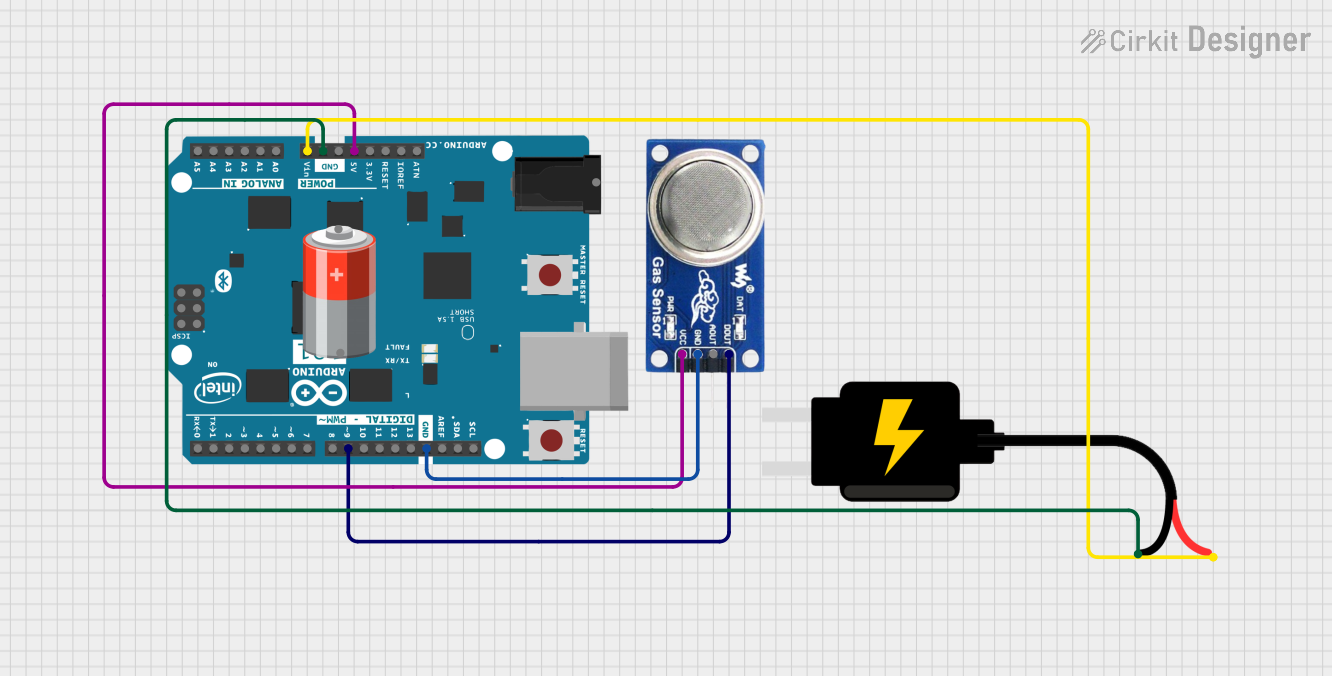
This circuit is designed to interface an Arduino 101 microcontroller with an MQ6 gas sensor. The MQ6 sensor is capable of detecting LPG, butane, and propane in the air. The Arduino 101 reads the digital output from the MQ6 sensor and prints the value to the Serial Monitor. The circuit is powered by a 5V DC source, which provides power to both the Arduino and the MQ6 sensor.
Component List
Arduino 101
- Description: A microcontroller board based on the Intel Curie module, compatible with Arduino IDE.
- Pins: A5/SCL, A4/SDA, AREF, GND, D13/SCK, D12/MISO, D11 PWM/MOSI, D10 PWM/SS, D9 PWM, D8, D7, D6 PWM, D5 PWM, D4, D3 PWM, D2, D1/TX, D0/RX, AIN, ioref, RESET, 3V3, 5V, VIN, A0, A1, A2, A3, ICSP MISO, ICSP SCK, ICSP MOSI.
MQ6 Gas Sensor
- Description: A gas sensor designed for detecting LPG, isobutane, propane, LNG.
- Pins: VCC, GND, A0, DO.
5V Battery
- Description: A power source providing a 5V output.
- Pins: + (positive), - (negative).
DC Source 5V
- Description: A direct current power supply that outputs 5 volts.
- Pins: VCC, GND.
Wiring Details
Arduino 101
- GND: Connected to the GND pin of the MQ6 sensor and the GND pin of the DC Source 5V.
- 5V: Provides power to the VCC pin of the MQ6 sensor.
- VIN: Receives power from the VCC pin of the DC Source 5V.
- D9 PWM: Reads the digital output from the DO pin of the MQ6 sensor.
MQ6 Gas Sensor
- VCC: Connected to the 5V pin of the Arduino 101.
- GND: Connected to the GND pin of the Arduino 101.
- DO: Connected to the D9 PWM pin of the Arduino 101.
DC Source 5V
- VCC: Connected to the VIN pin of the Arduino 101.
- GND: Connected to the GND pin of the Arduino 101.
Documented Code
/*
 * Arduino Interface with MQ6 Sensor
 * This code reads the digital value from the MQ6 sensor
 * connected to pin D9 and prints it to the Serial Monitor.
 */

void setup() {
  // Initialize serial communication at 9600 baud rate
  Serial.begin(9600);
  // Set pin mode for digital input from MQ6
  pinMode(9, INPUT);
}

void loop() {
  // Read digital value from MQ6
  int digitalValue = digitalRead(9);
  // Print value to Serial Monitor
  Serial.print("Digital Value: ");
  Serial.println(digitalValue);
  // Wait for 1 second before next read
  delay(1000);
}
- File Name: sketch.ino
- Description: The code initializes serial communication at a baud rate of 9600. It sets pin D9 as an input to read the digital output from the MQ6 sensor. In the loop, it reads the digital value and prints it to the Serial Monitor every second.