
Arduino Nano-Controlled Automated Plant Watering System with RGB LED Indicator
View and Edit Project In Cirkit Designer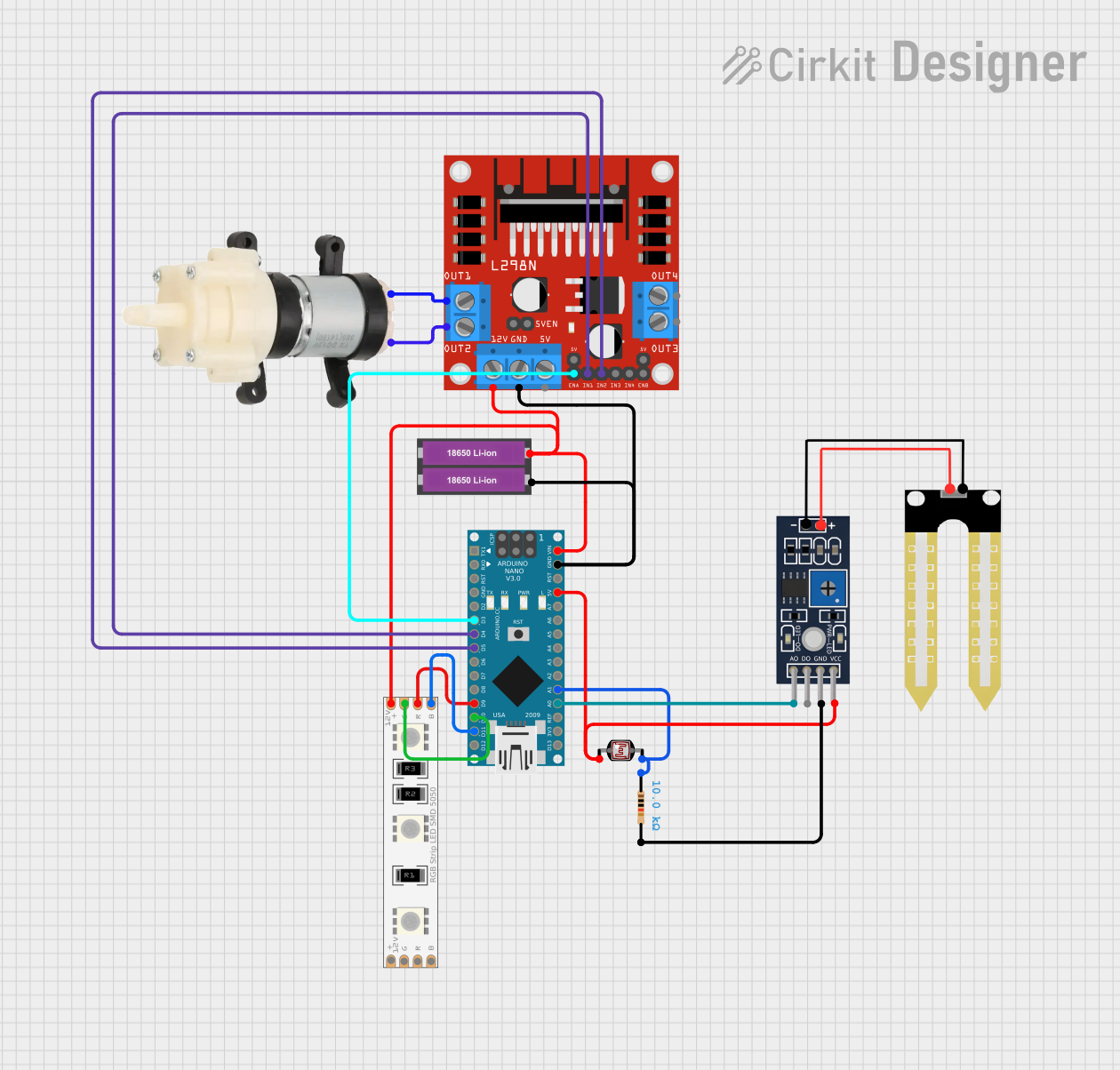
Circuit Documentation
Summary
This circuit is designed to interface with various sensors and actuators using an Arduino Nano as the central microcontroller. It includes a humidity sensor (YL-69), an RGB LED strip, a photocell (LDR), a pair of 18650 Li-ion batteries, a 10k Ohm resistor, a mini diaphragm water pump, and an L298N DC motor driver. The circuit is likely intended for environmental monitoring and control, with the capability to respond to humidity and light levels, and to actuate a water pump and control RGB lighting.
Component List
Humidity Sensor (YL-69)
- Pins: A0, D0, GND, VCC
- Description: A sensor used to measure the humidity of the soil or environment.
LED RGB Strip
- Pins: Common Connect, Blue Connect, Red Connect, Green Connect
- Description: A strip of LEDs capable of displaying multiple colors through the combination of red, green, and blue LEDs.
Photocell (LDR)
- Pins: pin 0, pin 1
- Description: A light-dependent resistor whose resistance changes based on the ambient light level.
18650 Li-ion Battery x 2
- Pins: +, -
- Description: A pair of rechargeable batteries providing power to the circuit.
Resistor
- Pins: pin1, pin2
- Resistance: 10000 Ohms
- Description: A resistor with a resistance of 10k Ohms, possibly used for current limiting or voltage division.
Arduino Nano
- Pins: D1/TX, D0/RX, RESET, GND, D2, D3, D4, D5, D6, D7, D8, D9, D10, D11/MOSI, D12/MISO, VIN, 5V, A7, A6, A5, A4, A3, A2, A1, A0, AREF, 3V3, D13/SCK
- Description: A compact microcontroller board based on the ATmega328, used for controlling the components in the circuit.
Mini Diaphragm Water Pump
- Pins: Positive (+), Negative (-)
- Description: A pump used for moving water, controlled by the L298N motor driver.
L298N DC Motor Driver
- Pins: OUT1, OUT2, 12V, GND, 5V, OUT3, OUT4, 5V-ENA-JMP-I, 5V-ENA-JMP-O, +5V-J1, +5V-J2, ENA, IN1, IN2, IN3, IN4, ENB
- Description: A motor driver module used to control the operation of the mini diaphragm water pump.
Wiring Details
Humidity Sensor (YL-69)
- A0 connected to Arduino Nano A0
- GND connected through a 10k Ohm resistor
- VCC connected to Arduino Nano 5V
LED RGB Strip
- Common Connect connected to 18650 Li-ion Battery +
- Blue Connect connected to Arduino Nano D11/MOSI
- Red Connect connected to Arduino Nano D9
- Green Connect connected to Arduino Nano D10
Photocell (LDR)
- pin 0 connected to Arduino Nano 5V
- pin 1 connected to Arduino Nano A1 and through a 10k Ohm resistor to GND
18650 Li-ion Battery x 2
-
- connected to LED RGB Strip Common Connect, L298N DC motor driver 12V, and Arduino Nano VIN
-
- connected to L298N DC motor driver GND and Arduino Nano GND
Resistor
- pin1 connected to Photocell (LDR) pin 1 and Arduino Nano GND
- pin2 connected to Humidity Sensor (YL-69) GND
Arduino Nano
- A0 connected to Humidity Sensor (YL-69) A0
- 5V connected to Humidity Sensor (YL-69) VCC and Photocell (LDR) pin 0
- VIN connected to 18650 Li-ion Battery +
- GND connected to 18650 Li-ion Battery -, Resistor pin1, and L298N DC motor driver GND
- D3 connected to L298N DC motor driver ENA
- D4 connected to L298N DC motor driver IN1
- D5 connected to L298N DC motor driver IN2
- D9 connected to LED RGB Strip Red Connect
- D10 connected to LED RGB Strip Green Connect
- D11/MOSI connected to LED RGB Strip Blue Connect
- A1 connected to Photocell (LDR) pin 1
Mini Diaphragm Water Pump
- Positive (+) connected to L298N DC motor driver OUT2
- Negative (-) connected to L298N DC motor driver OUT1
L298N DC Motor Driver
- 12V connected to 18650 Li-ion Battery +
- GND connected to 18650 Li-ion Battery -
- ENA connected to Arduino Nano D3
- IN1 connected to Arduino Nano D4
- IN2 connected to Arduino Nano D5
- OUT1 connected to Mini Diaphragm Water Pump Negative (-)
- OUT2 connected to Mini Diaphragm Water Pump Positive (+)
Documented Code
Arduino Nano Code (sketch.ino)
void setup() {
  // put your setup code here, to run once:

}

void loop() {
  // put your main code here, to run repeatedly:

}
Additional Notes (documentation.txt)
No additional code documentation was provided.