
Arduino-Controlled Obstacle-Avoiding Robot with Ultrasonic Sensor and Servo Motor
View and Edit Project In Cirkit Designer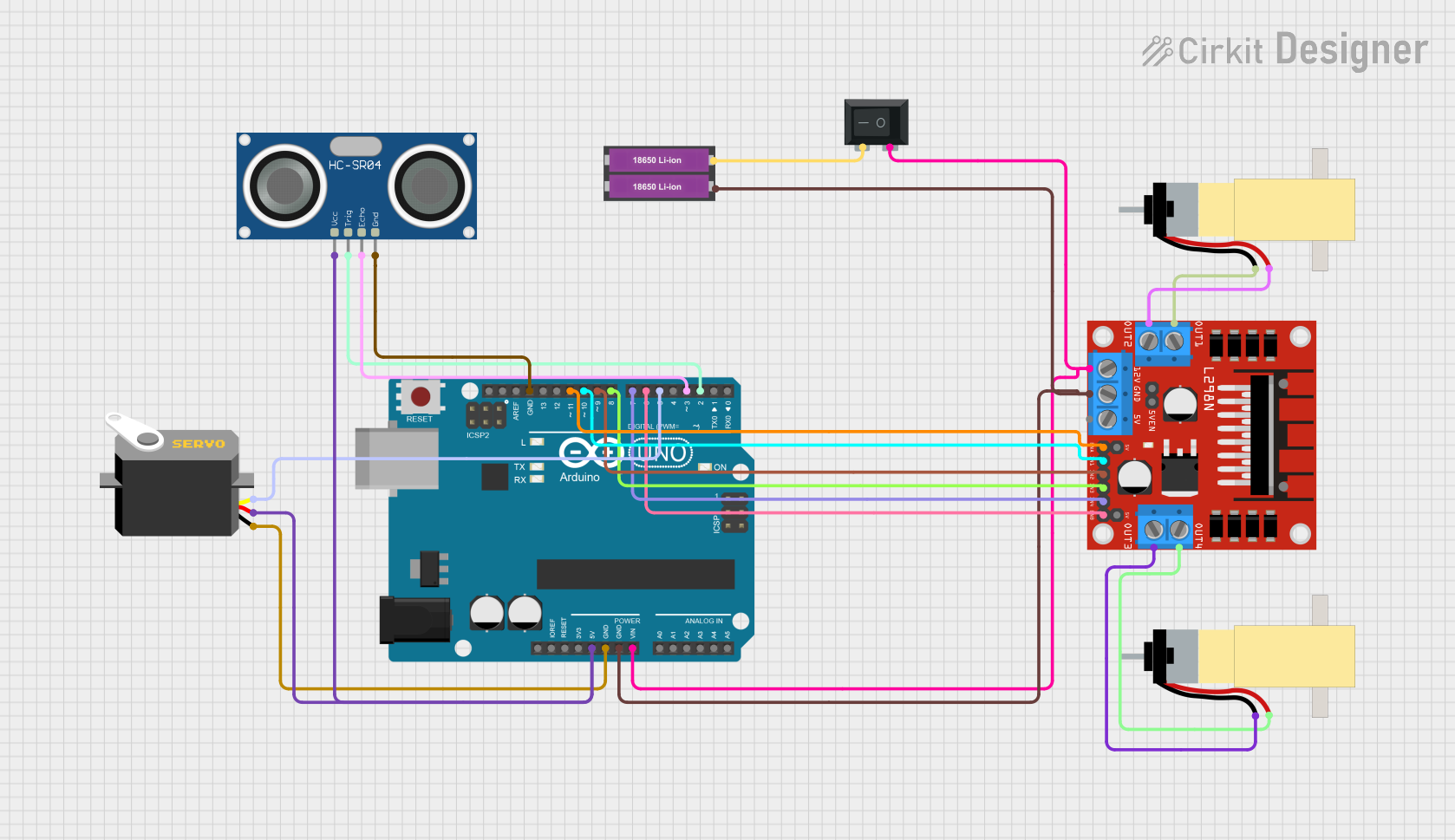
Circuit Documentation
Summary of the Circuit
This circuit is designed to control an obstacle-avoiding robot. It uses an Arduino UNO as the central microcontroller to process inputs from an HC-SR04 ultrasonic sensor and outputs commands to a servo motor and two DC motors through an L298N motor driver. The robot is powered by two 18650 Li-ion batteries connected in series, with a rocker switch (SPST) to control the power flow. The ultrasonic sensor detects obstacles, and the servo motor adjusts the robot's direction accordingly. The DC motors drive the robot's wheels, allowing it to move and change direction based on sensor input.
Component List
Arduino UNO
- Microcontroller board based on the ATmega328P
- Used for processing sensor data and controlling the motors and servo
Servo
- A motor capable of precise position control
- Used to change the robot's direction by adjusting its orientation
HC-SR04 Ultrasonic Sensor
- A sensor that measures distance using ultrasonic waves
- Used to detect obstacles in the robot's path
L298N DC Motor Driver
- A module capable of driving two DC motors
- Used to control the speed and direction of the robot's motors
18650 Li-ion Battery x 2
- Rechargeable batteries providing the power source for the circuit
- Used to supply power to the Arduino, motors, and sensors
Rocker Switch (SPST)
- A single-pole single-throw switch
- Used to turn the robot's power on and off
Hobby Gearmotor with 48:1 Gearbox (x2)
- DC motors with a gearbox for increased torque
- Used to drive the robot's wheels
Wiring Details
Arduino UNO
5Vconnected to HC-SR04 VCC and Servo VCCGNDconnected to HC-SR04 GND, Servo GND, and L298N GNDVinconnected to the output of the Rocker SwitchD11connected to L298N ENAD10connected to L298N IN1D9connected to L298N IN2D8connected to L298N IN3D7connected to L298N IN4D6connected to L298N ENBD5connected to Servo pulseD3connected to HC-SR04 ECHOD2connected to HC-SR04 TRIG
Servo
gndconnected to Arduino GNDvccconnected to Arduino 5Vpulseconnected to Arduino D5
HC-SR04 Ultrasonic Sensor
GNDconnected to Arduino GNDVCCconnected to Arduino 5VECHOconnected to Arduino D3TRIGconnected to Arduino D2
L298N DC Motor Driver
GNDconnected to Arduino GND12Vconnected to the output of the Rocker SwitchENAconnected to Arduino D11IN1connected to Arduino D10IN2connected to Arduino D9IN3connected to Arduino D8IN4connected to Arduino D7ENBconnected to Arduino D6OUT1connected to Gearmotor 1 pin 1OUT2connected to Gearmotor 1 pin 2OUT3connected to Gearmotor 2 pin 1OUT4connected to Gearmotor 2 pin 2
18650 Li-ion Battery x 2
+connected to Rocker Switch pin 2-connected to L298N GND
Rocker Switch (SPST)
1connected to L298N 12V and Arduino Vin2connected to the positive terminal of the 18650 Li-ion Battery x 2
Hobby Gearmotor with 48:1 Gearbox
- Gearmotor 1 pin 1 connected to L298N OUT1
- Gearmotor 1 pin 2 connected to L298N OUT2
- Gearmotor 2 pin 1 connected to L298N OUT3
- Gearmotor 2 pin 2 connected to L298N OUT4
Documented Code
/*
 * This Arduino sketch controls an obstacle-avoiding robot with a servo motor.
 * The robot uses an HC-SR04 ultrasonic sensor to detect obstacles and a servo
 * motor to change direction. Two DC motors are used for movement, controlled
 * by an L298N motor driver. The robot stops and changes direction when an
 * obstacle is detected within a certain distance.
 */

#include <Servo.h>

// Pin definitions
const int trigPin = 2;
const int echoPin = 3;
const int servoPin = 5;
const int motor1Pin1 = 10;
const int motor1Pin2 = 9;
const int motor2Pin1 = 8;
const int motor2Pin2 = 7;
const int enA = 11;
const int enB = 6;

Servo myServo;

void setup() {
  // Initialize the motor control pins as outputs
  pinMode(motor1Pin1, OUTPUT);
  pinMode(motor1Pin2, OUTPUT);
  pinMode(motor2Pin1, OUTPUT);
  pinMode(motor2Pin2, OUTPUT);
  pinMode(enA, OUTPUT);
  pinMode(enB, OUTPUT);
  // Initialize the ultrasonic sensor pins
  pinMode(trigPin, OUTPUT);
  pinMode(echoPin, INPUT);
  // Attach the servo motor
  myServo.attach(servoPin);
  // Start the servo at 90 degrees
  myServo.write(90);
}

void loop() {
  // Measure the distance to an obstacle
  long duration, distance;
  digitalWrite(trigPin, LOW);
  delayMicroseconds(2);
  digitalWrite(trigPin, HIGH);
  delayMicroseconds(10);
  digitalWrite(trigPin, LOW);
  duration = pulseIn(echoPin, HIGH);
  distance = (duration / 2) / 29.1;

  if (distance < 20) { // If an obstacle is detected within 20 cm
    // Stop the motors
    digitalWrite(motor1Pin1, LOW);
    digitalWrite(motor1Pin2, LOW);
    digitalWrite(motor2Pin1, LOW);
    digitalWrite(motor2Pin2, LOW);
    // Turn the servo to look for a clear path
    myServo.write(0);
    delay(500);
    myServo.write(180);
    delay(500);
    myServo.write(90);
    // Reverse the motors to change direction
    digitalWrite(motor1Pin1, LOW);
    digitalWrite(motor1Pin2, HIGH);
    digitalWrite(motor2Pin1, LOW);
    digitalWrite(motor2Pin2, HIGH);
    delay(1000);
  } else { // If no obstacle is detected
    // Move the motors forward
    digitalWrite(motor1Pin1, HIGH);
    digitalWrite(motor1Pin2, LOW);
    digitalWrite(motor2Pin1, HIGH);
    digitalWrite(motor2Pin2, LOW);
  }
}
This code is responsible for the operation of the obstacle-avoiding robot. It initializes the pins, sets up the servo, and continuously checks for obstacles using the ultrasonic sensor. When an obstacle is detected, the robot stops, the servo scans for a clear path, and then the robot reverses direction. If no obstacle is detected, the robot continues to move forward.