
Arduino UNO-Based Smart Fan Control System with Temperature and Presence Detection
View and Edit Project In Cirkit Designer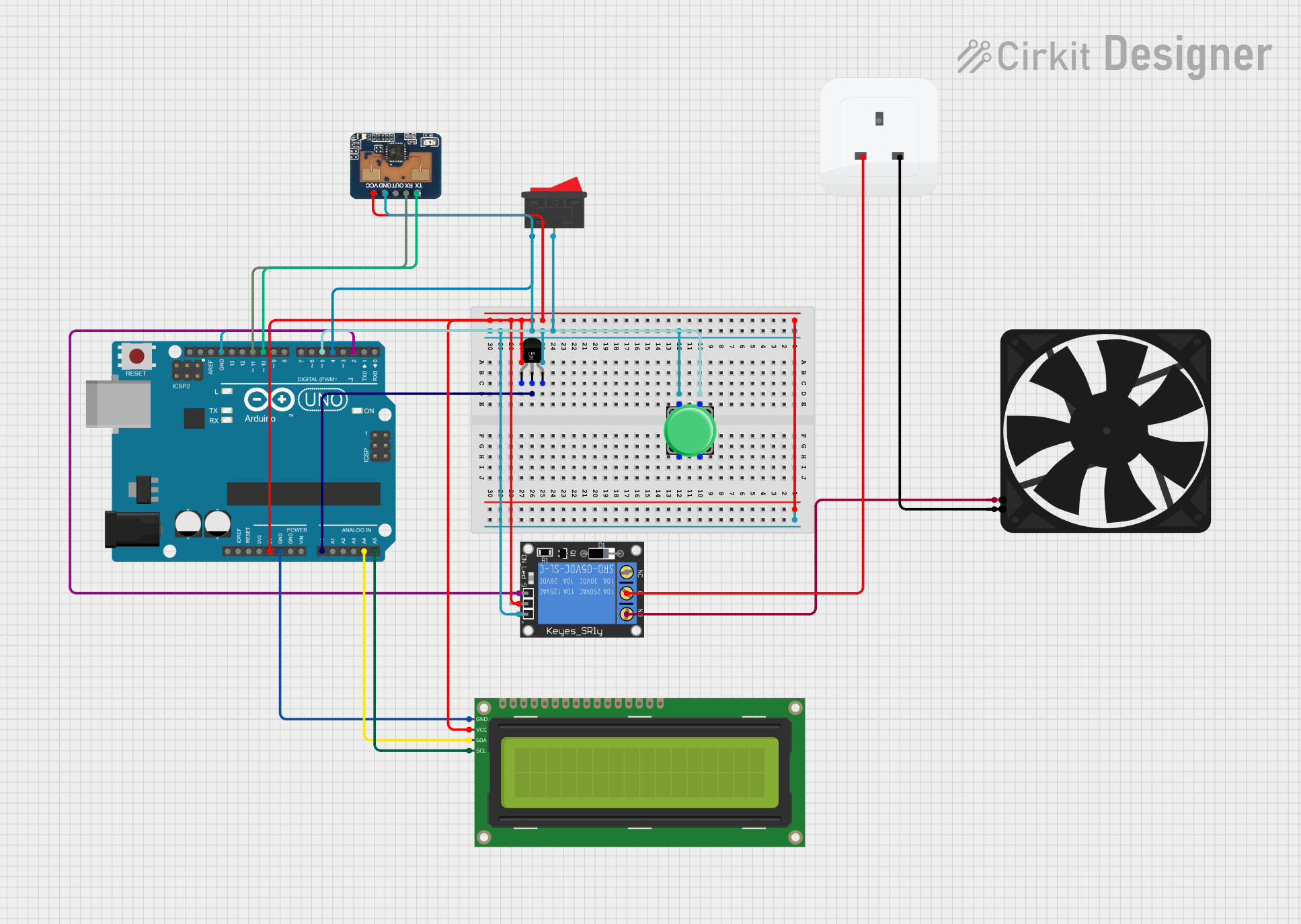
Circuit Documentation
Summary
This circuit is designed to control a fan based on temperature readings and human presence detection. The system uses an Arduino UNO microcontroller to read data from a temperature sensor (LM35) and a human presence sensor (LD2410C). The fan is controlled via a relay, and the system status is displayed on a 16x2 I2C LCD. A pushbutton is used to cycle through temperature thresholds, and a rocker switch allows for manual control of the fan.
Component List
Arduino UNO
- Description: Microcontroller board based on the ATmega328P.
- Pins: UNUSED, IOREF, Reset, 3.3V, 5V, GND, Vin, A0, A1, A2, A3, A4, A5, SCL, SDA, AREF, D13, D12, D11, D10, D9, D8, D7, D6, D5, D4, D3, D2, D1, D0
Temperature Sensor (LM35)
- Description: Analog temperature sensor.
- Pins: +Vs, Vout, GND
1-Channel Relay (5V 10A)
- Description: Relay module for controlling high-power devices.
- Pins: NC, signal, C, power, NO, ground
16x2 I2C LCD
- Description: LCD display with I2C interface.
- Pins: GND, VCC, SDA, SCL
Fan
- Description: DC fan.
- Pins: GND, 5V
Pushbutton
- Description: Momentary pushbutton switch.
- Pins: Pin 2, Pin 1, Pin 3, Pin 4
Rocker Switch
- Description: On/Off rocker switch.
- Pins: 1, 2
LD2410C
- Description: Human presence sensor.
- Pins: RX, OUT, GND, VCC, TX
Socket
- Description: Electrical socket.
- Pins: earth, life, neutral
Wiring Details
Arduino UNO
5V connected to:
- +Vs of Temperature Sensor (LM35)
- VCC of LD2410C
- VCC of 16x2 I2C LCD
- power of 1-Channel Relay (5V 10A)
GND connected to:
- GND of Temperature Sensor (LM35)
- GND of LD2410C
- ground of 1-Channel Relay (5V 10A)
- GND of 16x2 I2C LCD
A0 connected to Vout of Temperature Sensor (LM35)
A4 connected to SDA of 16x2 I2C LCD
A5 connected to SCL of 16x2 I2C LCD
D2 connected to signal of 1-Channel Relay (5V 10A)
D4 connected to 1 of Rocker Switch
D5 connected to Pin 3 of Pushbutton
D10 connected to TX of LD2410C
D11 connected to RX of LD2410C
Temperature Sensor (LM35)
- +Vs connected to 5V of Arduino UNO
- Vout connected to A0 of Arduino UNO
- GND connected to GND of Arduino UNO
1-Channel Relay (5V 10A)
- power connected to 5V of Arduino UNO
- ground connected to GND of Arduino UNO
- signal connected to D2 of Arduino UNO
- C connected to life of Socket
- NO connected to 5V of Fan
16x2 I2C LCD
- VCC connected to 5V of Arduino UNO
- GND connected to GND of Arduino UNO
- SDA connected to A4 of Arduino UNO
- SCL connected to A5 of Arduino UNO
Fan
- 5V connected to NO of 1-Channel Relay (5V 10A)
- GND connected to neutral of Socket
Pushbutton
- Pin 3 connected to D5 of Arduino UNO
- Pin 1 connected to GND of Arduino UNO
Rocker Switch
- 1 connected to D4 of Arduino UNO
- 2 connected to GND of Arduino UNO
LD2410C
- VCC connected to 5V of Arduino UNO
- GND connected to GND of Arduino UNO
- RX connected to D11 of Arduino UNO
- TX connected to D10 of Arduino UNO
Socket
- life connected to C of 1-Channel Relay (5V 10A)
- neutral connected to GND of Fan
Code Documentation
#include <Wire.h>
#include <LiquidCrystal_I2C.h>
#include <SoftwareSerial.h>

// Define pins for LD2410C (connect TX to RX on Arduino and RX to TX)
#define LD2410_TX 10
#define LD2410_RX 11

// Initialize SoftwareSerial for LD2410C communication
SoftwareSerial ld2410Serial(LD2410_RX, LD2410_TX);

// Other component pins
const int lm35_pin = A0;            // LM35 temperature sensor pin
const int relay_pin = 2;            // Relay control pin
const int switch_pin = 4;           // Manual mode switch pin
const int threshold_button_pin = 5; // Button to cycle through thresholds

// Initialize the LCD (e.g., address 0x27, 16 columns, 2 rows)
LiquidCrystal_I2C lcd(0x27, 16, 2);

float temp_threshold = 60.0;         // Default temperature threshold
int threshold_state = 0;             // Tracks the threshold state
bool buttonPressed = false;          // Tracks button press state
bool personDetected = false;         // Tracks person detection status

void setup() {
  Serial.begin(9600);               // For debugging
  ld2410Serial.begin(115200);       // LD2410C operates at 115200 baud rate

  configureLD2410C();               // Configure LD2410C for human detection within range

  lcd.init();                       // Initialize the LCD
  lcd.backlight();                  // Turn on the LCD backlight
  lcd.setCursor(0, 0);
  lcd.print("Temp Threshold:");
  updateLCD();                      // Display initial threshold

  pinMode(relay_pin, OUTPUT);       // Set relay pin as output
  pinMode(switch_pin, INPUT_PULLUP);// Manual switch pin with internal pull-up
  pinMode(threshold_button_pin, INPUT_PULLUP); // Threshold button with internal pull-up

  digitalWrite(relay_pin, LOW);     // Turn off relay (fan) initially
}

void loop() {
  // Read temperature
  int temp_adc_val = analogRead(lm35_pin);
  float temp_val = (temp_adc_val * 4.88) / 10;  // Convert ADC value to °C

  // Debug temperature
  Serial.print("Temperature: ");
  Serial.print(temp_val);
  Serial.println(" °C");

  // Read manual switch state
  int switch_state = digitalRead(switch_pin);

  // Check person detection using LD2410C
  personDetected = detectPersonLD2410C();

  // Manual mode: override temperature control
  if (switch_state == LOW) {
    Serial.println("Manual Mode: Fan ON");
    digitalWrite(relay_pin, HIGH);
    lcd.clear();
    lcd.setCursor(0, 0);
    lcd.print("Manual Mode:");
    lcd.setCursor(0, 1);
    lcd.print("Fan ON");
  } else {
    // Automatic mode with presence detection
    if (personDetected) {
      // Handle threshold button press
      if (digitalRead(threshold_button_pin) == LOW && !buttonPressed) {
        buttonPressed = true;
        threshold_state = (threshold_state + 1) % 3;  // Cycle through states

        if (threshold_state == 0) temp_threshold = 60.0;
        else if (threshold_state == 1) temp_threshold = 70.0;
        else if (threshold_state == 2) temp_threshold = 80.0;

        updateLCD();
      }

      // Reset buttonPressed when released
      if (digitalRead(threshold_button_pin) == HIGH && buttonPressed) {
        buttonPressed = false;
      }

      // Fan control based on temperature threshold
      if (temp_val < temp_threshold) {