
Arduino UNO-Based Water Quality Monitoring and Cleaning Robot with Turbidity and TDS Sensors
View and Edit Project In Cirkit Designer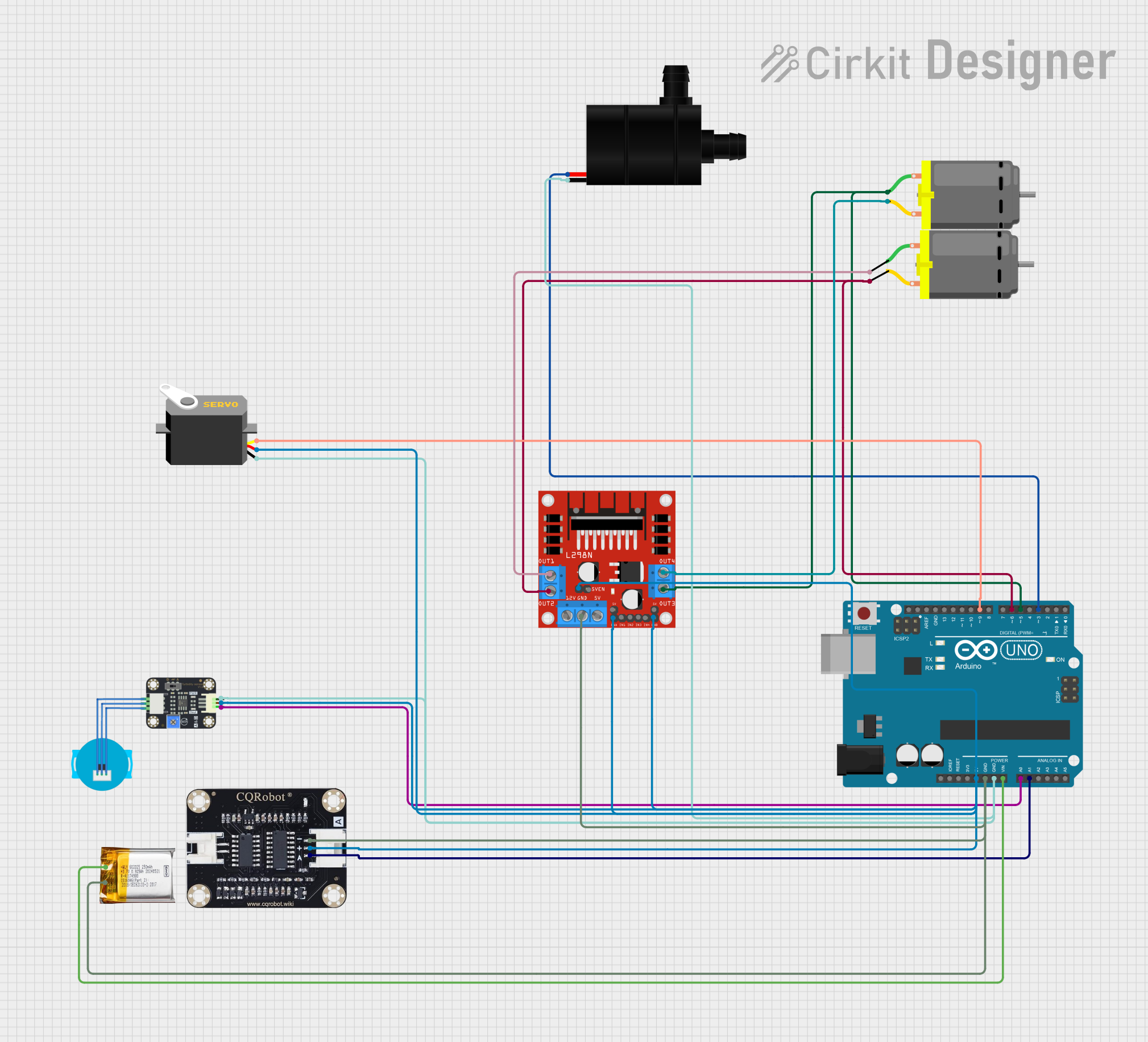
Circuit Documentation
Summary
This document provides a detailed overview of a circuit designed to control a robotic system using an Arduino UNO microcontroller. The system includes various sensors, a water pump, DC motors, a servo motor, and a motor driver. The Arduino UNO reads sensor data and controls the actuators based on predefined logic.
Component List
Arduino UNO
- Description: Microcontroller board based on the ATmega328P.
- Pins: UNUSED, IOREF, Reset, 3.3V, 5V, GND, Vin, A0, A1, A2, A3, A4, A5, SCL, SDA, AREF, D13, D12, D11, D10, D9, D8, D7, D6, D5, D4, D3, D2, D1, D0
L298N DC Motor Driver
- Description: Dual H-Bridge motor driver.
- Pins: OUT1, OUT2, 12V, GND, 5V, OUT3, OUT4, 5V-ENA-JMP-I, 5V-ENA-JMP-O, +5V-J1, +5V-J2, ENA, IN1, IN2, IN3, IN4, ENB
Turbidity Sensor
- Description: Sensor to measure the turbidity of water.
- Pins: OUT, VCC, GND
TDS Sensor Board
- Description: Sensor to measure Total Dissolved Solids (TDS) in water.
- Pins: GND, VCC, A
Water Pump
- Description: Pump to move water.
- Pins: VCC, GND
Servo Motor
- Description: Motor for precise control of angular position.
- Pins: gnd, vcc, pulse
DC Motor
- Description: Motor for general-purpose use.
- Pins: pin 1, pin 2
3.7v LiPo Battery
- Description: Lithium Polymer battery for power supply.
- Pins: +Ve, GND
Wiring Details
Arduino UNO
- 5V: Connected to VCC of Servo, ENA, ENB, 5V-ENA-JMP-I of L298N DC Motor Driver, VCC of Turbidity Sensor, and VCC of TDS Sensor Board.
- GND: Connected to GND of L298N DC Motor Driver, GND of 3.7v LiPo Battery, GND of TDS Sensor Board, GND of Servo, GND of Water Pump, and GND of Turbidity Sensor.
- Vin: Connected to +Ve of 3.7v LiPo Battery.
- A0: Connected to OUT of Turbidity Sensor.
- A1: Connected to A of TDS Sensor Board.
- D9: Connected to pulse of Servo.
- D6: Connected to OUT2 of L298N DC Motor Driver and pin 2 of DC Motor.
- D5: Connected to OUT3 of L298N DC Motor Driver and pin 1 of DC Motor.
- D3: Connected to VCC of Water Pump.
L298N DC Motor Driver
- ENA: Connected to 5V of Arduino UNO.
- ENB: Connected to 5V of Arduino UNO.
- 5V-ENA-JMP-I: Connected to 5V of Arduino UNO.
- GND: Connected to GND of 3.7v LiPo Battery and GND of Arduino UNO.
- OUT2: Connected to D6 of Arduino UNO and pin 2 of DC Motor.
- OUT3: Connected to D5 of Arduino UNO and pin 1 of DC Motor.
- OUT1: Connected to pin 1 of DC Motor.
- OUT4: Connected to pin 2 of DC Motor.
Turbidity Sensor
- VCC: Connected to 5V of Arduino UNO.
- GND: Connected to GND of Arduino UNO.
- OUT: Connected to A0 of Arduino UNO.
TDS Sensor Board
- VCC: Connected to 5V of Arduino UNO.
- GND: Connected to GND of Arduino UNO.
- A: Connected to A1 of Arduino UNO.
Water Pump
- VCC: Connected to D3 of Arduino UNO.
- GND: Connected to GND of Arduino UNO.
Servo Motor
- vcc: Connected to 5V of Arduino UNO.
- gnd: Connected to GND of Arduino UNO.
- pulse: Connected to D9 of Arduino UNO.
DC Motor (Instance 1)
- pin 1: Connected to OUT3 of L298N DC Motor Driver.
- pin 2: Connected to OUT4 of L298N DC Motor Driver.
DC Motor (Instance 2)
- pin 1: Connected to OUT1 of L298N DC Motor Driver.
- pin 2: Connected to OUT2 of L298N DC Motor Driver.
3.7v LiPo Battery
- +Ve: Connected to Vin of Arduino UNO.
- GND: Connected to GND of Arduino UNO and GND of L298N DC Motor Driver.
Code Documentation
sketch.ino
#include <Servo.h>

// Pins
const int turbidityPin = A0; // Turbidity sensor
const int tdsPin = A1; // TDS sensor
const int pumpPin = 3; // Water pump (PWM output)
const int leftMotorPin = 5; // Left motor
const int rightMotorPin = 6; // Right motor
const int statusLED = 13; // Status LED

Servo roboticArm; // If using a servo-controlled arm

void setup() {
  // Initialize components
  pinMode(turbidityPin, INPUT);
  pinMode(tdsPin, INPUT);
  pinMode(pumpPin, OUTPUT);
  pinMode(leftMotorPin, OUTPUT);
  pinMode(rightMotorPin, OUTPUT);
  pinMode(statusLED, OUTPUT);

  roboticArm.attach(9); // Attach the servo to pin 9
  roboticArm.write(90); // Set initial arm position to neutral

  Serial.begin(9600); // For debugging
}

void loop() {
  // Read turbidity and TDS sensor data
  int turbidityValue = analogRead(turbidityPin);
  int tdsValue = analogRead(tdsPin);

  // Print sensor data
  Serial.print("Turbidity: ");
  Serial.print(turbidityValue);
  Serial.print(" | TDS: ");
  Serial.println(tdsValue);

  // Cleaning logic
  if (turbidityValue > 500 || tdsValue > 700) { // Threshold values
    digitalWrite(statusLED, HIGH); // Turn on LED
    activatePump();
    moveRobot(1, 1); // Move forward
  } else {
    digitalWrite(statusLED, LOW); // Turn off LED
    stopPump();
    moveRobot(0, 0); // Stop
  }

  delay(500); // Small delay for stability
}

// Function to control the water pump
void activatePump() {
  analogWrite(pumpPin, 255); // Full power
}

void stopPump() {
  analogWrite(pumpPin, 0); // Stop pump
}

// Function to move the robot
void moveRobot(int leftMotorSpeed, int rightMotorSpeed) {
  analogWrite(leftMotorPin, leftMotorSpeed * 255);
  analogWrite(rightMotorPin, rightMotorSpeed * 255);
}
documentation.txt
#include <Servo.h>

// Pins
const int turbidityPin = A0;  // Turbidity sensor
const int tdsPin = A1;        // TDS sensor
const int pumpPin = 3;        // Water pump (PWM output)
const int leftMotorPin = 5;   // Left motor
const int rightMotorPin = 6;  // Right motor
const int statusLED = 13;     // Status LED

Servo roboticArm;  // If using a servo-controlled arm

void setup() {
  // Initialize components
  pinMode(turbidityPin, INPUT);
  pinMode(tdsPin, INPUT);
  pinMode(pumpPin, OUTPUT);
  pinMode(leftMotorPin, OUTPUT);
  pinMode(rightMotorPin, OUTPUT);
  pinMode(statusLED, OUTPUT);

  roboticArm.attach(9);  // Attach the servo to pin 9
  roboticArm.write(90);  // Set initial arm position to neutral

  Serial.begin(9600);  // For debugging
}

void loop() {
  // Read turbidity and TDS sensor data
  int turbidityValue = analogRead(turbidityPin);
  int tdsValue = analogRead(tdsPin);

  // Print sensor data
  Serial.print("Turbidity: ");
  Serial.print(turbidityValue);
  Serial.print(" | TDS: ");
  Serial.println(tdsValue);

  // Cleaning logic
  if (turbidityValue > 500 ||