
Circuit Documentation
Summary
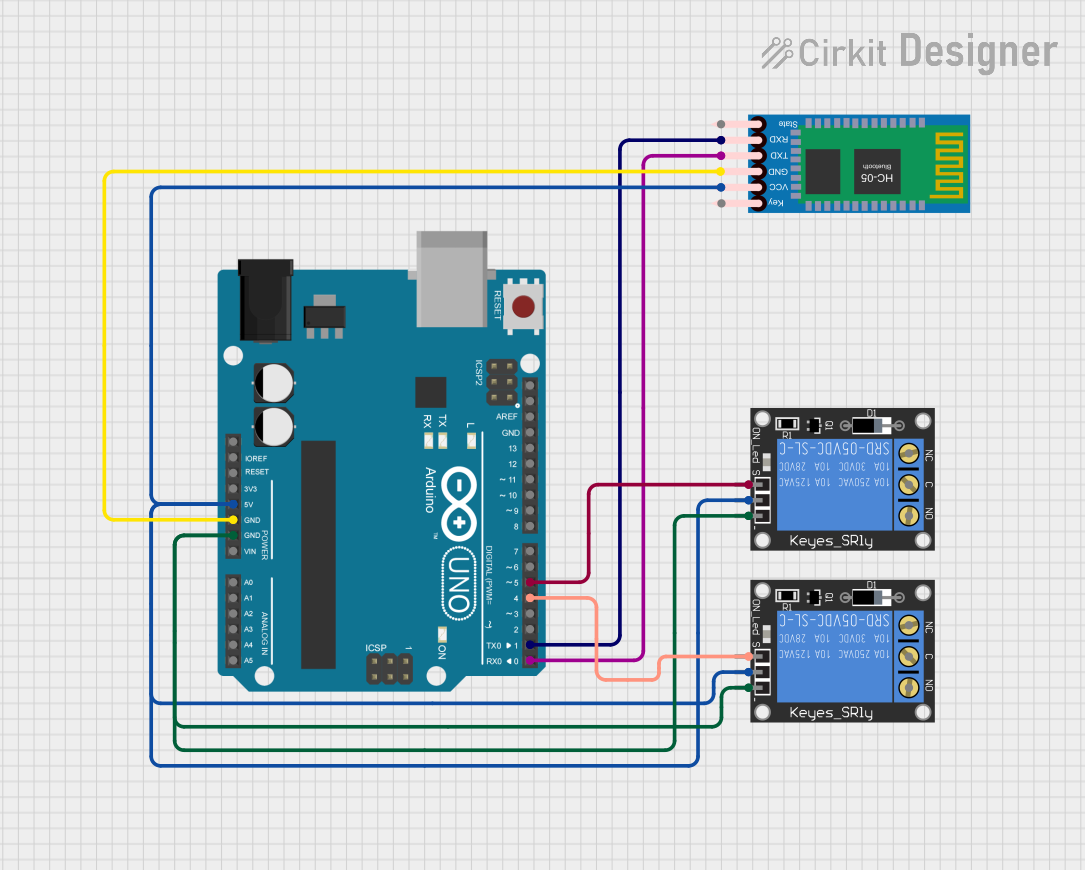
This circuit involves an Arduino UNO microcontroller, two 1-Channel Relays (5V 10A), and an HC-05 Bluetooth Module. The Arduino UNO serves as the central controller, interfacing with the relays and the Bluetooth module to control external devices wirelessly.
Component List
Arduino UNO
- Description: A microcontroller board based on the ATmega328P.
- Pins: UNUSED, IOREF, Reset, 3.3V, 5V, GND, Vin, A0, A1, A2, A3, A4, A5, SCL, SDA, AREF, D13, D12, D11, D10, D9, D8, D7, D6, D5, D4, D3, D2, D1, D0
1-Channel Relay (5V 10A)
- Description: A relay module that allows a microcontroller to control high voltage devices.
- Pins: NC, signal, C, power, NO, ground
HC-05 Bluetooth Module
- Description: A Bluetooth module for wireless communication.
- Pins: Key, VCC, TXD, RXD, State, GND
Wiring Details
Arduino UNO
- 5V: Connected to the power pins of both 1-Channel Relays and the VCC pin of the HC-05 Bluetooth Module.
- GND: Connected to the ground pins of both 1-Channel Relays and the GND pin of the HC-05 Bluetooth Module.
- D5: Connected to the signal pin of the first 1-Channel Relay.
- D4: Connected to the signal pin of the second 1-Channel Relay.
- D1: Connected to the RXD pin of the HC-05 Bluetooth Module.
- D0: Connected to the TXD pin of the HC-05 Bluetooth Module.
1-Channel Relay (5V 10A) - First Relay
- Power: Connected to the 5V pin of the Arduino UNO.
- Ground: Connected to the GND pin of the Arduino UNO.
- Signal: Connected to the D5 pin of the Arduino UNO.
1-Channel Relay (5V 10A) - Second Relay
- Power: Connected to the 5V pin of the Arduino UNO.
- Ground: Connected to the GND pin of the Arduino UNO.
- Signal: Connected to the D4 pin of the Arduino UNO.
HC-05 Bluetooth Module
- VCC: Connected to the 5V pin of the Arduino UNO.
- GND: Connected to the GND pin of the Arduino UNO.
- RXD: Connected to the D1 pin of the Arduino UNO.
- TXD: Connected to the D0 pin of the Arduino UNO.
Documented Code
Arduino UNO Code (sketch.ino)
void setup() {
  // put your setup code here, to run once:

}

void loop() {
  // put your main code here, to run repeatedly:

}
Additional Documentation (documentation.txt)
This documentation provides a comprehensive overview of the circuit, including a summary, detailed component list, wiring details, and the code used in the Arduino UNO.