
Wireless Rain Alert System with Arduino and NRF24L01 Modules
View and Edit Project In Cirkit Designer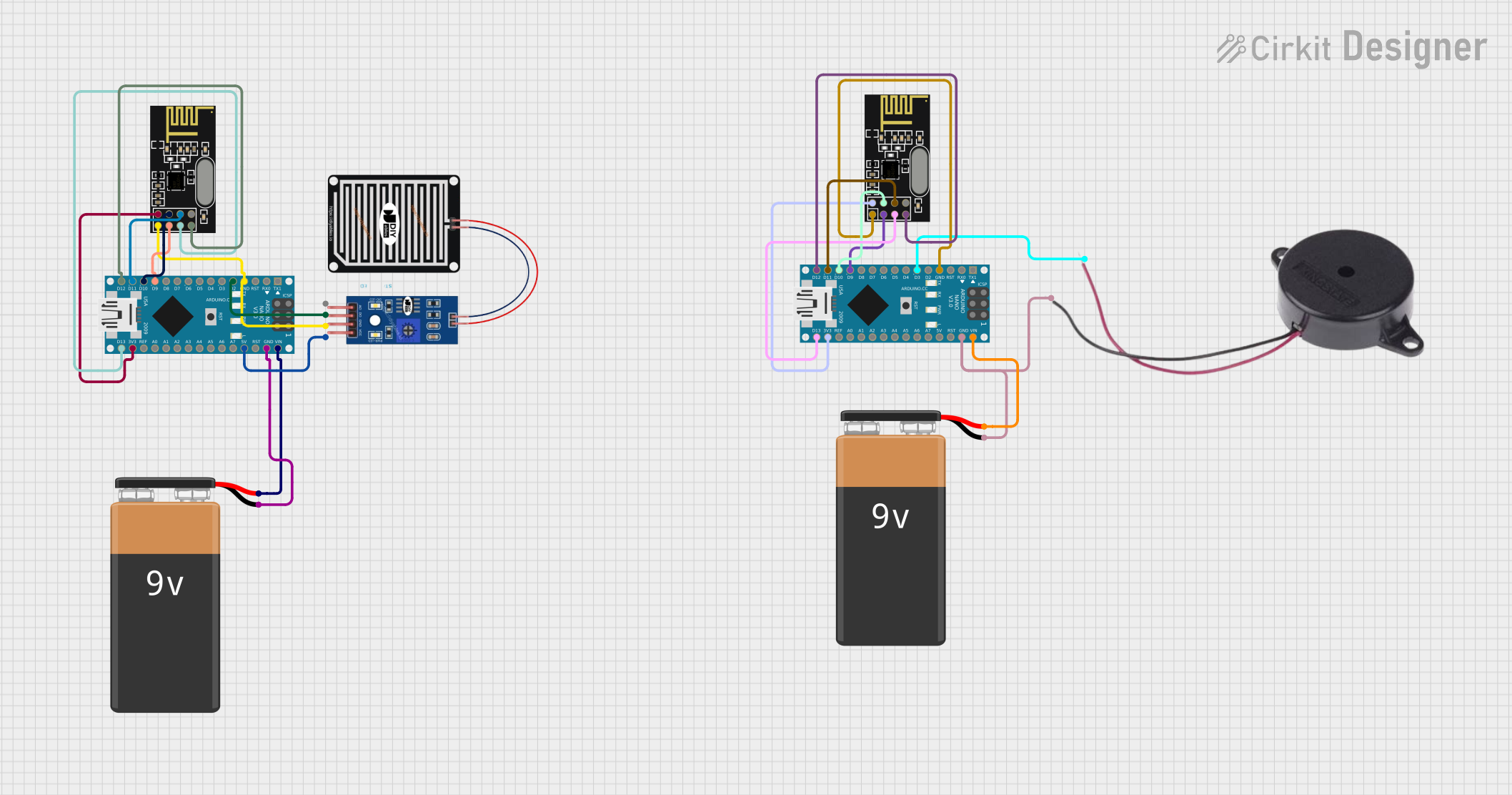
Circuit Documentation
Summary
This circuit is designed to detect rain using a rain sensor and communicate the status wirelessly to an indoor unit using NRF24L01 transceiver modules. The outdoor unit consists of an Arduino Nano microcontroller connected to a rain sensor and an NRF24L01 module to send the rain detection signal. The indoor unit also uses an Arduino Nano microcontroller and an NRF24L01 module to receive the signal and activate a buzzer if rain is detected.
Component List
Rain Sensor
- Pins: AO (Analog Output), DO (Digital Output), GRD (Ground), VCC (Power Supply)
- Description: Detects rain by measuring the amount of water on its surface.
Arduino Nano (Outdoor Unit)
- Pins: D1/TX, D0/RX, RESET, GND, D2-D13, VIN, 5V, A0-A7, AREF, 3V3
- Description: A compact microcontroller board based on the ATmega328P, used to process sensor data and control the NRF24L01 module.
NRF24L01 (Outdoor Unit)
- Pins: IRQ (not used), MOSI, CSN, VCC (3V), GND, CE, SCK, MISO
- Description: A wireless transceiver module used to send data to the indoor unit.
Buzzer
- Pins: POSITIVE, NEGATIVE
- Description: Emits an audible alert when activated by the indoor unit.
9V Battery (Outdoor Unit)
- Pins: -, +
- Description: Provides power to the outdoor unit's Arduino Nano.
Arduino Nano (Indoor Unit)
- Pins: Same as the outdoor unit.
- Description: Receives the rain detection signal and activates the buzzer.
NRF24L01 (Indoor Unit)
- Pins: Same as the outdoor unit.
- Description: Receives the signal from the outdoor unit.
9V Battery (Indoor Unit)
- Pins: -, +
- Description: Provides power to the indoor unit's Arduino Nano.
Wiring Details
Rain Sensor
- DO connected to Arduino Nano (Outdoor Unit) D2
- GRD connected to Arduino Nano (Outdoor Unit) GND
- VCC connected to Arduino Nano (Outdoor Unit) 5V
Arduino Nano (Outdoor Unit)
- D2 connected to Rain Sensor DO
- GND connected to Rain Sensor GRD, NRF24L01 GND, and 9V Battery -
- 5V connected to Rain Sensor VCC
- D9 connected to NRF24L01 CE
- D10 connected to NRF24L01 CSN
- D11/MOSI connected to NRF24L01 MOSI
- D12/MISO connected to NRF24L01 MISO
- VIN connected to 9V Battery +
- 3V3 connected to NRF24L01 VCC (3V)
- D13/SCK connected to NRF24L01 SCK
NRF24L01 (Outdoor Unit)
- MOSI connected to Arduino Nano (Outdoor Unit) D11/MOSI
- CSN connected to Arduino Nano (Outdoor Unit) D10
- VCC (3V) connected to Arduino Nano (Outdoor Unit) 3V3
- GND connected to Arduino Nano (Outdoor Unit) GND
- CE connected to Arduino Nano (Outdoor Unit) D9
- SCK connected to Arduino Nano (Outdoor Unit) D13/SCK
- MISO connected to Arduino Nano (Outdoor Unit) D12/MISO
Buzzer
- POSITIVE connected to Arduino Nano (Indoor Unit) D3
- NEGATIVE connected to Arduino Nano (Indoor Unit) GND
Arduino Nano (Indoor Unit)
- D3 connected to Buzzer POSITIVE
- GND connected to Buzzer NEGATIVE, NRF24L01 GND, and 9V Battery -
- VIN connected to 9V Battery +
- D9 connected to NRF24L01 CE
- D10 connected to NRF24L01 CSN
- D11/MOSI connected to NRF24L01 MOSI
- D12/MISO connected to NRF24L01 MISO
- 3V3 connected to NRF24L01 VCC (3V)
- D13/SCK connected to NRF24L01 SCK
NRF24L01 (Indoor Unit)
- MOSI connected to Arduino Nano (Indoor Unit) D11/MOSI
- CSN connected to Arduino Nano (Indoor Unit) D10
- VCC (3V) connected to Arduino Nano (Indoor Unit) 3V3
- GND connected to Arduino Nano (Indoor Unit) GND
- CE connected to Arduino Nano (Indoor Unit) D9
- SCK connected to Arduino Nano (Indoor Unit) D13/SCK
- MISO connected to Arduino Nano (Indoor Unit) D12/MISO
Documented Code
Arduino Nano (Outdoor Unit)
#include <SPI.h>
#include <nRF24L01.h>
#include <RF24.h>

RF24 radio(9, 10); // CE, CSN pins
const byte address[6] = "00001"; // Communication address

const int rainSensorPin = 2; // Pin for rain sensor (DO)
bool isRaining;

void setup() {
  pinMode(rainSensorPin, INPUT);
  radio.begin();
  radio.openWritingPipe(address);
  radio.setPALevel(RF24_PA_LOW);
}

void loop() {
  isRaining = digitalRead(rainSensorPin) == LOW; // LOW means rain detected
  radio.write(&isRaining, sizeof(isRaining));  // Send rain status to indoor unit
  delay(1000); // Delay before next check
}
Arduino Nano (Indoor Unit)
#include <SPI.h>
#include <nRF24L01.h>
#include <RF24.h>

RF24 radio(9, 10); // CE, CSN pins
const byte address[6] = "00001"; // Must match the address in the outdoor unit

const int buzzerPin = 3; // Pin for buzzer
bool isRaining;

void setup() {
  pinMode(buzzerPin, OUTPUT);
  radio.begin();
  radio.openReadingPipe(0, address);
  radio.setPALevel(RF24_PA_LOW);
  radio.startListening();
}

void loop() {
  if (radio.available()) {
    radio.read(&isRaining, sizeof(isRaining));  // Read rain status
    if (isRaining) {
      digitalWrite(buzzerPin, HIGH);  // Turn on buzzer if rain is detected
    } else {
      digitalWrite(buzzerPin, LOW);   // Turn off buzzer if no rain
    }
  }
}