
Arduino-Based Environmental Monitoring System with LCD Display
View and Edit Project In Cirkit Designer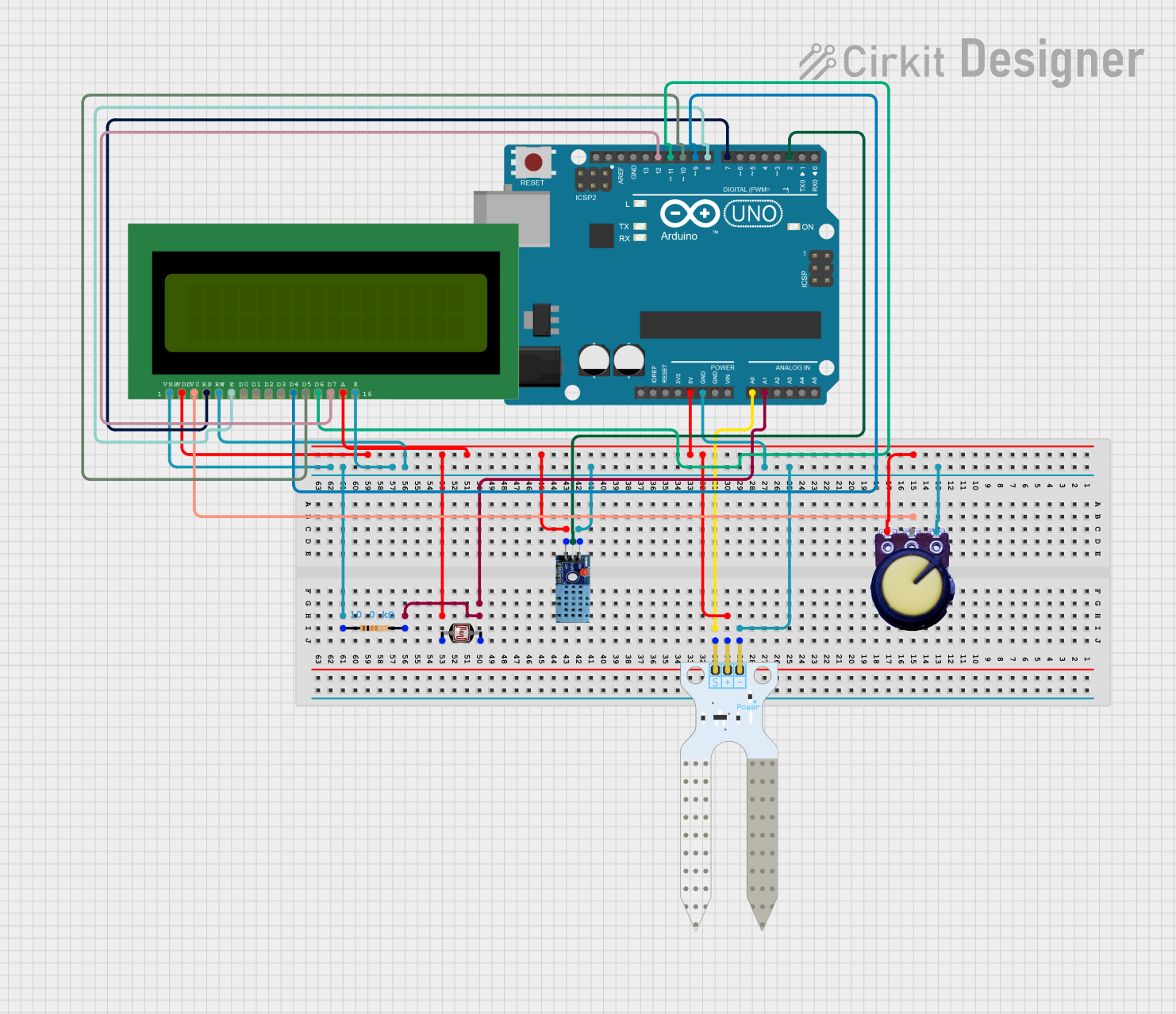
Circuit Documentation
Summary
This circuit is designed to read data from a soil moisture sensor, a DHT11 temperature and humidity sensor, and a photocell (LDR). The sensor readings are then displayed on a 16x2 LCD. The circuit is controlled by an Arduino UNO microcontroller.
Component List
Arduino UNO
- Description: Microcontroller board based on the ATmega328P.
- Pins: UNUSED, IOREF, Reset, 3.3V, 5V, GND, Vin, A0, A1, A2, A3, A4, A5, SCL, SDA, AREF, D13, D12, D11, D10, D9, D8, D7, D6, D5, D4, D3, D2, D1, D0
Soil Moisture Sensor
- Description: Sensor to measure the moisture level in the soil.
- Pins: VCC, GND, SIG
DHT11
- Description: Temperature and humidity sensor.
- Pins: VCC, GND, DATA
Photocell (LDR)
- Description: Light-dependent resistor used to measure light levels.
- Pins: pin 0, pin 1
Resistor
- Description: 10k Ohm resistor.
- Pins: pin1, pin2
- Properties: Resistance: 10k Ohms
LCD 16x2 (Wokwi Compatible)
- Description: 16x2 character LCD display.
- Pins: VSS, VDD, V0, RS, RW, E, D0, D1, D2, D3, D4, D5, D6, D7, A, K
Potentiometer
- Description: Variable resistor used to adjust the contrast of the LCD.
- Pins: GND, Output, VCC
Wiring Details
Arduino UNO
5V connected to:
- Potentiometer VCC
- Soil Moisture Sensor VCC
- DHT11 VCC
- LCD 16x2 A
- Photocell (LDR) pin 0
- LCD 16x2 VDD
GND connected to:
- Potentiometer GND
- Soil Moisture Sensor GND
- DHT11 GND
- LCD 16x2 RW
- LCD 16x2 K
- Resistor pin1
- LCD 16x2 VSS
A0 connected to:
- Soil Moisture Sensor SIG
A1 connected to:
- Resistor pin2
- Photocell (LDR) pin 1
D12 connected to:
- LCD 16x2 D7
D11 connected to:
- LCD 16x2 D6
D10 connected to:
- LCD 16x2 D5
D9 connected to:
- LCD 16x2 D4
D8 connected to:
- LCD 16x2 E
D7 connected to:
- LCD 16x2 RS
D2 connected to:
- DHT11 DATA
Soil Moisture Sensor
VCC connected to:
- Arduino UNO 5V
GND connected to:
- Arduino UNO GND
SIG connected to:
- Arduino UNO A0
DHT11
VCC connected to:
- Arduino UNO 5V
GND connected to:
- Arduino UNO GND
DATA connected to:
- Arduino UNO D2
Photocell (LDR)
pin 0 connected to:
- Arduino UNO 5V
pin 1 connected to:
- Resistor pin2
- Arduino UNO A1
Resistor
pin1 connected to:
- Arduino UNO GND
pin2 connected to:
- Photocell (LDR) pin 1
- Arduino UNO A1
LCD 16x2 (Wokwi Compatible)
VSS connected to:
- Arduino UNO GND
VDD connected to:
- Arduino UNO 5V
V0 connected to:
- Potentiometer Output
RS connected to:
- Arduino UNO D7
RW connected to:
- Arduino UNO GND
E connected to:
- Arduino UNO D8
D4 connected to:
- Arduino UNO D9
D5 connected to:
- Arduino UNO D10
D6 connected to:
- Arduino UNO D11
D7 connected to:
- Arduino UNO D12
A connected to:
- Arduino UNO 5V
K connected to:
- Arduino UNO GND
Potentiometer
GND connected to:
- Arduino UNO GND
Output connected to:
- LCD 16x2 V0
VCC connected to:
- Arduino UNO 5V
Code Documentation
/*
 * This Arduino Sketch reads data from a soil moisture sensor, a DHT11 sensor,
 * and a photocell (LDR). It then displays the sensor readings on a 16x2 LCD.
 */

#include <LiquidCrystal.h>
#include <DHT.h>

// Pin definitions
#define SOIL_MOISTURE_PIN A0
#define DHT_PIN 2
#define LDR_PIN A1
#define DHT_TYPE DHT11

// Initialize the LCD library with the numbers of the interface pins
LiquidCrystal lcd(7, 8, 9, 10, 11, 12);
DHT dht(DHT_PIN, DHT_TYPE);

void setup() {
  // Initialize the LCD
  lcd.begin(16, 2);
  lcd.print("Initializing...");

  // Initialize the DHT sensor
  dht.begin();

  // Wait for sensors to stabilize
  delay(2000);
}

void loop() {
  // Read soil moisture
  int soilMoistureValue = analogRead(SOIL_MOISTURE_PIN);

  // Read temperature and humidity from DHT11
  float humidity = dht.readHumidity();
  float temperature = dht.readTemperature();

  // Read light level from LDR
  int ldrValue = analogRead(LDR_PIN);

  // Clear the LCD
  lcd.clear();

  // Display soil moisture
  lcd.setCursor(0, 0);
  lcd.print("Soil: ");
  lcd.print(soilMoistureValue);

  // Display temperature and humidity
  lcd.setCursor(0, 1);
  lcd.print("Temp: ");
  lcd.print(temperature);
  lcd.print("C ");
  lcd.print("Hum: ");
  lcd.print(humidity);
  lcd.print("%");

  // Wait before next update
  delay(2000);

  // Display light level
  lcd.clear();
  lcd.setCursor(0, 0);
  lcd.print("Light: ");
  lcd.print(ldrValue);

  // Wait before next update
  delay(2000);
}
This code initializes the LCD and DHT11 sensor, reads data from the soil moisture sensor, DHT11 sensor, and LDR, and displays the readings on the LCD. The readings are updated every 2 seconds.