
Arduino UNO-Based Environmental Monitoring System with OLED Display
View and Edit Project In Cirkit Designer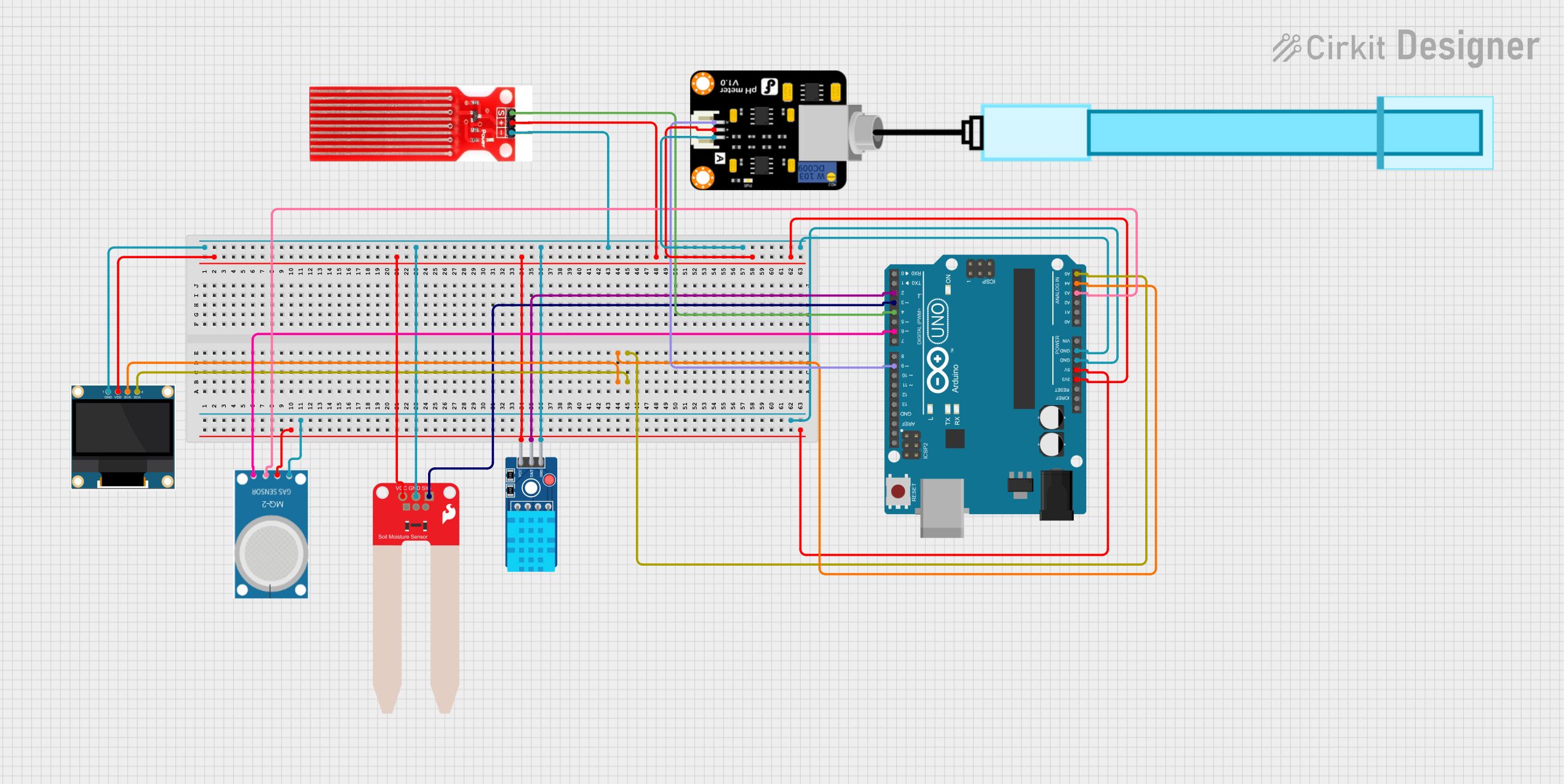
Circuit Documentation
Summary
This document provides a detailed overview of a circuit that integrates various sensors and an OLED display with an Arduino UNO microcontroller. The circuit is designed to monitor environmental parameters such as soil moisture, temperature, humidity, water presence, gas concentration, and pH levels. The data collected from these sensors can be displayed on the OLED screen.
Component List
Arduino UNO
- Description: A microcontroller board based on the ATmega328P.
- Pins: UNUSED, IOREF, Reset, 3.3V, 5V, GND, Vin, A0, A1, A2, A3, A4, A5, SCL, SDA, AREF, D13, D12, D11, D10, D9, D8, D7, D6, D5, D4, D3, D2, D1, D0
SparkFun Soil Moisture Sensor
- Description: A sensor used to measure the moisture content in the soil.
- Pins: VCC, GND, SIG
DHT11 Sensor V2
- Description: A sensor used to measure temperature and humidity.
- Pins: GND, DAT, VCC
0.96" OLED
- Description: A small OLED display used to show data.
- Pins: GND, VDD, SCK, SDA
Water Sensor
- Description: A sensor used to detect the presence of water.
- Pins: Signal, VCC, GND
MQ-2
- Description: A gas sensor used to detect various gases including LPG, smoke, alcohol, propane, hydrogen, methane, and carbon monoxide.
- Pins: GND, VCC, ANALOG, Digital
PH Meter
- Description: A sensor used to measure the pH level of a solution.
- Pins: Signal, VCC, GND
Wiring Details
Arduino UNO
3.3V
- Connected to VCC of 0.96" OLED
- Connected to VCC of SparkFun Soil Moisture Sensor
- Connected to VCC of DHT11 Sensor V2
- Connected to VCC of Water Sensor
- Connected to VCC of PH Meter
5V
- Connected to VCC of MQ-2
GND
- Connected to GND of 0.96" OLED
- Connected to GND of SparkFun Soil Moisture Sensor
- Connected to GND of DHT11 Sensor V2
- Connected to GND of Water Sensor
- Connected to GND of PH Meter
- Connected to GND of MQ-2
A3
- Connected to ANALOG of MQ-2
A4
- Connected to SCK of 0.96" OLED
A5
- Connected to SDA of 0.96" OLED
D2
- Connected to DAT of DHT11 Sensor V2
D3
- Connected to SIG of SparkFun Soil Moisture Sensor
D4
- Connected to Signal of Water Sensor
D6
- Connected to Digital of MQ-2
D9
- Connected to Signal of PH Meter
SparkFun Soil Moisture Sensor
VCC
- Connected to 3.3V of Arduino UNO
GND
- Connected to GND of Arduino UNO
SIG
- Connected to D3 of Arduino UNO
DHT11 Sensor V2
VCC
- Connected to 3.3V of Arduino UNO
GND
- Connected to GND of Arduino UNO
DAT
- Connected to D2 of Arduino UNO
0.96" OLED
VDD
- Connected to 3.3V of Arduino UNO
GND
- Connected to GND of Arduino UNO
SCK
- Connected to A4 of Arduino UNO
SDA
- Connected to A5 of Arduino UNO
Water Sensor
VCC
- Connected to 3.3V of Arduino UNO
GND
- Connected to GND of Arduino UNO
Signal
- Connected to D4 of Arduino UNO
MQ-2
VCC
- Connected to 5V of Arduino UNO
GND
- Connected to GND of Arduino UNO
ANALOG
- Connected to A3 of Arduino UNO
Digital
- Connected to D6 of Arduino UNO
PH Meter
VCC
- Connected to 3.3V of Arduino UNO
GND
- Connected to GND of Arduino UNO
Signal
- Connected to D9 of Arduino UNO
Documented Code
Arduino UNO Code
void setup() {
  // put your setup code here, to run once:

}

void loop() {
  // put your main code here, to run repeatedly:

}
This code is a basic template for the Arduino UNO. The setup() function is where you initialize your sensors and display, and the loop() function is where you continuously read sensor data and update the display.
Additional Documentation
This section is reserved for any additional documentation or notes related to the circuit and its operation.