
Arduino-Controlled DC Motor with Speed Adjustment and Pushbutton Activation
View and Edit Project In Cirkit Designer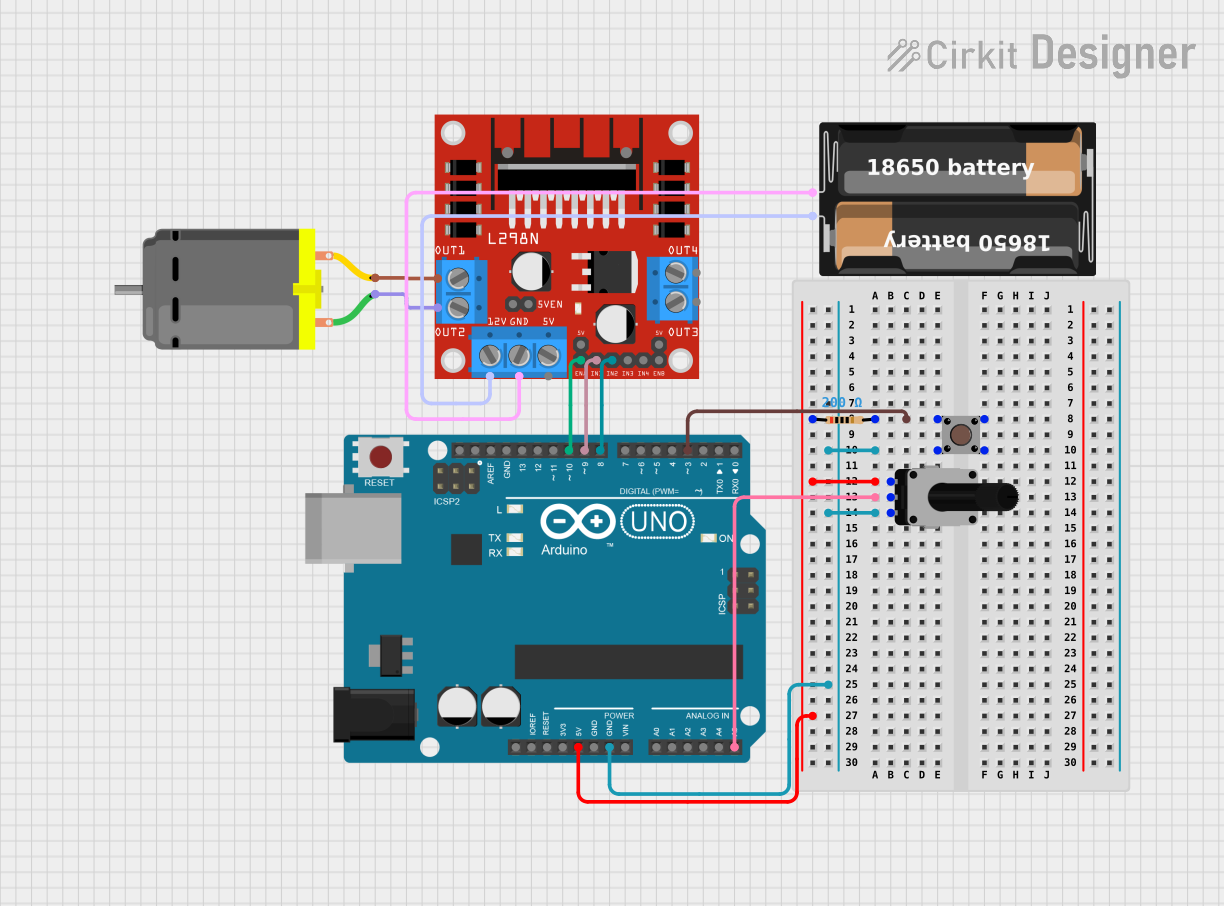
Circuit Documentation
Summary of the Circuit
This circuit is designed to control a DC motor using an Arduino UNO microcontroller and an L298N DC motor driver. The speed of the motor is adjustable via a rotary potentiometer. A pushbutton is included to provide input to the Arduino, and a resistor is used for pull-down on the pushbutton. The motor driver is powered by a battery case. The circuit's functionality is controlled by embedded code running on the Arduino UNO.
Component List
L298N DC Motor Driver
- Description: A motor driver module capable of driving two DC motors.
- Pins: OUT1, OUT2, 12V, GND, 5V, OUT3, OUT4, 5V-ENA-JMP-I, 5V-ENA-JMP-O, +5V-J1, +5V-J2, ENA, IN1, IN2, IN3, IN4, ENB
DC Motor
- Description: A standard DC motor.
- Pins: pin 1, pin 2
My Battery Case
- Description: A battery case to provide power to the circuit.
- Pins: +, -
Rotary Potentiometer
- Description: A variable resistor with a knob used to provide analog input.
- Pins: leg1, wiper, leg2
- Properties: Resistance: 10,000 Ohms
Arduino UNO
- Description: A microcontroller board based on the ATmega328P.
- Pins: UNUSED, IOREF, Reset, 3.3V, 5V, GND, Vin, A0, A1, A2, A3, A4, A5, SCL, SDA, AREF, D13, D12, D11, D10, D9, D8, D7, D6, D5, D4, D3, D2, D1, D0
Pushbutton
- Description: A simple pushbutton switch.
- Pins: Pin 3 (out), Pin 4 (out), Pin 1 (in), Pin 2 (in)
Resistor
- Description: A passive two-terminal electrical component that implements electrical resistance.
- Pins: pin1, pin2
- Properties: Resistance: 200 Ohms
Wiring Details
L298N DC Motor Driver
- ENA connected to Arduino UNO D10
- IN1 connected to Arduino UNO D9
- IN2 connected to Arduino UNO D8
- OUT1 connected to DC Motor pin 2
- OUT2 connected to DC Motor pin 1
- 12V connected to My Battery Case +
- GND connected to My Battery Case -
DC Motor
- pin 1 connected to L298N DC Motor Driver OUT2
- pin 2 connected to L298N DC Motor Driver OUT1
My Battery Case
-
- connected to L298N DC Motor Driver 12V
-
- connected to L298N DC Motor Driver GND
Rotary Potentiometer
- leg1 connected to Arduino UNO 5V
- wiper connected to Arduino UNO A5
- leg2 connected to Pushbutton Pin 4 (out)
Arduino UNO
- D3 connected to Resistor pin2
- GND connected to Pushbutton Pin 4 (out)
- 5V connected to Rotary Potentiometer leg1
- A5 connected to Rotary Potentiometer wiper
- D10 connected to L298N DC Motor Driver ENA
- D9 connected to L298N DC Motor Driver IN1
- D8 connected to L298N DC Motor Driver IN2
Pushbutton
- Pin 2 (in) connected to Resistor pin2
- Pin 4 (out) connected to Rotary Potentiometer leg2
Resistor
- pin1 connected to Rotary Potentiometer leg1
- pin2 connected to Pushbutton Pin 2 (in) and Arduino UNO D3
Documented Code
Arduino UNO Code (sketch.ino)
void setup() {
  // put your setup code here, to run once:

}

void loop() {
  // put your main code here, to run repeatedly:

}
Additional Notes (documentation.txt)
No additional code documentation was provided.