
Arduino UNO-Based Smart Weight Measurement System with Load Cell and LCD Display
View and Edit Project In Cirkit Designer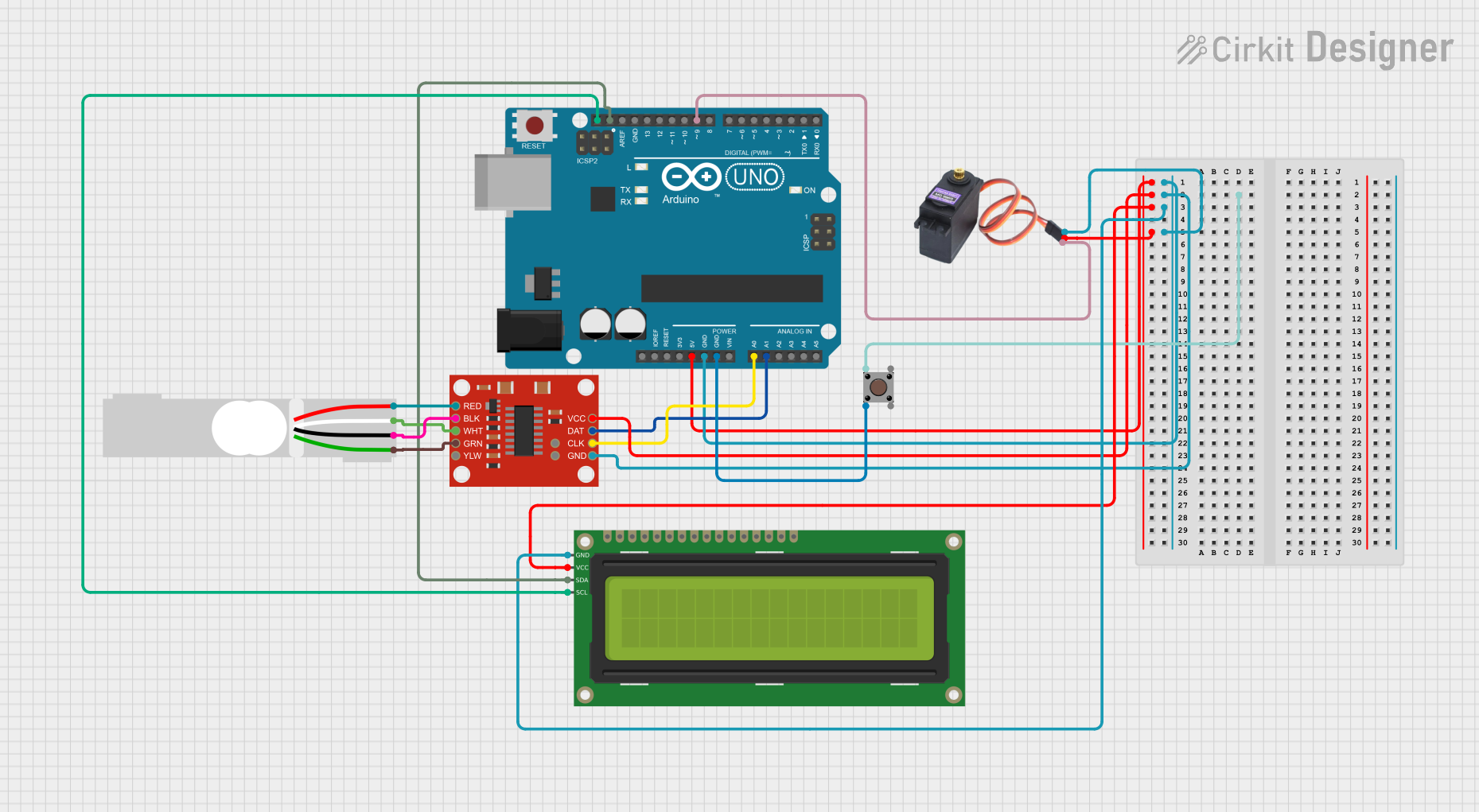
Circuit Documentation
Summary
This circuit is designed to measure the weight of an item using a load cell and display the weight on a 16x2 I2C LCD. It also uses a servo motor to sort items based on their weight. The circuit includes a pushbutton to toggle between two sets of weight limits. The core of the circuit is an Arduino UNO microcontroller, which interfaces with the load cell amplifier, LCD, servo motor, and pushbutton.
Component List
SparkFun Load Cell Amplifier - HX711
- Description: Amplifies the signal from the load cell and converts it to a digital signal.
- Pins: GND, CLK, DAT, VCC, YLW, GRN, WHT, BLK, RED, B-, B+
Pushbutton
- Description: Used to toggle between two sets of weight limits.
- Pins: Pin 3 (out), Pin 4 (out), Pin 1 (in), Pin 2 (in)
16x2 I2C LCD
- Description: Displays the weight and status of the item.
- Pins: GND, VCC, SDA, SCL
MG996R Servo Motor
- Description: Moves to indicate whether the item is within acceptable weight limits.
- Pins: GND, VCC, SIG
Arduino UNO
- Description: Microcontroller that controls the entire circuit.
- Pins: UNUSED, IOREF, Reset, 3.3V, 5V, GND, Vin, A0, A1, A2, A3, A4, A5, SCL, SDA, AREF, D13, D12, D11, D10, D9, D8, D7, D6, D5, D4, D3, D2, D1, D0
Load Cell - Red/white/black/green
- Description: Measures the weight of the item.
- Pins: E+, A-, E-, A+
Wiring Details
SparkFun Load Cell Amplifier - HX711
- VCC connected to 5V of Arduino UNO
- GND connected to GND of Arduino UNO
- CLK connected to A0 of Arduino UNO
- DAT connected to A1 of Arduino UNO
- GRN connected to A+ of Load Cell
- WHT connected to A- of Load Cell
- BLK connected to E- of Load Cell
- RED connected to E+ of Load Cell
Pushbutton
- Pin 1 (in) not connected
- Pin 2 (in) connected to GND of Arduino UNO
- Pin 3 (out) not connected
- Pin 4 (out) not connected
16x2 I2C LCD
- VCC connected to 5V of Arduino UNO
- GND connected to GND of Arduino UNO
- SDA connected to SDA of Arduino UNO
- SCL connected to SCL of Arduino UNO
MG996R Servo Motor
- VCC connected to 5V of Arduino UNO
- GND connected to GND of Arduino UNO
- SIG connected to D9 of Arduino UNO
Arduino UNO
- 5V connected to VCC of SparkFun Load Cell Amplifier - HX711, 16x2 I2C LCD, and MG996R Servo Motor
- GND connected to GND of SparkFun Load Cell Amplifier - HX711, 16x2 I2C LCD, MG996R Servo Motor, and Pin 2 (in) of Pushbutton
- A0 connected to CLK of SparkFun Load Cell Amplifier - HX711
- A1 connected to DAT of SparkFun Load Cell Amplifier - HX711
- SDA connected to SDA of 16x2 I2C LCD
- SCL connected to SCL of 16x2 I2C LCD
- D9 connected to SIG of MG996R Servo Motor
Load Cell - Red/white/black/green
- E+ connected to RED of SparkFun Load Cell Amplifier - HX711
- A- connected to WHT of SparkFun Load Cell Amplifier - HX711
- E- connected to BLK of SparkFun Load Cell Amplifier - HX711
- A+ connected to GRN of SparkFun Load Cell Amplifier - HX711
Documented Code
Arduino UNO Code
#include <HX711.h>
#include <Servo.h>
#include <Wire.h>
#include <LiquidCrystal_I2C.h>

// Pin definitions
const int LOADCELL_DOUT_PIN = A1;
const int LOADCELL_SCK_PIN = A0;
const int SERVO_PIN = 9;
const int BUTTON_PIN = 2; // Pin for the push button

// Load cell and servo objects
HX711 scale;
Servo myServo;

// LCD object
LiquidCrystal_I2C lcd(0x27, 16, 2);

// Weight limits for item
const float ITEM_MIN_WEIGHT_DEFAULT = 50.0; // Default minimum acceptable weight in grams
const float ITEM_MAX_WEIGHT_DEFAULT = 150.0; // Default maximum acceptable weight in grams
const float ITEM_MIN_WEIGHT_ALTERNATE = 30.0; // Alternate minimum acceptable weight in grams
const float ITEM_MAX_WEIGHT_ALTERNATE = 100.0; // Alternate maximum acceptable weight in grams

// Calibration factor for the load cell (update this with your calibrated value)
const float CALIBRATION_FACTOR = 724; // Adjust this value based on your calibration

// Threshold to consider the weight as significant
const float WEIGHT_THRESHOLD = 10.0; // Adjust this value based on your setup

// Button state variables
bool buttonState = HIGH; // Current state of the button
bool lastButtonState = LOW; // Previous state of the button
bool useAlternateLimits = false; // Flag to use alternate weight limits
unsigned long lastDebounceTime = 0; // The last time the output pin was toggled
unsigned long debounceDelay = 50; // The debounce time; increase if the output flickers

// Timing variables
unsigned long lastMeasurementTime = 0; // Last time weight was measured
const unsigned long measurementInterval = 500; // Interval for weight measurement

void setup() {
  // Initialize serial communication
  Serial.begin(9600);

  // Initialize load cell
  scale.begin(LOADCELL_DOUT_PIN, LOADCELL_SCK_PIN);
  scale.set_scale(CALIBRATION_FACTOR); // Set the calibration factor
  scale.tare(); // Reset the scale to 0

  // Initialize servo
  myServo.attach(SERVO_PIN);
  myServo.write(90); // Initial position (neutral)

  // Initialize LCD
  lcd.init();
  lcd.backlight();

  // Initialize button pin
  pinMode(BUTTON_PIN, INPUT_PULLUP); // Use internal pull-up resistor

  // Display initial message
  lcd.clear();
  lcd.setCursor(0, 0);
  lcd.print("Ready....");
  delay(1000);
}

void loop() {
  // Read the button state
  int reading = digitalRead(BUTTON_PIN);

  // Check for button state change with debounce
  if (reading != lastButtonState) {
    lastDebounceTime = millis();
  }

  if ((millis() - lastDebounceTime) > debounceDelay) {
    if (reading != buttonState) {
      buttonState = reading;
      if (buttonState == LOW) { // Button pressed
        useAlternateLimits = !useAlternateLimits; // Toggle weight limit variant

        // Display message when switching variants
        lcd.clear();
        lcd.setCursor(0, 0);
        lcd.print("Menggunakan");
        lcd.setCursor(0, 1);
        if (useAlternateLimits) {
          lcd.print("Variasi 2");
        } else {
          lcd.print("Variasi 1");
        }
        delay(1000); // Display message for 1 second
      }
    }
  }

  lastButtonState = reading;

  // Measure weight at defined intervals
  if (millis() - lastMeasurementTime >= measurementInterval) {
    lastMeasurementTime = millis();

    // Set weight limits based on the current variant
    float ITEM_MIN_WEIGHT = useAlternateLimits ? ITEM_MIN_WEIGHT_ALTERNATE : ITEM_MIN_WEIGHT_DEFAULT;
    float ITEM_MAX_WEIGHT = useAlternateLimits ? ITEM_MAX_WEIGHT_ALTERNATE : ITEM_MAX_WEIGHT_DEFAULT;

    // Measure weight
    float weight = scale.get_units(20);
    int displayWeight = weight * 1; // Multiply by 100 to convert 1.66 to 166

    // Display weight on LCD
    lcd.clear();
    lcd.setCursor(0, 0);
    lcd.print("Weight: ");
    if (abs(displayWeight) < 10) { // If the weight is very close to zero, display