
Arduino UNO-Based Obstacle Avoidance Robot with Ultrasonic Sensors and L298N Motor Driver
View and Edit Project In Cirkit Designer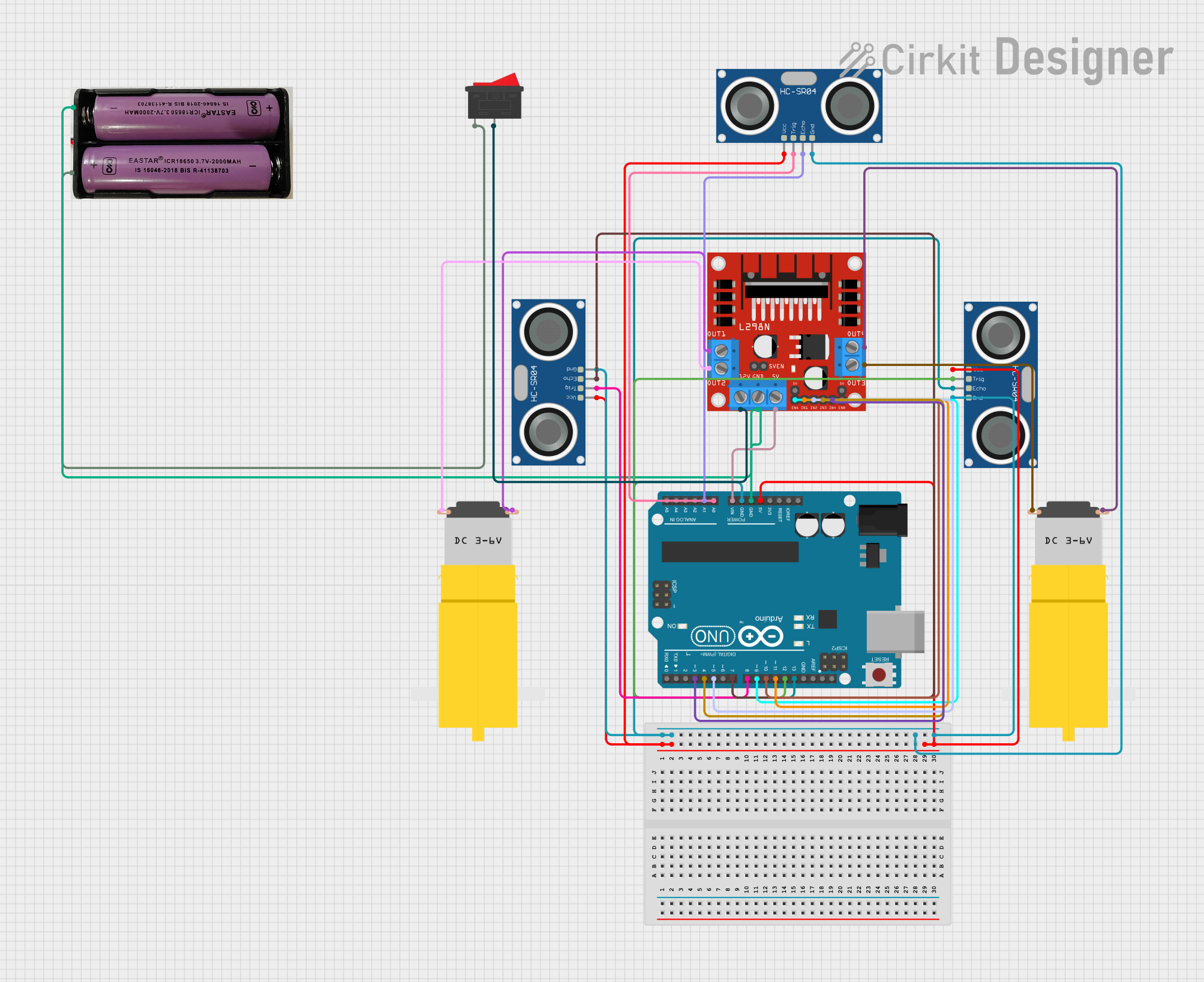
Circuit Documentation
Summary
This circuit involves an Arduino UNO microcontroller interfacing with multiple HC-SR04 Ultrasonic Sensors, an L298N DC motor driver, and two hobby motors. The circuit is powered by a 7.4V battery and includes a rocker switch for power control. The Arduino UNO is programmed to read data from the ultrasonic sensors and control the motors accordingly.
Component List
L298N DC Motor Driver
- Description: A dual H-Bridge motor driver that allows control of the speed and direction of two DC motors.
- Pins: OUT1, OUT2, 12V, GND, 5V, OUT3, OUT4, 5V-ENA-JMP-I, 5V-ENA-JMP-O, +5V-J1, +5V-J2, ENA, IN1, IN2, IN3, IN4, ENB
HC-SR04 Ultrasonic Sensor
- Description: A sensor used to measure distance by using ultrasonic waves.
- Pins: VCC, TRIG, ECHO, GND
Motor amarillo motorreductor hobby
- Description: A small DC motor with a gearbox, commonly used in hobby projects.
- Pins: vcc, GND
7.4V Battery
- Description: A power source for the circuit.
- Pins: +, -
Arduino UNO
- Description: A microcontroller board based on the ATmega328P.
- Pins: UNUSED, IOREF, Reset, 3.3V, 5V, GND, Vin, A0, A1, A2, A3, A4, A5, SCL, SDA, AREF, D13, D12, D11, D10, D9, D8, D7, D6, D5, D4, D3, D2, D1, D0
Rocker Switch
- Description: A switch used to control the power supply to the circuit.
- Pins: 1, 2
Wiring Details
L298N DC Motor Driver
- GND connected to Arduino UNO GND and 7.4V Battery (-)
- 5V connected to Arduino UNO Vin
- IN1 connected to Arduino UNO D11
- IN2 connected to Arduino UNO D5
- IN3 connected to Arduino UNO D4
- IN4 connected to Arduino UNO D3
- ENA connected to Arduino UNO D9
- ENB connected to Arduino UNO D10
- OUT1 connected to Motor amarillo motorreductor hobby vcc
- OUT2 connected to Motor amarillo motorreductor hobby GND
- OUT3 connected to Motor amarillo motorreductor hobby GND
- OUT4 connected to Motor amarillo motorreductor hobby vcc
- 12V connected to Rocker Switch pin 2
HC-SR04 Ultrasonic Sensor (Instance 1)
- VCC connected to Arduino UNO 5V
- GND connected to Arduino UNO GND
- TRIG connected to Arduino UNO D8
- ECHO connected to Arduino UNO D7
HC-SR04 Ultrasonic Sensor (Instance 2)
- VCC connected to Arduino UNO 5V
- GND connected to Arduino UNO GND
- TRIG connected to Arduino UNO D12
- ECHO connected to Arduino UNO D13
HC-SR04 Ultrasonic Sensor (Instance 3)
- VCC connected to Arduino UNO 5V
- GND connected to Arduino UNO GND
- TRIG connected to Arduino UNO A0
- ECHO connected to Arduino UNO A1
Motor amarillo motorreductor hobby (Instance 1)
- vcc connected to L298N DC motor driver OUT1
- GND connected to L298N DC motor driver OUT2
Motor amarillo motorreductor hobby (Instance 2)
- vcc connected to L298N DC motor driver OUT4
- GND connected to L298N DC motor driver OUT3
7.4V Battery
- + connected to Rocker Switch pin 1
- - connected to Arduino UNO GND and L298N DC motor driver GND
Rocker Switch
- Pin 1 connected to 7.4V Battery (+)
- Pin 2 connected to L298N DC motor driver 12V
Code Documentation
Arduino UNO Code
/**
 * This example demonstrates how to collect temperature and humidity measurements
 * from the Adafruit DHT11 sensor. Measurements are printed out to the serial monitor.
 *
 * - Make sure to first install the following libraries through the Arduino Library Manager:
 *   - DHT Sensor Library (by Adafruit)
 *   - Adafruit Unified Sensor (by Adafruit)
 * - When you open the serial monitor to view measurements from the DHT11, make sure
 * that you select 9600 baud so that the serial monitor can receive data from the Arduino.
 *
 * This example was originally written by Adafruit Industries LLC.
 */

#include <Adafruit_Sensor.h>
#include <DHT.h>
#include <DHT_U.h>

#define DHTPIN 2     // Digital pin connected to the DHT sensor
// Feather HUZZAH ESP8266 note: use pins 3, 4, 5, 12, 13 or 14 --
// Pin 15 can work but DHT must be disconnected during program upload.

// Uncomment the type of sensor in use:
#define DHTTYPE    DHT11     // DHT 11
//#define DHTTYPE    DHT22     // DHT 22 (AM2302)
//#define DHTTYPE    DHT21     // DHT 21 (AM2301)

// See guide for details on sensor wiring and usage:
//   https://learn.adafruit.com/dht/overview

DHT_Unified dht(DHTPIN, DHTTYPE);

uint32_t delayMS;

void setup() {
  Serial.begin(9600);
  // Initialize device.
  dht.begin();
  Serial.println(F("DHTxx Unified Sensor Example"));
  // Print temperature sensor details.
  sensor_t sensor;
  dht.temperature().getSensor(&sensor);
  Serial.println(F("------------------------------------"));
  Serial.println(F("Temperature Sensor"));
  Serial.print  (F("Sensor Type: ")); Serial.println(sensor.name);
  Serial.print  (F("Driver Ver:  ")); Serial.println(sensor.version);
  Serial.print  (F("Unique ID:   ")); Serial.println(sensor.sensor_id);
  Serial.print  (F("Max Value:   ")); Serial.print(sensor.max_value); Serial.println(F("°C"));
  Serial.print  (F("Min Value:   ")); Serial.print(sensor.min_value); Serial.println(F("°C"));
  Serial.print  (F("Resolution:  ")); Serial.print(sensor.resolution); Serial.println(F("°C"));
  Serial.println(F("------------------------------------"));
  // Print humidity sensor details.
  dht.humidity().getSensor(&sensor);
  Serial.println(F("Humidity Sensor"));
  Serial.print  (F("Sensor Type: ")); Serial.println(sensor.name);
  Serial.print  (F("Driver Ver:  ")); Serial.println(sensor.version);
  Serial.print  (F("Unique ID:   ")); Serial.println(sensor.sensor_id);
  Serial.print  (F("Max Value:   ")); Serial.print(sensor.max_value); Serial.println(F("%"));
  Serial.print  (F("Min Value:   ")); Serial.print(sensor.min_value); Serial.println(F("%"));
  Serial.print  (F("Resolution:  ")); Serial.print(sensor.resolution); Serial.println(F("%"));
  Serial.println(F("------------------------------------"));
  // Set delay between sensor readings based on sensor details.
  delayMS = sensor.min_delay / 1000;
}

void loop() {
  // Delay between measurements.
  delay(delayMS);
  // Get temperature event and print its value.
  sensors_event_t event;
  dht.temperature().getEvent(&event);
  if (isnan(event.temperature)) {
    Serial.println(F("Error reading temperature!"));
  }
  else {
    Serial.print(F("Temperature: "));
    Serial.print(event.temperature);
    Serial.println(F("°C"));
  }
  // Get humidity event and print its value.
  dht.humidity().getEvent(&event);
  if (isnan(event.relative_humidity)) {
    Serial.println(F("Error reading humidity!"));
  }
  else {
    Serial.print(F("Humidity: "));
    Serial.print(event.relative_humidity);
    Serial.println(F("%"));
  }
}
This code is designed to read temperature and humidity data from a DHT11 sensor and print the values to the serial monitor. Make sure to install the required libraries and select the correct baud rate in the serial monitor.