
Arduino UNO Load Cell Weight Measurement System with HX711 Interface
View and Edit Project In Cirkit Designer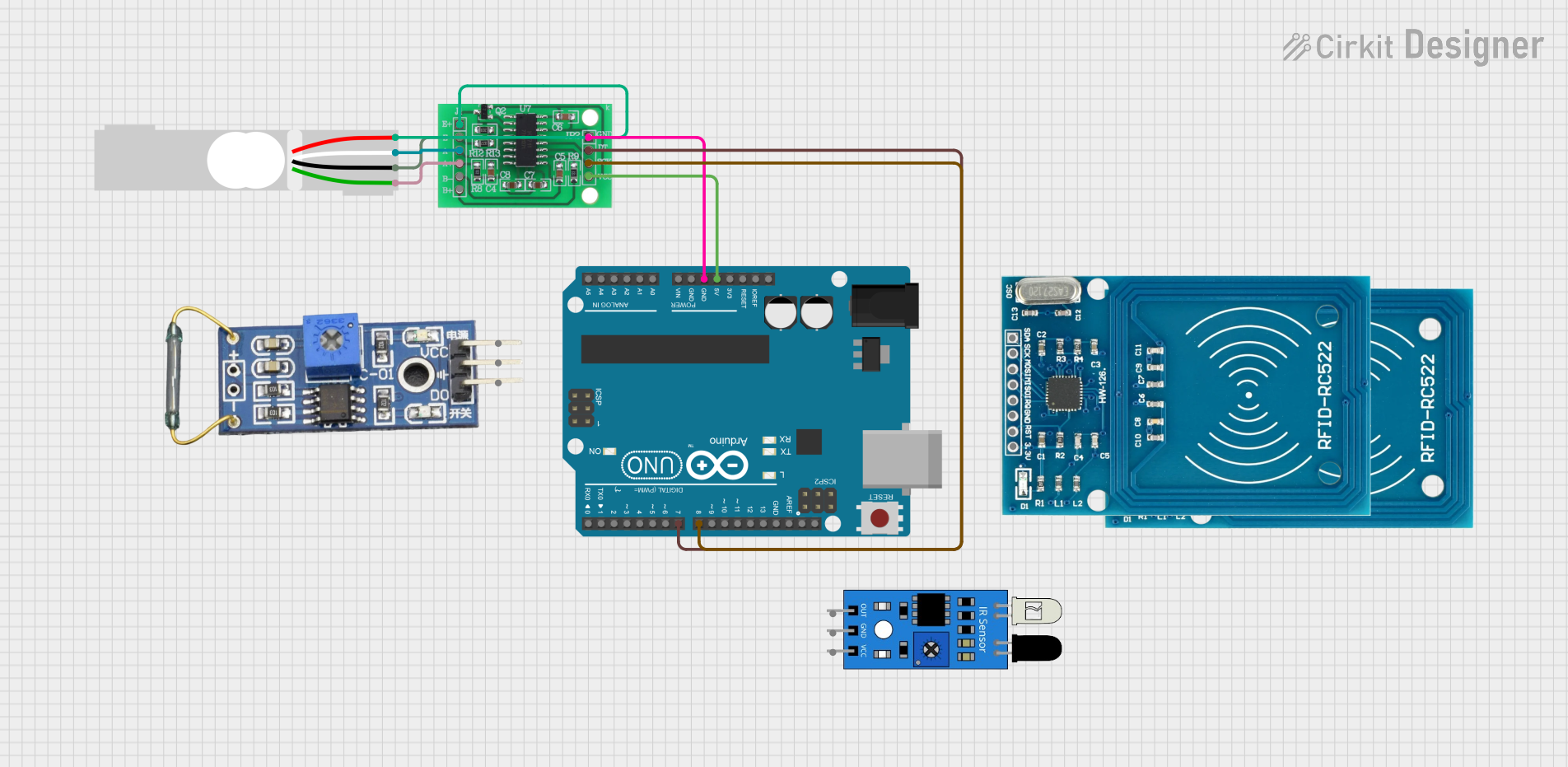
Circuit Documentation
Summary
This document provides a detailed overview of a circuit that includes a Load Cell, an Arduino UNO, an HX711 Bridge Sensor Interface, an IR sensor, RFID-RC522 modules, and a Reed Switch. The circuit is designed to interface these components for various sensing and data acquisition tasks. The Arduino UNO serves as the central microcontroller, interfacing with the other components to process and relay data.
Component List
Load Cell - Red/white/black/green
- Description: A load cell used for measuring weight or force.
- Pins: E+, A-, E-, A+
Arduino UNO
- Description: A microcontroller board based on the ATmega328P.
- Pins: UNUSED, IOREF, Reset, 3.3V, 5V, GND, Vin, A0, A1, A2, A3, A4, A5, SCL, SDA, AREF, D13, D12, D11, D10, D9, D8, D7, D6, D5, D4, D3, D2, D1, D0
HX711 - Bridge Sensor Interface
- Description: A precision 24-bit analog-to-digital converter (ADC) designed for weigh scales and industrial control applications to interface directly with a bridge sensor.
- Pins: E+, E-, A-, A+, B-, B+, GND - GROUND, DATA (OUT), SCK - CLOCK (IN), 3.3/3.5V Supply
IR Sensor
- Description: An infrared sensor used for detecting objects or measuring distance.
- Pins: out, gnd, vcc
RFID-RC522
- Description: A low-cost RFID module that uses the MFRC522 IC for communication.
- Pins: VCC (3.3V), RST, GND, IRQ, MISO, MOSI, SCK, SDA
Reed Switch
- Description: A magnetic switch used for detecting the presence of a magnetic field.
- Pins: VCC, GND, DO
Wiring Details
Load Cell - Red/white/black/green
- E+ connected to HX711 - Bridge Sensor Interface E+
- A- connected to HX711 - Bridge Sensor Interface A-
- E- connected to HX711 - Bridge Sensor Interface E-
- A+ connected to HX711 - Bridge Sensor Interface A+
Arduino UNO
- 5V connected to HX711 - Bridge Sensor Interface 3.3/3.5V Supply
- GND connected to HX711 - Bridge Sensor Interface GND - GROUND
- D8 connected to HX711 - Bridge Sensor Interface SCK - CLOCK (IN)
- D7 connected to HX711 - Bridge Sensor Interface DATA (OUT)
HX711 - Bridge Sensor Interface
- E+ connected to Load Cell E+
- A- connected to Load Cell A-
- E- connected to Load Cell E-
- A+ connected to Load Cell A+
- 3.3/3.5V Supply connected to Arduino UNO 5V
- GND - GROUND connected to Arduino UNO GND
- SCK - CLOCK (IN) connected to Arduino UNO D8
- DATA (OUT) connected to Arduino UNO D7
IR Sensor
- out not connected
- gnd not connected
- vcc not connected
RFID-RC522
- VCC (3.3V) not connected
- RST not connected
- GND not connected
- IRQ not connected
- MISO not connected
- MOSI not connected
- SCK not connected
- SDA not connected
Reed Switch
- VCC not connected
- GND not connected
- DO not connected
Documented Code
Arduino UNO Code (sketch.ino)
void setup() {
  // put your setup code here, to run once:

}

void loop() {
  // put your main code here, to run repeatedly:

}
Documentation (documentation.txt)
This document provides a comprehensive overview of the circuit, including the components used, their connections, and the code running on the Arduino UNO.