
Arduino UNO Controlled Multi-Color LED Array with Sound Sensor
View and Edit Project In Cirkit Designer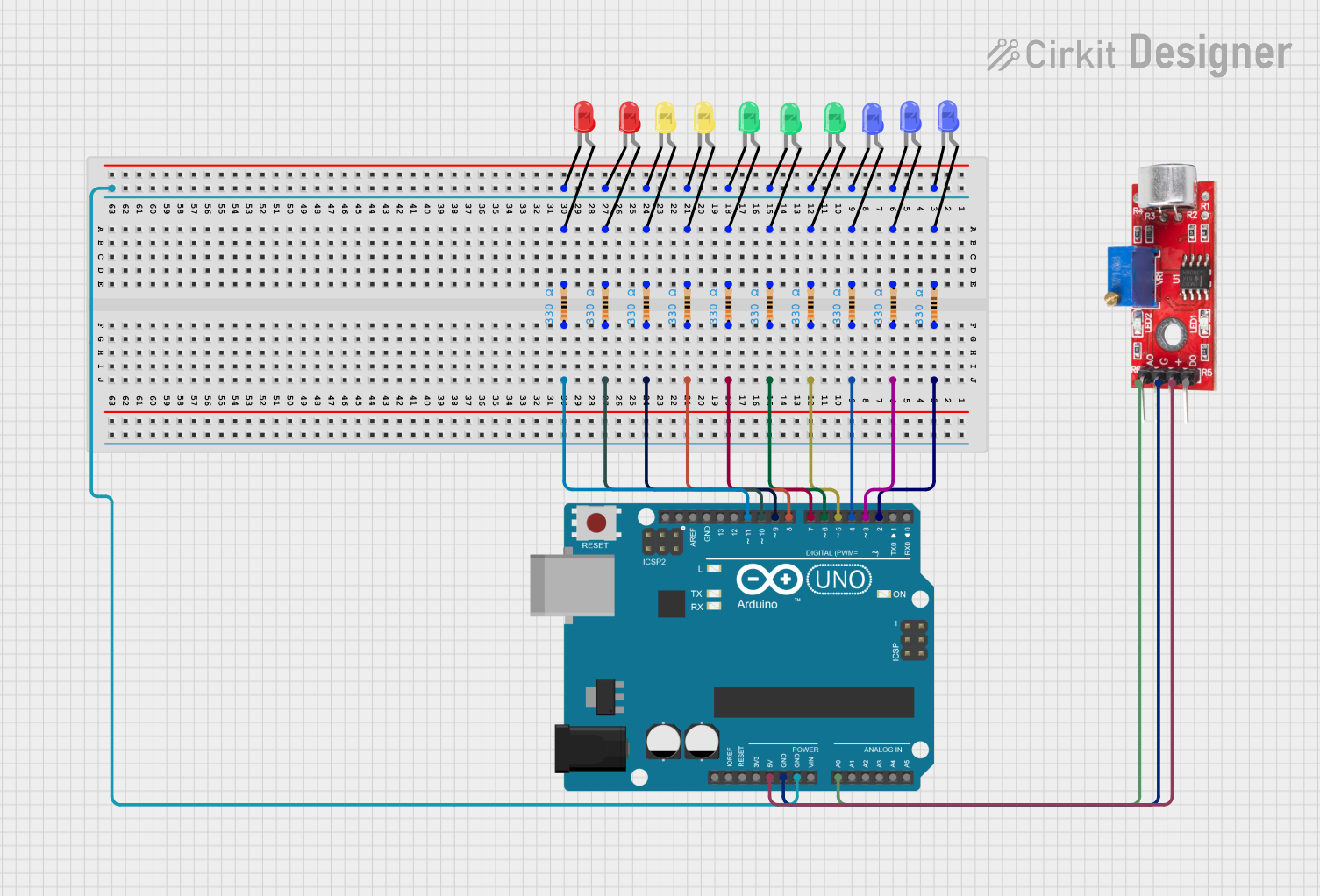
Circuit Documentation
Summary
This circuit is designed to interface with an Arduino UNO microcontroller to control multiple LEDs of different colors and a sound sensor. The LEDs are connected to the digital pins of the Arduino through individual resistors, which are used to limit the current to the LEDs. The sound sensor is connected to an analog pin for sound detection. The ground connections are shared among the LEDs and the sound sensor, and the sensor is also connected to a 5V supply from the Arduino.
Component List
LEDs
- LED (Red): A two-pin red LED.
- LED (Green): A two-pin green LED.
- LED (Yellow): A two-pin yellow LED.
- LED (Blue): A two-pin blue LED.
Resistors
- Resistor: A resistor with a resistance of 330 Ohms, used to limit the current through the LEDs.
Microcontroller
- Arduino UNO: A microcontroller board based on the ATmega328P, with a variety of digital and analog pins.
Sound Sensor
- Sound Sensor: A sensor that detects sound levels and provides both analog and digital outputs.
Wiring Details
LEDs
LED (Red)
- Cathode: Connected to GND.
- Anode: Connected to a 330 Ohm resistor, then to a digital pin on the Arduino UNO.
LED (Green)
- Cathode: Connected to GND.
- Anode: Connected to a 330 Ohm resistor, then to a digital pin on the Arduino UNO.
LED (Yellow)
- Cathode: Connected to GND.
- Anode: Connected to a 330 Ohm resistor, then to a digital pin on the Arduino UNO.
LED (Blue)
- Cathode: Connected to GND.
- Anode: Connected to a 330 Ohm resistor, then to a digital pin on the Arduino UNO.
Resistors
- Resistor (330 Ohms)
- One pin: Connected to the anode of an LED.
- Other pin: Connected to a digital pin on the Arduino UNO.
Microcontroller
- Arduino UNO
- Digital pins (D2-D11): Each connected to a resistor leading to an LED.
- GND: Connected to the cathodes of all LEDs and the GND pin of the sound sensor.
- 5V: Connected to the VCC pin of the sound sensor.
- A0: Connected to the Analog pin of the sound sensor.
Sound Sensor
- Sound Sensor
- VCC: Connected to 5V on the Arduino UNO.
- GND: Connected to GND on the Arduino UNO.
- Analog: Connected to A0 on the Arduino UNO.
Documented Code
Arduino UNO Code (sketch.ino)
void setup() {
  // put your setup code here, to run once:

}

void loop() {
  // put your main code here, to run repeatedly:

}
Additional Notes (documentation.txt)
No additional code documentation was provided.