
Arduino UNO Controlled Waste Sorting System with Dual Servos and Metal Detection
View and Edit Project In Cirkit Designer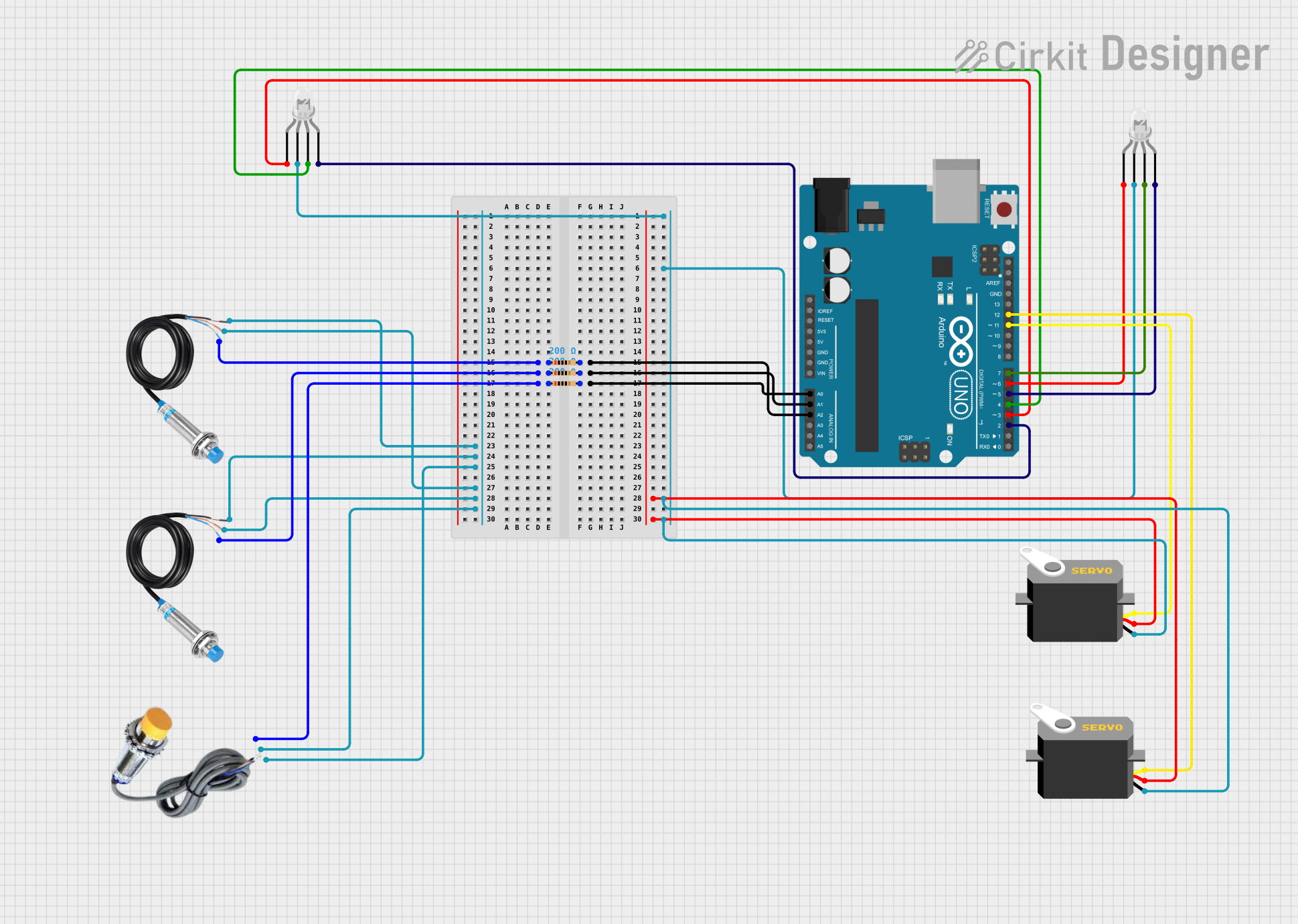
Circuit Documentation
Summary
The circuit in question is designed to interface with various sensors and actuators using an Arduino UNO microcontroller. The circuit includes two four-pin common cathode RGB LEDs, two metal detection sensors, a capacitive sensor, three resistors, and two servo motors. The Arduino UNO controls the LEDs and servo motors based on the input from the metal detection and capacitive sensors. The circuit is likely used for sorting materials where the presence of metal and certain capacitance levels trigger specific actions, such as the movement of the servo motors.
Component List
Arduino UNO
- Microcontroller board based on the ATmega328P
- It has 14 digital input/output pins, 6 analog inputs, a 16 MHz quartz crystal, a USB connection, a power jack, an ICSP header, and a reset button.
LED: Four Pin (Common Cathode)
- RGB LED with a common cathode configuration
- It has four pins: red anode, common cathode, green anode, and blue anode.
Capacitive Sensor
- Sensor used to detect the presence or absence of a conductive object
- It has three pins: GND, VCC, and SIGNAL.
Metal Detection Sensor
- Sensor used to detect the presence of metal
- It has three pins: POWER, GND, and OUT.
Resistor (200 Ohms)
- Passive two-terminal electrical component that implements electrical resistance as a circuit element.
Servo
- Rotary actuator or linear actuator that allows for precise control of angular or linear position, velocity, and acceleration.
- It has three pins: gnd, vcc, and pulse.
Wiring Details
Arduino UNO
- A0, A1, A2: Connected to the signal pins of the sensors through resistors
- D2, D3, D4, D5, D6, D7: Control pins for the RGB LEDs
- D11, D12: Control pins for the servo motors
- 5V, GND: Power supply lines for the sensors and servo motors
LED: Four Pin (Common Cathode)
- Red anode, green anode, blue anode: Connected to the corresponding control pins on the Arduino UNO
- Common cathode: Connected to the ground
Capacitive Sensor
- SIGNAL: Connected to A0 on the Arduino UNO through a resistor
- VCC: Connected to the 5V power supply
- GND: Connected to the ground
Metal Detection Sensor
- OUT: Connected to A1 and A2 on the Arduino UNO through resistors
- POWER: Connected to the 5V power supply
- GND: Connected to the ground
Resistor (200 Ohms)
- One pin connected to the signal pin of a sensor
- The other pin connected to an analog input on the Arduino UNO
Servo
- Pulse: Connected to D11 and D12 on the Arduino UNO
- VCC: Connected to the 5V power supply
- GND: Connected to the ground
Documented Code
/// include library

#include <Servo.h> // Servo motor library

// Pin Definitions

// Plastic bin pin
#define redpin 5
#define bluepin 6
#define greenpin 7
#define plasticsensor A0
#define metalsensor A1
#define IR_plastic A3

// Metal bin pin definitions
#define redpin_M 8
#define bluepin_M 9
#define greenpin_M 10
#define metalsensor_M A2
#define IR_metal A3

Servo myservo; // Create servo object to control a servo on plastic bin
Servo myservo_M; // Create servo object to control a servo on metal bin

int pos = 165; // Default servo position of plastic bin
int pos_M = 158; // Default servo position of metal bin

void setup() {
    myservo.attach(11); // Attaches the plastic bin servo on pin 11 to the servo object
    myservo_M.attach(12); // Attaches the metal bin servo on pin 12 to the servo object
    // RGB LED on plastic bin
    pinMode(redpin, OUTPUT);
    pinMode(bluepin, OUTPUT);
    pinMode(greenpin, OUTPUT);
    // RGB LED on metal bin
    pinMode(redpin_M, OUTPUT);
    pinMode(bluepin_M, OUTPUT);
    pinMode(greenpin_M, OUTPUT);
    // Create sensor values in pull-up condition
    pinMode(plasticsensor, INPUT_PULLUP);
    pinMode(metalsensor, INPUT_PULLUP);
    pinMode(metalsensor_M, INPUT_PULLUP);
    // Start serial monitor
    Serial.begin(9600);
    // Set RGB LED on default values (white)
    analogWrite(redpin, 255);
    analogWrite(bluepin, 255);
    analogWrite(greenpin, 255);
    analogWrite(redpin_M, 255);
    analogWrite(bluepin_M, 255);
    analogWrite(greenpin_M, 255);
}

void loop() {
    int sensor_read_plastic = digitalRead(plasticsensor);
    int sensor_read_metal = digitalRead(metalsensor);
    int sensor_read_metal2 = digitalRead(metalsensor_M);
    Serial.println("Plastic sensor");
    Serial.println(sensor_read_plastic);
    Serial.println("Metal sensor");
    Serial.println(sensor_read_metal);
    Serial.println(sensor_read_metal2);

    // Check if the trash bin is full

    // Plastic bin
    if ((sensor_read_plastic == 0) && (sensor_read_metal != 1)) {
        for (pos = 160; pos >= 90; pos -= 1) { // Goes from 160 degrees to 90 degrees
            myservo.write(pos); // Tell servo to go to position in variable 'pos'
            delay(15); // Waits 15ms for the servo to reach the position
        }
        analogWrite(redpin, 255);
        analogWrite(bluepin, 0);
        analogWrite(greenpin, 255);
        delay(2500);
        for (pos = 90; pos <= 160; pos += 1) { // Goes from 90 degrees to 160 degrees
            myservo.write(pos); // Tell servo to go to position in variable 'pos'
            delay(15); // Waits 15ms for the servo to reach the position
        }
        analogWrite(redpin, 0);
        analogWrite(bluepin, 0);
        analogWrite(greenpin, 0);
    } else {
        // Keep the door closed
        myservo.write(pos);
        analogWrite(redpin, 255);
        analogWrite(bluepin, 255);
        analogWrite(greenpin, 255);
    }

    // Metal bin
    if (sensor_read_metal2 == 1) {
        for (pos_M = 160; pos_M >= 90; pos_M -= 1) { // Goes from 160 degrees to 90 degrees
            myservo_M.write(pos_M); // Tell servo to go to position in variable 'pos_M'
            delay(15); // Waits 15ms for the servo to reach the position
        }
        analogWrite(redpin_M, 255);
        analogWrite(bluepin_M, 0);
        analogWrite(greenpin_M, 255);
        delay(2500);
        for (pos_M = 90; pos_M <= 160; pos_M += 1) { // Goes from 90 degrees to 160 degrees
            myservo_M.write(pos_M); // Tell servo to go to position in variable 'pos_M'
            delay(15); // Waits 15ms for the servo to reach the position
        }
        analogWrite(redpin_M, 0);
        analogWrite(bluepin_M, 0);
        analogWrite(greenpin_M, 0);
    } else {
        // Keep the door closed
        myservo_M.write(pos_M);
        analogWrite(redpin_M, 255);
        analogWrite(bluepin_M, 255);
        analogWrite(greenpin_M, 255);
    }
}
Note: The code provided has some syntax errors and inconsistencies with the pin definitions and actual connections. It is important to correct these errors before uploading the code to the Arduino UNO. For example, the #include directive is misspelled, and there are mismatched pin definitions for the LEDs and servo motors. Additionally, the loop delay for servo movement is set to 1ms, which may be too fast for some servos to respond accurately; a typical delay might be around 15ms. These issues should be addressed to ensure proper functionality of the circuit.