
ESP32-Based Automatic Rain-Sensing Roof with Wi-Fi Connectivity
View and Edit Project In Cirkit Designer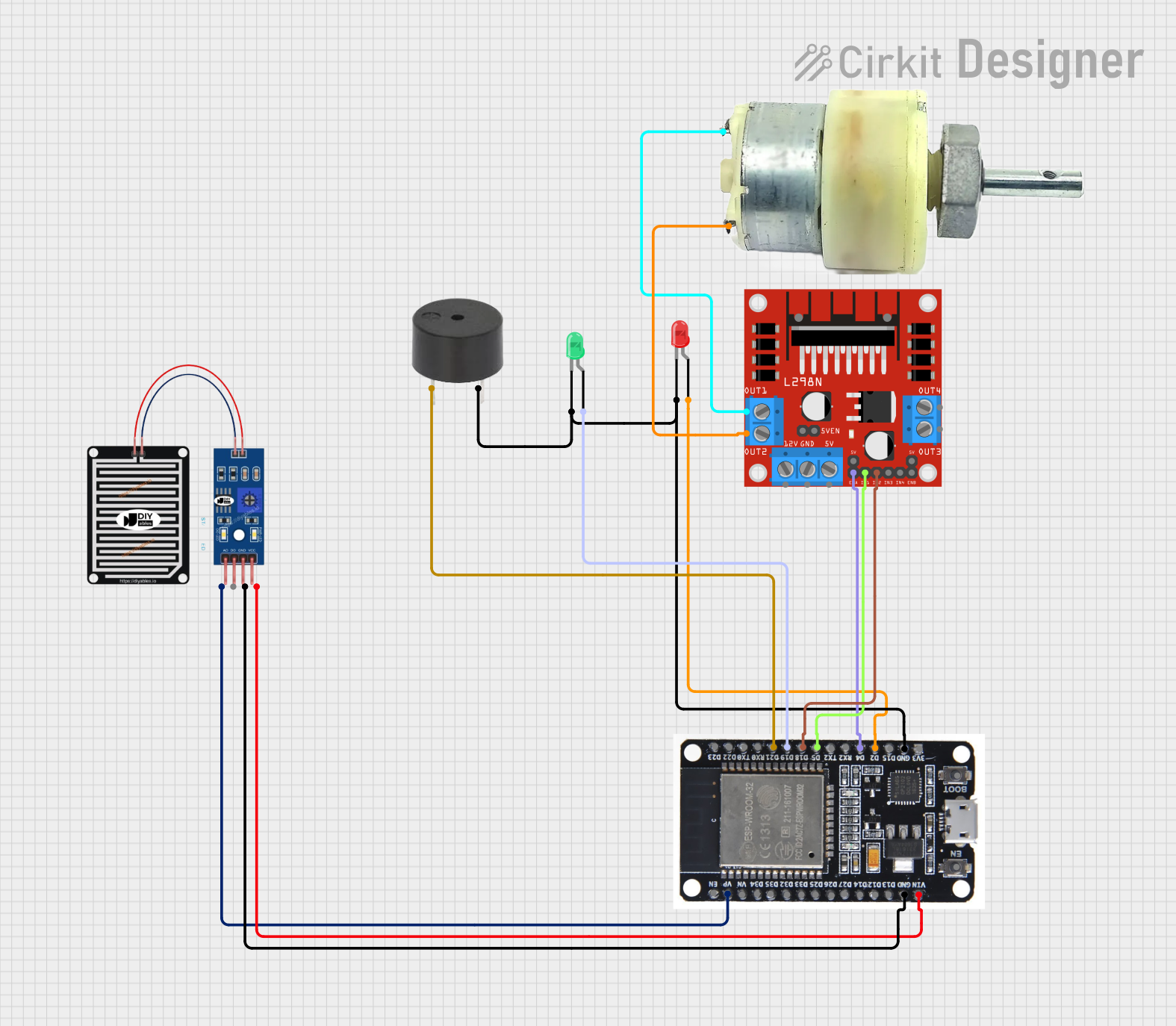
Automatic Roof System Circuit Documentation
Summary
This document provides a detailed overview of an automatic roof system controlled by an ESP32 microcontroller. The system detects rain using a rain sensor and responds by closing the roof, indicated by a red LED and a buzzer. When no rain is detected, the roof opens, indicated by a green LED. The system also sends data to ThingSpeak and sends an email notification when rain is detected.
Component List
RAIN SENSOR
- Description: Detects the presence of rain.
- Pins: AO, DO, GRD, VCC
ESP32
- Description: Microcontroller used to control the system.
- Pins: EN, VP, VN, D34, D35, D32, D33, D25, D26, D27, D14, D12, D13, GND, VIN, 3V3, D15, D2, D4, RX2, TX2, D5, D18, D19, D21, RX0, TX0, D22, D23, BOOT
LED: Two Pin (red)
- Description: Indicates rain detection.
- Pins: cathode, anode
L298N DC motor driver
- Description: Controls the 12V geared motor for opening and closing the roof.
- Pins: OUT1, OUT2, 12V, GND, 5V, OUT3, OUT4, 5V-ENA-JMP-I, 5V-ENA-JMP-O, +5V-J1, +5V-J2, ENA, IN1, IN2, IN3, IN4, ENB
12V Geared Motor
- Description: Drives the roof mechanism.
- Pins: Terminal 1, Terminal 2
LED: Two Pin (green)
- Description: Indicates no rain detection.
- Pins: cathode, anode
Buzzer
- Description: Sounds an alarm when rain is detected.
- Pins: PIN, GND
Wiring Details
RAIN SENSOR
- AO connected to VP on ESP32
- GRD connected to GND on ESP32
- VCC connected to VIN on ESP32
ESP32
- VP connected to AO on RAIN SENSOR
- GND connected to GRD on RAIN SENSOR
- VIN connected to VCC on RAIN SENSOR
- GND connected to cathode on LED: Two Pin (red)
- GND connected to cathode on LED: Two Pin (green)
- GND connected to GND on buzzer
- D2 connected to anode on LED: Two Pin (red)
- D4 connected to ENA on L298N DC motor driver
- D5 connected to IN1 on L298N DC motor driver
- D18 connected to IN2 on L298N DC motor driver
- D19 connected to anode on LED: Two Pin (green)
- D21 connected to PIN on buzzer
LED: Two Pin (red)
- cathode connected to GND on ESP32
- anode connected to D2 on ESP32
L298N DC motor driver
- ENA connected to D4 on ESP32
- IN1 connected to D5 on ESP32
- IN2 connected to D18 on ESP32
- OUT1 connected to Terminal 1 on 12V Geared Motor
- OUT2 connected to Terminal 2 on 12V Geared Motor
12V Geared Motor
- Terminal 1 connected to OUT1 on L298N DC motor driver
- Terminal 2 connected to OUT2 on L298N DC motor driver
LED: Two Pin (green)
- cathode connected to GND on ESP32
- anode connected to D19 on ESP32
Buzzer
- PIN connected to D21 on ESP32
- GND connected to GND on ESP32
Code Documentation
/*
 * This Arduino Sketch controls an automatic roof system using an ESP32.
 * The roof closes when rain is detected, indicated by a red LED and buzzer.
 * The roof opens when no rain is detected, indicated by a green LED.
 * Data is sent to ThingSpeak and an email is sent when rain is detected.
 */

#include <WiFi.h>
#include <HTTPClient.h>

// Pin definitions
#define RAIN_SENSOR_PIN 36 // VP
#define RED_LED_PIN 2
#define GREEN_LED_PIN 19
#define BUZZER_PIN 21
#define MOTOR_ENA_PIN 4
#define MOTOR_IN1_PIN 5
#define MOTOR_IN2_PIN 18

// WiFi credentials
const char* ssid = "your_SSID";
const char* password = "your_PASSWORD";

// ThingSpeak settings
const char* server = "api.thingspeak.com";
String apiKey = "your_API_KEY";

void setup() {
  // Initialize serial communication
  Serial.begin(115200);

  // Initialize pins
  pinMode(RAIN_SENSOR_PIN, INPUT);
  pinMode(RED_LED_PIN, OUTPUT);
  pinMode(GREEN_LED_PIN, OUTPUT);
  pinMode(BUZZER_PIN, OUTPUT);
  pinMode(MOTOR_ENA_PIN, OUTPUT);
  pinMode(MOTOR_IN1_PIN, OUTPUT);
  pinMode(MOTOR_IN2_PIN, OUTPUT);

  // Connect to WiFi
  WiFi.begin(ssid, password);
  while (WiFi.status() != WL_CONNECTED) {
    delay(1000);
    Serial.println("Connecting to WiFi...");
  }
  Serial.println("Connected to WiFi");
}

void loop() {
  int rainValue = analogRead(RAIN_SENSOR_PIN);
  Serial.print("Rain Sensor Value: ");
  Serial.println(rainValue);

  if (rainValue < 500) { // Rain detected
    digitalWrite(RED_LED_PIN, HIGH);
    digitalWrite(GREEN_LED_PIN, LOW);
    digitalWrite(BUZZER_PIN, HIGH);
    closeRoof();
    sendToThingSpeak(rainValue);
    sendEmail();
  } else { // No rain
    digitalWrite(RED_LED_PIN, LOW);
    digitalWrite(GREEN_LED_PIN, HIGH);
    digitalWrite(BUZZER_PIN, LOW);
    openRoof();
  }
  delay(10000); // Check every 10 seconds
}

void closeRoof() {
  digitalWrite(MOTOR_ENA_PIN, HIGH);
  digitalWrite(MOTOR_IN1_PIN, HIGH);
  digitalWrite(MOTOR_IN2_PIN, LOW);
  delay(5000); // Adjust based on motor speed
  digitalWrite(MOTOR_ENA_PIN, LOW);
}

void openRoof() {
  digitalWrite(MOTOR_ENA_PIN, HIGH);
  digitalWrite(MOTOR_IN1_PIN, LOW);
  digitalWrite(MOTOR_IN2_PIN, HIGH);
  delay(5000); // Adjust based on motor speed
  digitalWrite(MOTOR_ENA_PIN, LOW);
}

void sendToThingSpeak(int value) {
  if (WiFi.status() == WL_CONNECTED) {
    HTTPClient http;
    String url = String(server) + "/update?api_key=" + apiKey + "&field1=" + value;
    http.begin(url);
    int httpCode = http.GET();
    if (httpCode > 0) {
      Serial.println("Data sent to ThingSpeak");
    } else {
      Serial.println("Error sending data to ThingSpeak");
    }
    http.end();
  }
}

void sendEmail() {
  // Implement email sending functionality
  Serial.println("Email sent");
}
This code initializes the ESP32, sets up the pins, connects to WiFi, and continuously checks the rain sensor value. If rain is detected, it activates the red LED and buzzer, closes the roof, sends data to ThingSpeak, and sends an email. If no rain is detected, it activates the green LED and opens the roof.