
Circuit Documentation
Summary
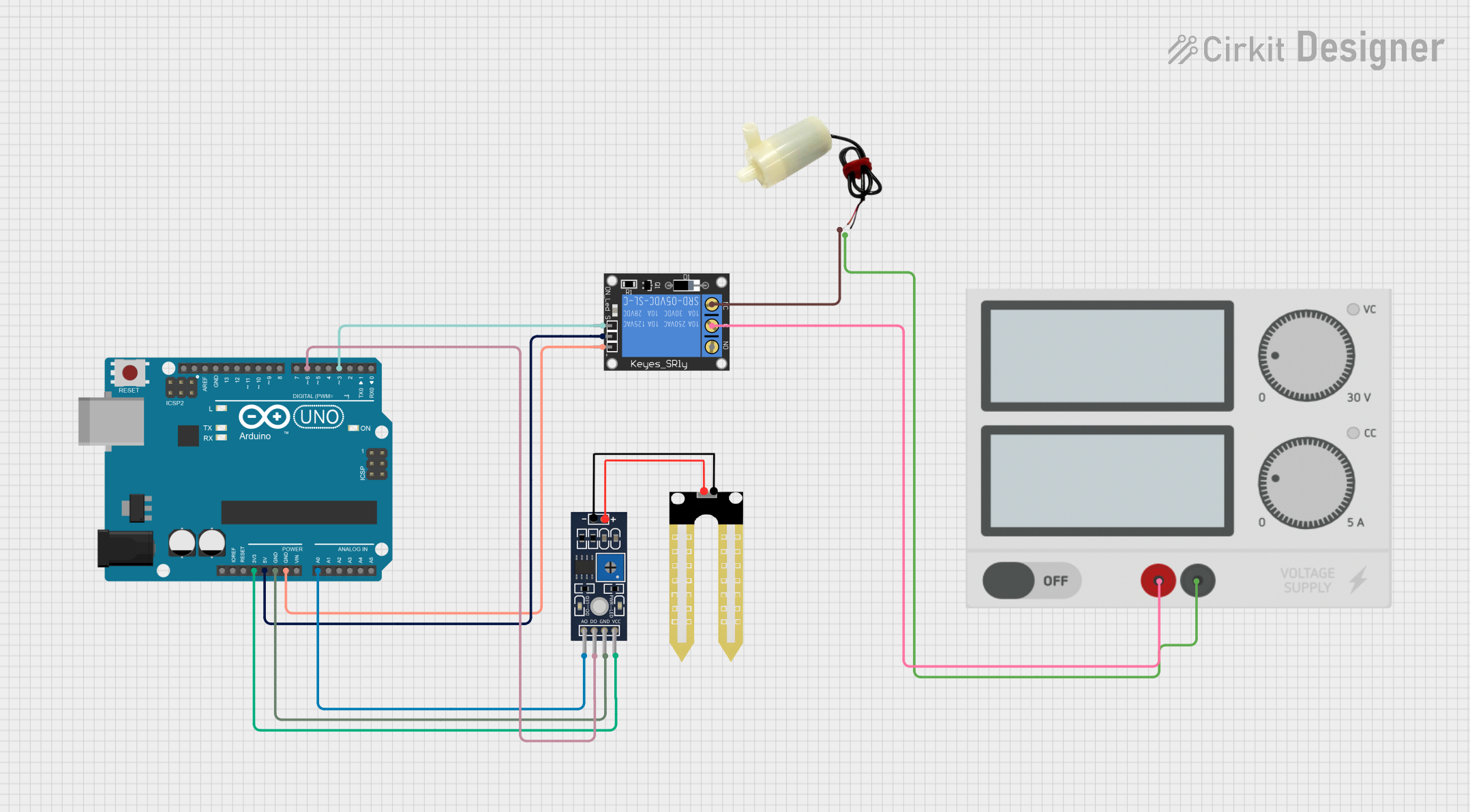
This circuit is designed to control a 5V mini water pump based on the moisture level detected by a Humidity YL-69 sensor. The Arduino UNO serves as the central microcontroller, reading the sensor data and controlling a 1-Channel Relay, which in turn powers the water pump. The relay ensures that the pump is activated only when the moisture level is below a certain threshold, indicating that the soil is dry and requires watering.
Component List
Arduino UNO
- Microcontroller board based on the ATmega328P
- It has 14 digital input/output pins, 6 analog inputs, a 16 MHz quartz crystal, a USB connection, a power jack, an ICSP header, and a reset button.
5V Mini Water Pump
- A small, submersible water pump that operates at 5V, suitable for small-scale projects.
Power Supply
- Provides the necessary power to the circuit components. It has a positive and a negative output.
1-Channel Relay (5V 10A)
- An electromechanical switch that allows the Arduino to control higher power devices, such as the water pump. It has a Normally Closed (NC), Common (C), and Normally Open (NO) contact, along with a signal input, power input, and ground.
Humidity YL-69 Sensor
- A soil moisture sensor that can measure the moisture level of the soil. It has both analog and digital outputs, along with power (VCC) and ground (GND) connections.
Wiring Details
Arduino UNO
3.3Vconnected to Humidity YL-69 VCC5Vconnected to 1-Channel Relay powerGNDconnected to Humidity YL-69 GND and 1-Channel Relay groundA0connected to Humidity YL-69 A0D6connected to Humidity YL-69 D0D3connected to 1-Channel Relay signal
5V Mini Water Pump
Positive pinconnected to 1-Channel Relay NCNegative pinconnected to Power Supply -
Power Supply
+connected to 1-Channel Relay C-connected to 5V Mini Water Pump negative pin
1-Channel Relay (5V 10A)
NCconnected to 5V Mini Water Pump positive pinSignalconnected to Arduino UNO D3Cconnected to Power Supply +Powerconnected to Arduino UNO 5VGroundconnected to Arduino UNO GND
Humidity YL-69 Sensor
VCCconnected to Arduino UNO 3.3VGNDconnected to Arduino UNO GNDA0connected to Arduino UNO A0D0connected to Arduino UNO D6
Documented Code
int water; // Variable to store the moisture level

void setup() {
  pinMode(3, OUTPUT); // Output pin for relay board, this will send signal to the relay
  pinMode(6, INPUT);  // Input pin coming from soil sensor
}

void loop() {
  water = digitalRead(6);  // Reading the signal from the soil sensor
  if (water == HIGH) {     // If water level is full, then cut the relay
    digitalWrite(3, LOW);  // LOW is to cut the relay
  } else {
    digitalWrite(3, HIGH); // HIGH to continue providing signal and water supply
  }
  delay(400);  // Wait for 400 milliseconds
}
This code is designed to run on the Arduino UNO. It initializes the relay control pin (D3) as an output and the soil moisture sensor pin (D6) as an input. In the main loop, it reads the moisture level from the sensor. If the sensor detects moisture (HIGH), the relay is turned off (LOW), stopping the water pump. If the sensor detects a lack of moisture (LOW), the relay is turned on (HIGH), activating the water pump. The system checks the moisture level every 400 milliseconds.