
NUCLEO-F072RB and L298N DC Motor Driver Based Dual Motor Speed Controller with Potentiometer Input
View and Edit Project In Cirkit Designer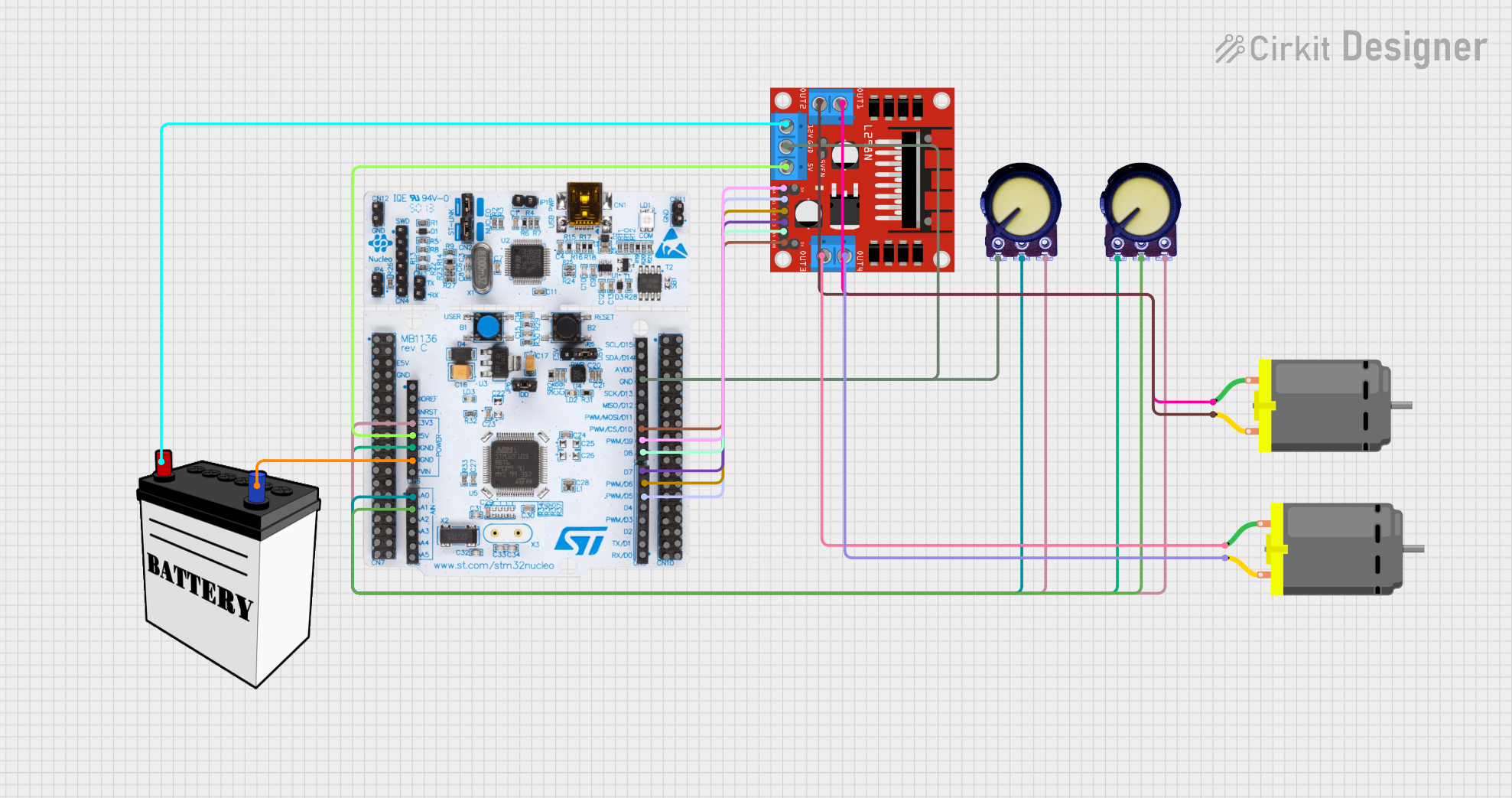
Circuit Documentation
Summary
This circuit is designed to control two DC motors using an L298N motor driver and a NUCLEO-F072RB microcontroller. The speed of the motors is controlled by two potentiometers. The circuit is powered by a 12V battery.
Component List
NUCLEO-F072RB
- Description: Microcontroller board based on the STM32F072RB MCU.
- Pins: A5, A4, A3, A2, A1, A0, VN, GND, 5V, 3V3, RESET, IOREF, SCL/D15, SDA/D14, AVDD, SCK/D13, MISO/D12, PWM/MOSI/D11, PWM/CS/D10, PWM/D9, D8, D7, PWM/D6, PWM/D5, D4, PWM/D3, D2, TX/D1, RX/D0
L298N DC Motor Driver
- Description: Dual H-Bridge motor driver for controlling DC motors.
- Pins: OUT1, OUT2, 12V, GND, 5V, OUT3, OUT4, 5V-ENA-JMP-I, 5V-ENA-JMP-O, +5V-J1, +5V-J2, ENA, IN1, IN2, IN3, IN4, ENB
DC Motor
- Description: Standard DC motor.
- Pins: pin 1, pin 2
Potentiometer
- Description: Variable resistor used to control voltage.
- Pins: GND, Output, VCC
12V Battery
- Description: Power source for the circuit.
- Pins: VCC, GND
Wiring Details
NUCLEO-F072RB
- A1 connected to Output of Potentiometer
- A0 connected to Output of Potentiometer
- GND connected to GND of 12V Battery
- GND connected to GND of Potentiometer
- 5V connected to 5V of L298N DC Motor Driver
- 3V3 connected to VCC of Potentiometer
- GND connected to GND of L298N DC Motor Driver
- PWM/CS/D10 connected to ENB of L298N DC Motor Driver
- PWM/D9 connected to ENA of L298N DC Motor Driver
- D8 connected to IN4 of L298N DC Motor Driver
- D7 connected to IN3 of L298N DC Motor Driver
- PWM/D6 connected to IN2 of L298N DC Motor Driver
- PWM/D5 connected to IN1 of L298N DC Motor Driver
L298N DC Motor Driver
- OUT1 connected to pin 1 of DC Motor
- OUT2 connected to pin 2 of DC Motor
- 12V connected to VCC of 12V Battery
- OUT3 connected to pin 1 of DC Motor
- OUT4 connected to pin 2 of DC Motor
Potentiometer
- Output connected to A1 of NUCLEO-F072RB
- Output connected to A0 of NUCLEO-F072RB
- GND connected to GND of NUCLEO-F072RB
- VCC connected to 3V3 of NUCLEO-F072RB
12V Battery
- GND connected to GND of NUCLEO-F072RB
- VCC connected to 12V of L298N DC Motor Driver
Code Documentation
Main Code
#include "mbed.h"

// Define the analog input pins for potentiometers
AnalogIn pot1(A0);
AnalogIn pot2(A1);

// Define the digital output pins for motor control
PwmOut motor1_ena(D9);
DigitalOut motor1_in1(D5);
DigitalOut motor1_in2(D6);

PwmOut motor2_ena(D10);
DigitalOut motor2_in3(D7);
DigitalOut motor2_in4(D8);

int main() {
    while (1) {
        // Read the analog value from the potentiometers
        float potValue1 = pot1.read(); // Value between 0.0 and 1.0
        float potValue2 = pot2.read(); // Value between 0.0 and 1.0

        // Set motor speeds based on potentiometer values
        motor1_ena.write(potValue1);
        motor2_ena.write(potValue2);

        // Set motor directions (example: forward)
        motor1_in1 = 1;
        motor1_in2 = 0;
        motor2_in3 = 1;
        motor2_in4 = 0;

        // Wait for a short period
        wait(0.1);
    }
}