
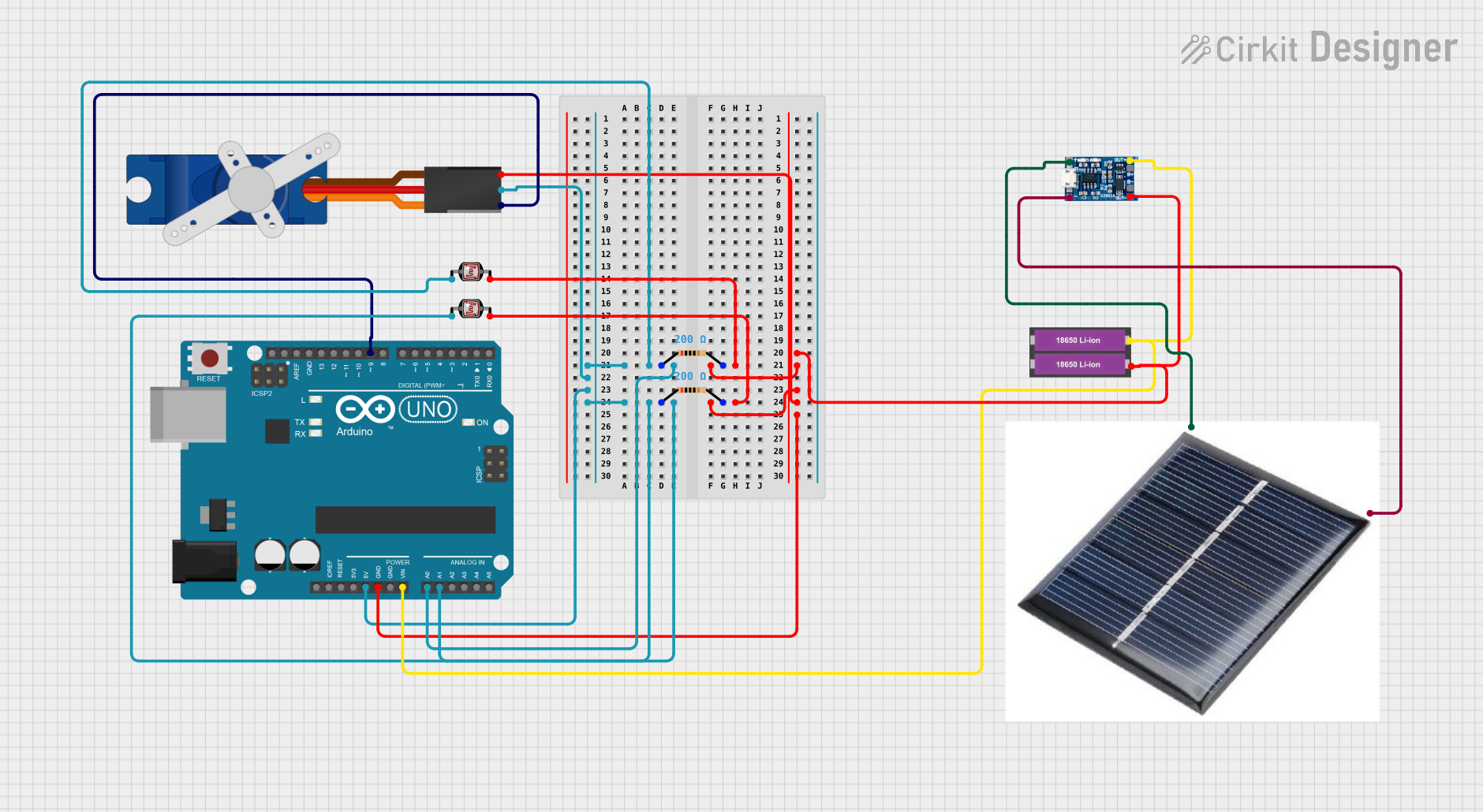
Circuit Documentation
Summary of the Circuit
This circuit is designed to utilize an Arduino UNO microcontroller to read light levels from two photocells (Light Dependent Resistors, LDRs) and control a servo motor based on the average light intensity detected. The circuit includes a power supply consisting of two 18650 Li-ion batteries, a TP4056 charging module, and a solar cell for charging. The servo motor's position is adjusted according to the average light intensity, which could be used for applications such as solar tracking or light-sensitive control mechanisms.
Component List
Resistor
- Description: A resistor is a passive two-terminal electrical component that implements electrical resistance as a circuit element.
- Properties: 200 Ohms resistance
Photocell (LDR)
- Description: A photocell or light-dependent resistor (LDR) is a resistor whose resistance decreases with increasing incident light intensity.
Arduino UNO
- Description: The Arduino UNO is a microcontroller board based on the ATmega328P. It has a variety of digital and analog I/O pins and is commonly used for building digital devices and interactive objects that can sense and control objects in the physical world.
Tower Pro SG90 Servo
- Description: The Tower Pro SG90 is a small and lightweight servo motor capable of precise control. It can rotate approximately 180 degrees (90 in each direction) and works well for simple projects.
18650 Li-ion Battery x 2
- Description: These are rechargeable lithium-ion batteries commonly used in high-drain devices. They are known for their large energy capacity and durability.
Solar Cell
- Description: A solar cell is a device that converts light into electrical energy through the photovoltaic effect.
TP4056 Charging Module
- Description: The TP4056 is a complete constant-current/constant-voltage linear charger for single-cell lithium-ion batteries.
Wiring Details
Resistor
- Connections:
- One end connected to the photocell and the Arduino UNO analog input pin (A0 or A1).
- The other end connected to the TP4056 charging module and the negative terminal of the battery.
Photocell (LDR)
- Connections:
- One end connected to the resistor and the Arduino UNO analog input pin (A0 or A1).
- The other end connected to the TP4056 charging module and the negative terminal of the battery.
Arduino UNO
- Connections:
- Analog pins A0 and A1 connected to the photocells through resistors.
- Digital pin D9 connected to the signal pin of the servo motor.
- 5V and GND pins provide power to the servo motor.
- Vin pin connected to the positive terminal of the battery through the TP4056 charging module.
Tower Pro SG90 Servo
- Connections:
- Signal pin connected to digital pin D9 of the Arduino UNO.
- +5V and GND pins connected to the corresponding 5V and GND pins of the Arduino UNO.
18650 Li-ion Battery x 2
- Connections:
- Positive terminal connected to the Vin pin of the Arduino UNO and the TP4056 charging module.
- Negative terminal connected to the GND pin of the Arduino UNO and the TP4056 charging module.
Solar Cell
- Connections:
- Connected to the TP4056 charging module for charging the batteries.
TP4056 Charging Module
- Connections:
- Connected to the solar cell for receiving charge.
- Connected to the 18650 Li-ion batteries for charging them.
- Connected to the Arduino UNO Vin pin to supply power.
Documented Code
#include <Servo.h>

Servo myServo;  // create servo object to control a servo

// Constants for the analog pins that the photocells are connected to
const int photocellPin1 = A0;
const int photocellPin2 = A1;

// Variables to store the read values from the photocells
int photocellValue1 = 0;
int photocellValue2 = 0;
int averageValue = 0;

void setup() {
  myServo.attach(9);  // attaches the servo on pin 9 to the servo object
  Serial.begin(9600); // start serial communication at 9600 baud rate
}

void loop() {
  // Read the value from the photocells
  photocellValue1 = analogRead(photocellPin1);
  photocellValue2 = analogRead(photocellPin2);

  // Calculate the average of the two values
  averageValue = (photocellValue1 + photocellValue2) / 2;

  // Map the average value to a range suitable for the servo (0-180 degrees)
  int servoAngle = map(averageValue, 0, 1023, 0, 180);

  // Move the servo to the mapped angle
  myServo.write(servoAngle);

  // Print the values to the serial monitor
  Serial.print("Photocell 1: ");
  Serial.print(photocellValue1);
  Serial.print("\tPhotocell 2: ");
  Serial.print(photocellValue2);
  Serial.print("\tAverage: ");
  Serial.print(averageValue);
  Serial.print("\tServo Angle: ");
  Serial.println(servoAngle);

  // Wait for a bit before reading again
  delay(500);
}
This code is designed to be uploaded to the Arduino UNO microcontroller. It initializes a servo motor and reads the analog values from two photocells. It calculates the average of these values and maps this average to a servo angle, which is then used to position the servo motor. The values are also printed to the serial monitor for debugging purposes.