
Arduino Nano-Based Multi-Servo Control System with Potentiometer Inputs
View and Edit Project In Cirkit Designer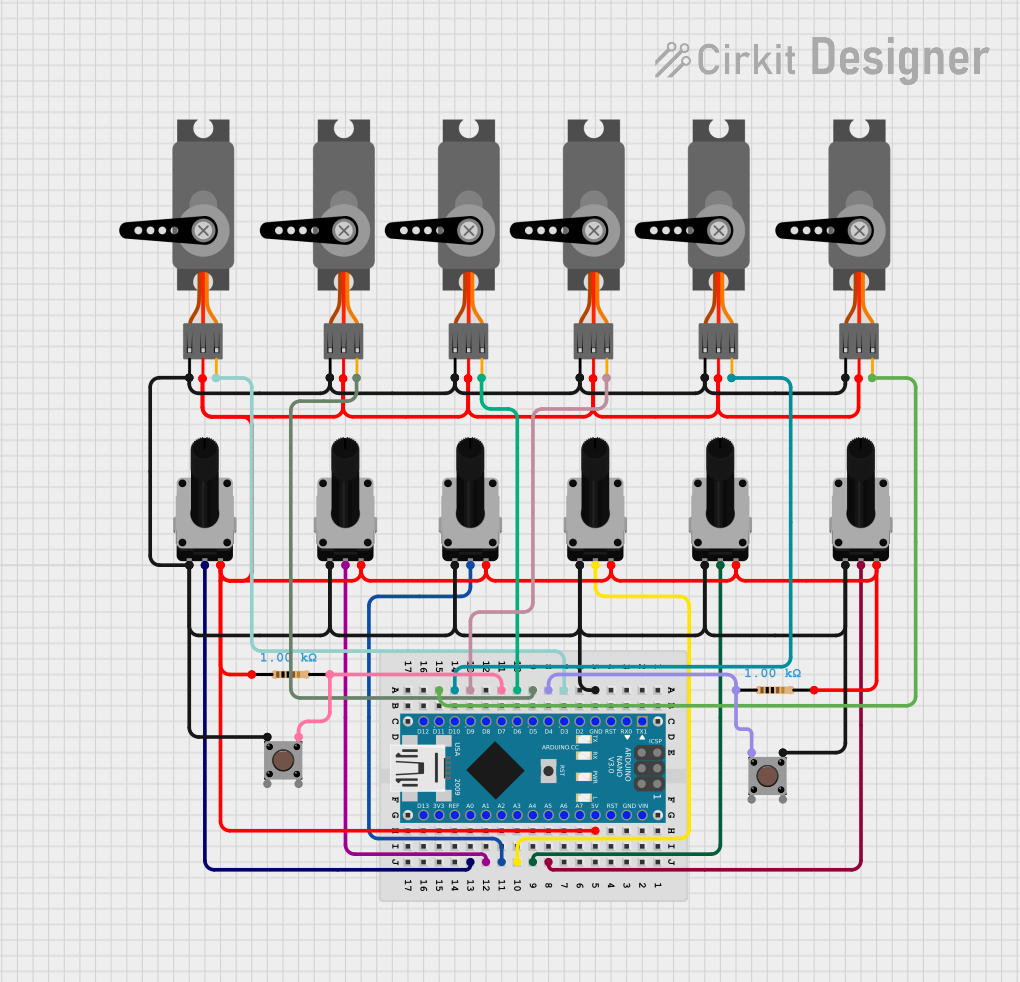
Circuit Documentation
Summary
This circuit involves an Arduino Nano microcontroller interfacing with multiple servos, rotary potentiometers, and pushbuttons. The Arduino Nano reads analog signals from the potentiometers to control the positions of the servos. Pushbuttons are used to switch between different modes of operation, and an LED is used as an indicator. The circuit is designed to allow manual control of the servos via potentiometers and also has a play mode to execute pre-recorded steps.
Component List
Arduino Nano
- Description: A small, complete, and breadboard-friendly board based on the ATmega328P.
- Pins: D1/TX, D0/RX, RESET, GND, D2, D3, D4, D5, D6, D7, D8, D9, D10, D11/MOSI, D12/MISO, VIN, 5V, A7, A6, A5, A4, A3, A2, A1, A0, AREF, 3V3, D13/SCK
Rotary Potentiometer
- Description: A variable resistor used to adjust levels of analog signals.
- Pins: leg1, wiper, leg2
- Properties: Resistance: 10k Ohms
Resistor
- Description: A passive electrical component that implements electrical resistance as a circuit element.
- Pins: pin1, pin2
- Properties: Resistance: 1k Ohms
Servo
- Description: A rotary actuator that allows for precise control of angular position.
- Pins: GND, VCC, PWM
Pushbutton
- Description: A simple switch mechanism for controlling some aspect of a machine or a process.
- Pins: Pin 3 (out), Pin 4 (out), Pin 1 (in), Pin 2 (in)
Wiring Details
Arduino Nano
GND is connected to:
- leg1 of Rotary Potentiometer
- GND of Servo
- Pin 3 (out) of Pushbutton
5V is connected to:
- leg2 of Rotary Potentiometer
- VCC of Servo
- pin1 of Resistor
D3 is connected to:
- PWM of Servo
D4 is connected to:
- Pin 1 (in) of Pushbutton
- pin1 of Resistor
A5 is connected to:
- wiper of Rotary Potentiometer
D5 is connected to:
- PWM of Servo
A4 is connected to:
- wiper of Rotary Potentiometer
D6 is connected to:
- PWM of Servo
A3 is connected to:
- wiper of Rotary Potentiometer
D7 is connected to:
- pin2 of Resistor
- Pin 3 (out) of Pushbutton
A2 is connected to:
- wiper of Rotary Potentiometer
A1 is connected to:
- wiper of Rotary Potentiometer
D9 is connected to:
- PWM of Servo
A0 is connected to:
- wiper of Rotary Potentiometer
D10 is connected to:
- PWM of Servo
D11/MOSI is connected to:
- PWM of Servo
Rotary Potentiometer
leg1 is connected to:
- GND of Arduino Nano
leg2 is connected to:
- 5V of Arduino Nano
wiper is connected to:
- A0, A1, A2, A3, A4, A5 of Arduino Nano
Resistor
pin1 is connected to:
- 5V of Arduino Nano
- D4 of Arduino Nano
pin2 is connected to:
- D7 of Arduino Nano
Servo
GND is connected to:
- GND of Arduino Nano
VCC is connected to:
- 5V of Arduino Nano
PWM is connected to:
- D3, D5, D6, D9, D10, D11/MOSI of Arduino Nano
Pushbutton
Pin 3 (out) is connected to:
- GND of Arduino Nano
- D7 of Arduino Nano
Pin 1 (in) is connected to:
- D4 of Arduino Nano
Code Documentation
Arduino Nano Code
#include <Servo.h> // Library untuk mengontrol servo motor

#define NUM_SERVOS 6 // Jumlah servo yang digunakan
#define BUTTON_PIN 7 // Pin untuk tombol mode
#define STOP_BUTTON_PIN 4 // Pin untuk tombol berhenti
#define LED_PIN 13 // Pin untuk LED indikator

Servo servos[NUM_SERVOS]; // Array untuk objek servo
int sensorPins[NUM_SERVOS] = {A0, A1, A2, A3, A4, A5}; // Pin analog untuk sensor potensiometer
int delayOptions[] = {0, 0, 1, 3, 15, 60, 300}; // Pilihan delay berdasarkan input sensor

// Struktur data untuk menyimpan informasi masing-masing servo
struct ServoData {
  int sensorValue; // Nilai sensor potensiometer
  float currentPosition; // Posisi saat ini dari servo
  float targetPosition; // Posisi target untuk servo
  float stepIncrement; // Increment langkah untuk interpolasi posisi
} servosData[NUM_SERVOS];

unsigned long previousMillis = 0, previousMicros = 0; // Variabel untuk pengaturan waktu
unsigned long debounceTimer = 0; // Timer untuk debounce tombol
int stepIndex = 0, maxSteps = 0, steps = 0; // Variabel untuk mengelola langkah gerakan
int playDelay = 1000; // Delay waktu dalam mode play
bool playMode = false, stepReady = false; // Status mode play dan kesiapan langkah
int buttonState = 0; // Status tombol

void setup() {
  int pwmPins[NUM_SERVOS] = {3, 5, 6, 9, 10, 11}; // Pin PWM untuk servo
  for (int i = 0; i < NUM_SERVOS; i++) {
    servos[i].attach(pwmPins[i]);
  }

  pinMode(BUTTON_PIN, INPUT); // Mengatur pin tombol sebagai input
  pinMode(STOP_BUTTON_PIN, INPUT); // Mengatur pin tombol berhenti sebagai input
  pinMode(LED_PIN, OUTPUT); // Mengatur pin LED sebagai output
  Serial.begin(115200); // Memulai komunikasi serial pada baud rate 115200
  Serial.println("Robot ready..."); // Pesan awal saat program mulai
  digitalWrite(LED_PIN, LOW);
}

void loop() {
  unsigned long currentMillis = millis(); // Membaca waktu dalam milidetik
  unsigned long currentMicros = micros(); // Membaca waktu dalam mikrodetik

  handleButtons(currentMillis); // Memproses input tombol

  if (!playMode) { // Mode manual
    if (currentMillis - previousMillis > 25) { // Interval pembacaan sensor
      previousMillis = currentMillis;
      readSensors(); // Membaca nilai potensiometer
      mapSensorValues(); // Memetakan nilai potensiometer ke posisi servo
      moveServos(); // Menggerakkan servo ke posisi target
    }
  } else { // Mode play
    if (stepReady) { // Jika langkah siap dieksekusi
      digitalWrite(LED_PIN, HIGH); // Nyalakan LED indikator
      if (stepIndex < maxSteps) { // Jika masih ada langkah yang tersisa
        stepIndex++;
        interpolateSteps(); // Hitung interpolasi langkah berikutnya
        stepReady = false;
        digitalWrite(LED_PIN, LOW); // Matikan LED indikator
      } else { // Jika semua langkah selesai
        stepIndex = 0;
        calculatePause(); // Hitung waktu jeda antar putaran
        delayRoutine(); // Lakukan jeda
      }
    } else if (currentMicros - previousMicros > playDelay) { // Interval untuk eksekusi langkah
      previousMicros = currentMicros;
      playRecordedSteps(); // Eksekusi langkah rekaman
    }
  }

  // Mode berhenti saat tombol berhenti ditekan
  while (digitalRead(STOP_BUTTON_PIN) == LOW) {
    digitalWrite(LED_PIN, HIGH); delay(500); // LED berkedip
    digitalWrite(LED_PIN, LOW); delay(500);
  }
}

void handleButtons(unsigned long currentMillis) {
  if (digitalRead(BUTTON_PIN) == LOW) { // Jika tombol ditekan
    if (currentMillis - debounceTimer > 50) { // Debounce untuk mencegah noise
      debounceTimer = currentMillis;
      buttonState++;

      if (buttonState == 1) { // Rekam langkah baru
        recordStep(); // Rekam posisi saat ini
        playMode =