
Arduino-Based Elevator Control System with IR Sensors and Seven Segment Display
View and Edit Project In Cirkit Designer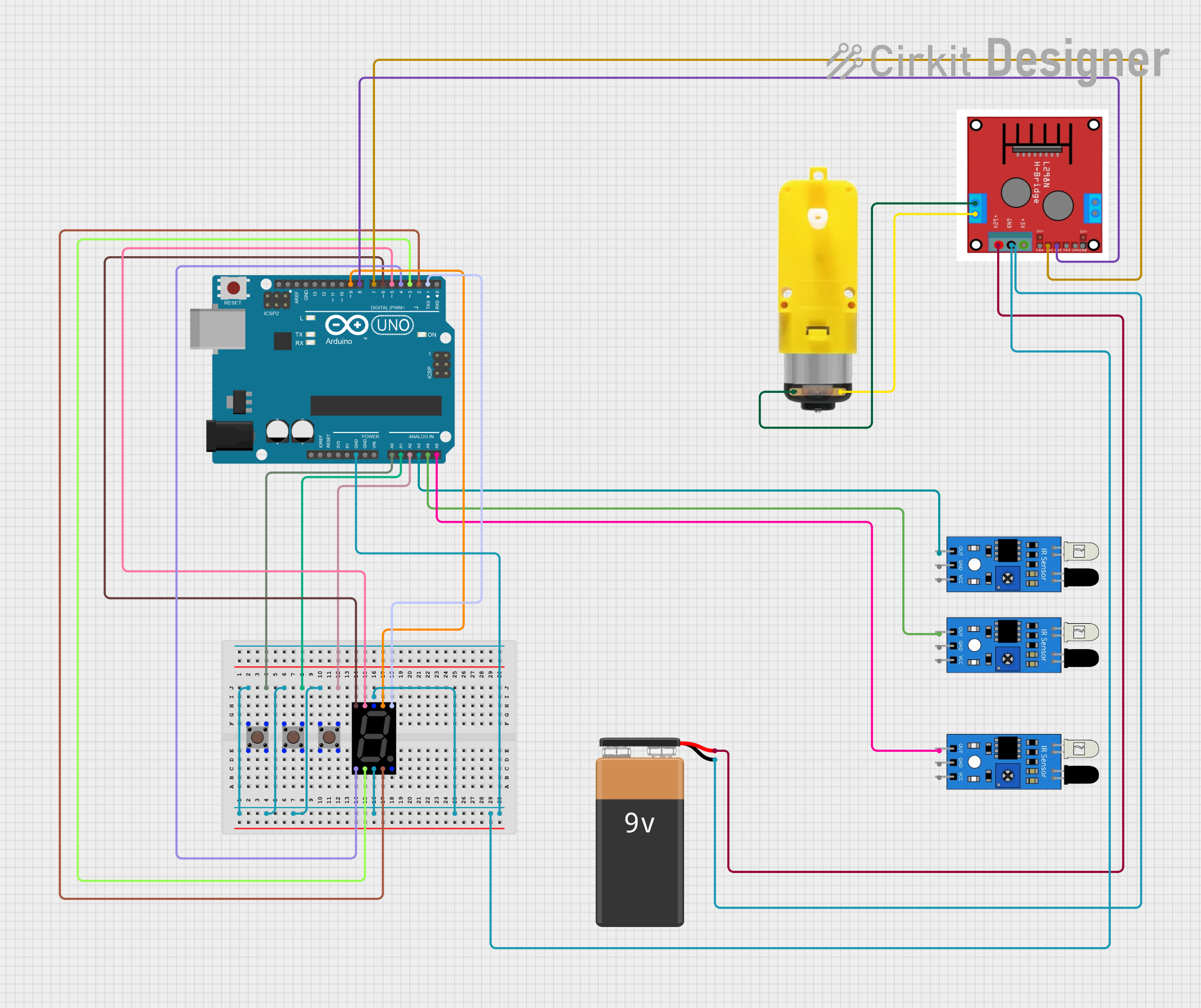
Circuit Documentation
Summary
This circuit is designed to interface with various sensors, a seven-segment display, pushbuttons, a motor with a reducer, and a motor driver, all controlled by an Arduino UNO. The circuit includes IR sensors for detection, pushbuttons for user input, and a motor system for mechanical movement. The Arduino UNO is programmed to read sensor inputs, control the motor, and display information on the seven-segment display.
Component List
IR Sensor
- Pins: out, gnd, vcc
- Description: Infrared sensor used for object detection.
Seven Segment Display (Wokwi Compatible)
- Pins: G, F, COM.2, B, A, E, D, COM.1, C, DP
- Description: Display used to show numerical information.
Pushbutton
- Pins: Pin 3 (out), Pin 4 (out), Pin 1 (in), Pin 2 (in)
- Description: Button used for user input.
Motor with Reducer
- Pins: 3 - 6 VCC, GND
- Description: Motor with a gear reducer for mechanical movement.
Motor Driver (L298N)
- Pins: OUT 1, OUT 2, OUT 3, OUT 4, +12V INPUT, GND, +5V OUTPUT, ENA, IN 1, IN 2, IN 3, IN 4, ENB
- Description: Driver used to control the motor.
Arduino UNO
- Pins: UNUSED, IOREF, Reset, 3.3V, 5V, GND, Vin, A0, A1, A2, A3, A4, A5, SCL, SDA, AREF, D13, D12, D11, D10, D9, D8, D7, D6, D5, D4, D3, D2, D1, D0
- Description: Microcontroller used to control the circuit.
9V Battery
- Pins: -, +
- Description: Power source for the circuit.
Wiring Details
IR Sensor
- out connected to Arduino UNO A5
- gnd connected to common ground
- vcc connected to 5V power supply
IR Sensor
- out connected to Arduino UNO A4
- gnd connected to common ground
- vcc connected to 5V power supply
IR Sensor
- out connected to Arduino UNO A3
- gnd connected to common ground
- vcc connected to 5V power supply
Seven Segment Display (Wokwi Compatible)
- G connected to Arduino UNO D6
- F connected to Arduino UNO D5
- COM.2 connected to common ground
- B connected to Arduino UNO D1
- A connected to Arduino UNO D9
- E connected to Arduino UNO D4
- D connected to Arduino UNO D3
- COM.1 connected to common ground
- C connected to Arduino UNO D2
- DP not connected
Pushbutton
- Pin 1 (in) connected to common ground
- Pin 2 (in) not connected
- Pin 3 (out) connected to Arduino UNO A0
- Pin 4 (out) not connected
Pushbutton
- Pin 1 (in) connected to common ground
- Pin 2 (in) not connected
- Pin 3 (out) connected to Arduino UNO A1
- Pin 4 (out) not connected
Pushbutton
- Pin 1 (in) connected to common ground
- Pin 2 (in) not connected
- Pin 3 (out) connected to Arduino UNO A2
- Pin 4 (out) not connected
Motor with Reducer
- 3 - 6 VCC connected to Motor Driver (L298N) OUT 2
- GND connected to Motor Driver (L298N) OUT 1
Motor Driver (L298N)
- OUT 1 connected to Motor with Reducer GND
- OUT 2 connected to Motor with Reducer 3 - 6 VCC
- OUT 3 not connected
- OUT 4 not connected
- +12V INPUT connected to 9V Battery +
- GND connected to common ground
- +5V OUTPUT not connected
- ENA not connected
- IN 1 connected to Arduino UNO D7
- IN 2 connected to Arduino UNO D8
- IN 3 not connected
- IN 4 not connected
- ENB not connected
Arduino UNO
- GND connected to common ground
- A0 connected to Pushbutton Pin 3 (out)
- A1 connected to Pushbutton Pin 3 (out)
- A2 connected to Pushbutton Pin 3 (out)
- A3 connected to IR Sensor out
- A4 connected to IR Sensor out
- A5 connected to IR Sensor out
- D1 connected to Seven Segment Display B
- D2 connected to Seven Segment Display C
- D3 connected to Seven Segment Display D
- D4 connected to Seven Segment Display E
- D5 connected to Seven Segment Display F
- D6 connected to Seven Segment Display G
- D7 connected to Motor Driver (L298N) IN 1
- D8 connected to Motor Driver (L298N) IN 2
- D9 connected to Seven Segment Display A
9V Battery
- - connected to common ground
- + connected to Motor Driver (L298N) +12V INPUT
Documented Code
int pin_A=9;
int pin_b=1;
int pin_c=2;
int pin_d=3;
int pin_e=4;
int pin_f=5;
int pin_g=6;
////////////
int OUT_Motor_1=7;
int OUT_Motor_2=8;
////////////
int floor_0=A0;
int floor_1=A1;
int floor_2=A2;
int sensor_0=A3;
int sensor_1=A4;
int sensor_2=A5;
//////////////
int DIN =12;
int CS =11;
int CLK=10;
///////
int speed_ = 150 ;

void setup() {
  // put your setup code here, to run once:
  pinMode(sensor_0,INPUT_PULLUP);
  pinMode(sensor_1,INPUT_PULLUP);
  pinMode(sensor_2,INPUT_PULLUP);
  pinMode(floor_0,INPUT_PULLUP);
  pinMode(floor_1,INPUT_PULLUP);
  pinMode(floor_2,INPUT_PULLUP);
  pinMode(OUT_Motor_1,OUTPUT);
  pinMode(OUT_Motor_2,OUTPUT);

  analogWrite(OUT_Motor_2,HIGH);
  delay(500);
}

void loop() {
  // put your main code here, to run repeatedly:
  if ( digitalRead(floor_0) ==0 ){
    if ( digitalRead(sensor_0) ==1){
      analogWrite(OUT_Motor_1 ,speed_);
      while(digitalRead(sensor_0)){}
      digitalWrite(OUT_Motor_1 ,0);
    }
  }
  //////////////////
  if ( digitalRead(floor_2) ==0 ){
    if ( digitalRead(sensor_2) ==1){
      analogWrite(OUT_Motor_2 ,speed_);
      while(digitalRead(sensor_2)){}
      delay(400);
      digitalWrite(OUT_Motor_2 ,0);
    }
  }
  ////////////////////
  if ( digitalRead(floor_1)==0 ){
    if ( digitalRead(sensor_1) ==1){
      ////////////
      if ( digitalRead(sensor_2) ==0){
        analogWrite(OUT_Motor_1 ,speed_);
        while(digitalRead(sensor_1)){}
        digitalWrite(OUT_Motor_1 ,0);
      }
      //////////
      else if (digitalRead(sensor_0)==0 ){
        analogWrite(OUT_Motor_2 ,speed_);
        while(digitalRead(sensor_1)){}
        delay(400);
        digitalWrite(OUT_Motor_2 ,0);
      }
      else {
        digitalWrite(OUT_Motor_1 ,0);
        digitalWrite(OUT_Motor_2 ,0);
      }
    }
  }

  if ( digitalRead(sensor_0) ==0){
    digitalWrite(pin_A ,1);
    digitalWrite(pin_b ,1);
    digitalWrite(pin_c ,1);
    digitalWrite(pin_d ,1);
    digitalWrite(pin_e ,1);
    digitalWrite(pin_f ,1);
    digitalWrite(pin_g ,0);
  }
  if ( digitalRead(sensor_1) ==0){
    digitalWrite(pin_A ,0);
    digitalWrite(pin_b ,1);
    digitalWrite(pin_c