
Arduino-Controlled Bluetooth Robotic Vehicle with ADXL345 Accelerometer Feedback
View and Edit Project In Cirkit Designer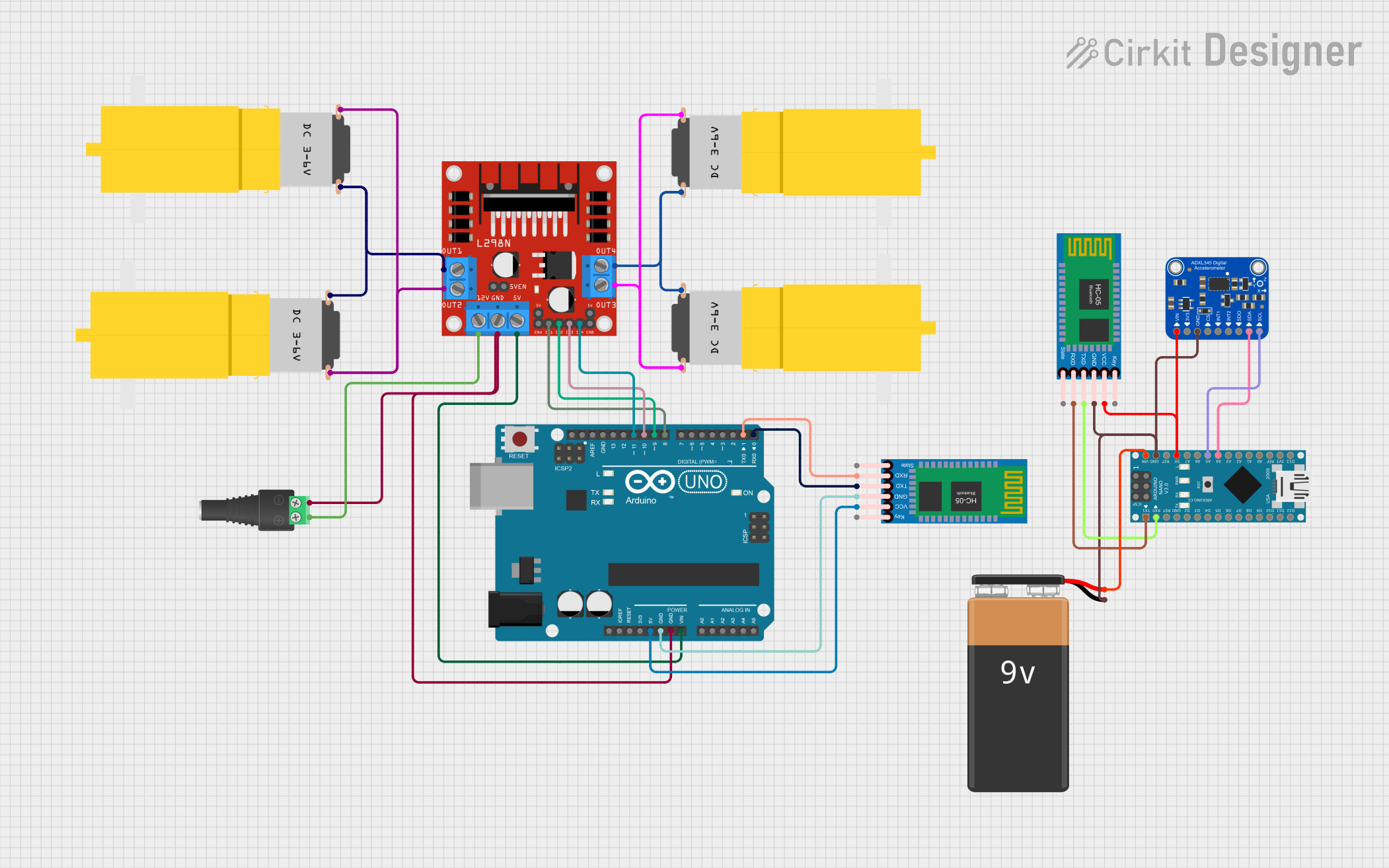
Circuit Documentation
Summary
This circuit integrates various components to create a system capable of motor control and wireless communication. The core of the circuit is built around two microcontrollers: an Arduino UNO and an Arduino Nano. The Arduino UNO interfaces with an HC-05 Bluetooth Module and an L298N DC motor driver to control four hobby motors. The Arduino Nano is connected to another HC-05 Bluetooth Module, a 9V battery, and an Adafruit ADXL345 accelerometer. The circuit is designed to receive commands via Bluetooth and control the motors accordingly, while the accelerometer provides motion feedback.
Component List
Microcontrollers
- Arduino UNO: A microcontroller board based on the ATmega328P, featuring digital and analog I/O pins.
- Arduino Nano: A small, complete, and breadboard-friendly board based on the ATmega328P, similar to the Arduino UNO.
Communication Modules
- HC-05 Bluetooth Module: A wireless communication module that allows for serial communication over Bluetooth.
Motor Driver
- L298N DC Motor Driver: A high-power motor driver capable of driving up to four DC motors or two stepper motors.
Motors
- Motor Amarillo Motorreductor Hobby: A yellow hobby gear motor used for basic mechanical motion.
Power Components
- 2.1mm Barrel Jack with Terminal Block: A connector for providing power to the circuit through an external power supply.
- 9V Battery: A standard 9V battery used to power the Arduino Nano and its peripherals.
Sensors
- Adafruit ADXL345: A small, thin, low power, 3-axis accelerometer with high resolution (13-bit) measurement.
Wiring Details
Arduino UNO
- 5V connected to HC-05 Bluetooth Module VCC.
- GND connected to HC-05 Bluetooth Module GND and L298N DC motor driver GND.
- Vin connected to L298N DC motor driver 5V.
- D8 connected to L298N DC motor driver IN1.
- D9 connected to L298N DC motor driver IN2.
- D10 connected to L298N DC motor driver IN3.
- D11 connected to L298N DC motor driver IN4.
- D0 connected to HC-05 Bluetooth Module TXD.
- D1 connected to HC-05 Bluetooth Module RXD.
HC-05 Bluetooth Module (Connected to Arduino UNO)
- VCC connected to Arduino UNO 5V.
- GND connected to Arduino UNO GND.
- TXD connected to Arduino UNO D0.
- RXD connected to Arduino UNO D1.
L298N DC Motor Driver
- GND connected to Arduino UNO GND and 2.1mm Barrel Jack with Terminal Block NEG.
- 5V connected to Arduino UNO Vin.
- IN1 connected to Arduino UNO D8.
- IN2 connected to Arduino UNO D9.
- IN3 connected to Arduino UNO D10.
- IN4 connected to Arduino UNO D11.
- OUT1 connected to Motor Amarillo Motorreductor Hobby vcc (instance 8a615eed).
- OUT2 connected to Motor Amarillo Motorreductor Hobby GND (instance 8a615eed).
- OUT3 connected to Motor Amarillo Motorreductor Hobby vcc (instance d1434a85).
- OUT4 connected to Motor Amarillo Motorreductor Hobby GND (instance d1434a85).
- 12V connected to 2.1mm Barrel Jack with Terminal Block POS.
Motor Amarillo Motorreductor Hobby (Four Instances)
- vcc connected to L298N DC motor driver OUT1 or OUT3.
- GND connected to L298N DC motor driver OUT2 or OUT4.
2.1mm Barrel Jack with Terminal Block
- POS connected to L298N DC motor driver 12V.
- NEG connected to L298N DC motor driver GND.
Arduino Nano
- 5V connected to HC-05 Bluetooth Module VCC and Adafruit ADXL345 VIN.
- GND connected to HC-05 Bluetooth Module GND, 9V Battery -, and Adafruit ADXL345 GND.
- VIN connected to 9V Battery +.
- D0/RX connected to HC-05 Bluetooth Module TXD.
- D1/TX connected to HC-05 Bluetooth Module RXD.
- A4 connected to Adafruit ADXL345 SDA/SDIO.
- A5 connected to Adafruit ADXL345 SCL.
HC-05 Bluetooth Module (Connected to Arduino Nano)
- VCC connected to Arduino Nano 5V.
- GND connected to Arduino Nano GND.
- TXD connected to Arduino Nano D0/RX.
- RXD connected to Arduino Nano D1/TX.
Adafruit ADXL345
- VIN connected to Arduino Nano 5V.
- GND connected to Arduino Nano GND.
- SCL connected to Arduino Nano A5.
- SDA/SDIO connected to Arduino Nano A4.
9V Battery
- + connected to Arduino Nano VIN.
- - connected to Arduino Nano GND.
Documented Code
Arduino UNO Code (sketch.ino)
void setup() {
  // put your setup code here, to run once:

}

void loop() {
  // put your main code here, to run repeatedly:

}
Arduino Nano Code (sketch.ino)
void setup() {
  // put your setup code here, to run once:

}

void loop() {
  // put your main code here, to run repeatedly:

}
Note: The actual functionality of the microcontrollers will be defined in the code within the setup() and loop() functions. The provided code snippets are templates and need to be filled with the logic for controlling the motors, handling Bluetooth communication, and reading sensor data.