
Arduino UNO Emotion Robot with TFT LCD Display and Servo Motors
View and Edit Project In Cirkit Designer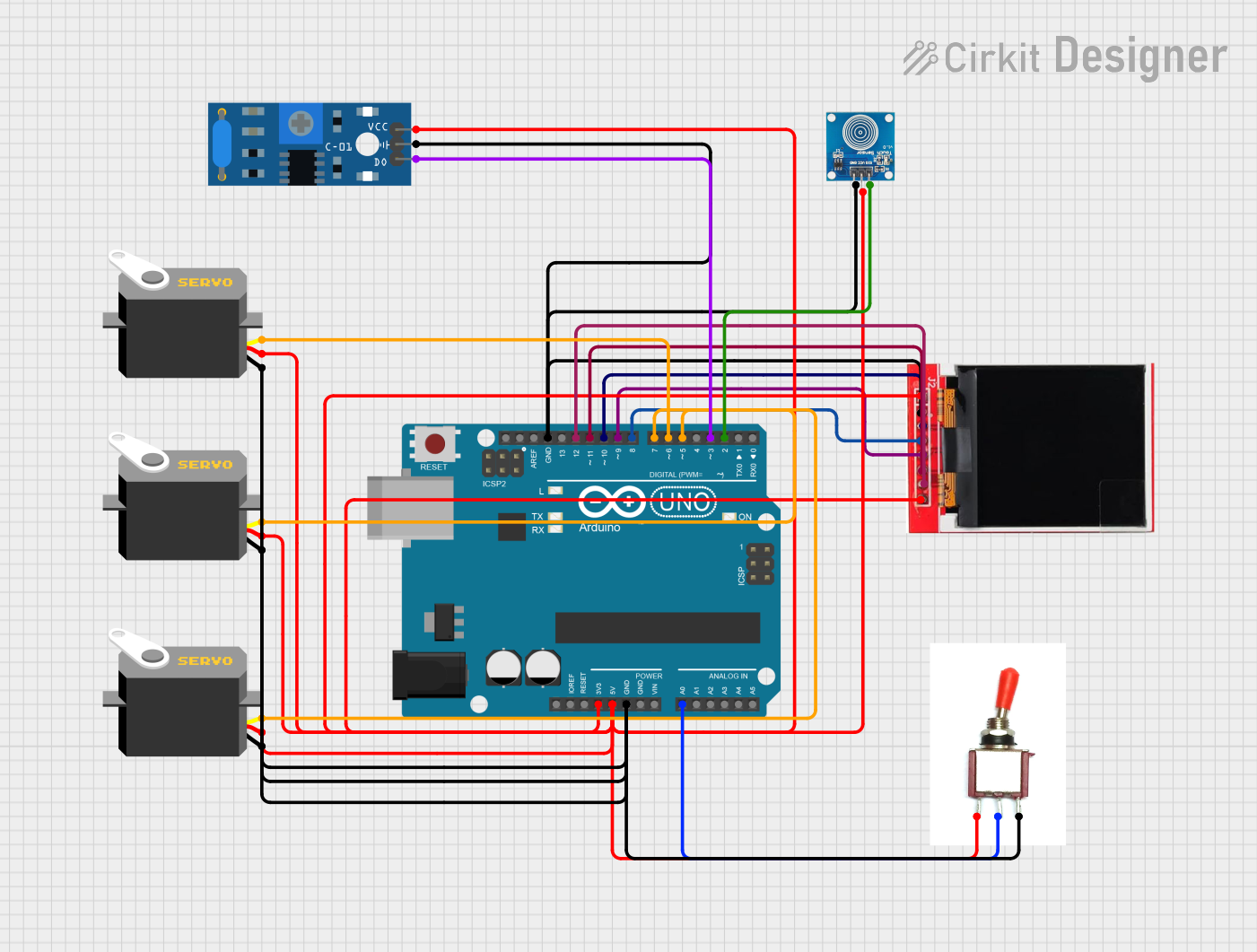
Circuit Documentation
Summary
This circuit is designed to control an emotion robot using an Arduino UNO microcontroller. The robot can display different emotions on a TFT LCD screen, respond to touch and vibration sensors, and control three servo motors to perform various movements. The robot can also enter a sleep mode based on inactivity and has a dance mode activated by a toggle switch.
Component List
Arduino UNO
- Description: Microcontroller board based on the ATmega328P.
- Pins: UNUSED, IOREF, Reset, 3.3V, 5V, GND, Vin, A0, A1, A2, A3, A4, A5, SCL, SDA, AREF, D13, D12, D11, D10, D9, D8, D7, D6, D5, D4, D3, D2, D1, D0
Servo (x3)
- Description: Standard servo motor.
- Pins: gnd, vcc, pulse
SW-420 Vibration Sensor
- Description: Vibration sensor module.
- Pins: vcc, Ground, Digital output
Toggle Switch
- Description: Simple toggle switch.
- Pins: Vcc, Sig, Gnd
TFT LCD Display ST7735S
- Description: TFT LCD display module.
- Pins: Vcc, GND, CS, RESET, A0, SDA, SCK, LED
Touch Sensor
- Description: Capacitive touch sensor.
- Pins: IO, VCC, GND
Wiring Details
Arduino UNO
- 3.3V: Connected to TFT LCD Display ST7735S (LED)
- 5V: Connected to Toggle Switch (Vcc), Touch Sensor (VCC), SW-420 Vibration Sensor (vcc), Servo (vcc), TFT LCD Display ST7735S (Vcc)
- GND: Connected to Toggle Switch (Gnd), Touch Sensor (GND), SW-420 Vibration Sensor (Ground), TFT LCD Display ST7735S (GND), Servo (gnd)
- A0: Connected to Toggle Switch (Sig)
- D12: Connected to TFT LCD Display ST7735S (SCK)
- D11: Connected to TFT LCD Display ST7735S (SDA)
- D10: Connected to TFT LCD Display ST7735S (CS)
- D9: Connected to TFT LCD Display ST7735S (A0)
- D8: Connected to TFT LCD Display ST7735S (RESET)
- D7: Connected to Servo (pulse)
- D6: Connected to Servo (pulse)
- D5: Connected to Servo (pulse)
- D3: Connected to SW-420 Vibration Sensor (Digital output)
- D2: Connected to Touch Sensor (IO)
Servo (x3)
- gnd: Connected to Arduino UNO (GND)
- vcc: Connected to Arduino UNO (5V)
- pulse: Connected to Arduino UNO (D7, D6, D5)
SW-420 Vibration Sensor
- vcc: Connected to Arduino UNO (5V)
- Ground: Connected to Arduino UNO (GND)
- Digital output: Connected to Arduino UNO (D3)
Toggle Switch
- Vcc: Connected to Arduino UNO (5V)
- Sig: Connected to Arduino UNO (A0)
- Gnd: Connected to Arduino UNO (GND)
TFT LCD Display ST7735S
- Vcc: Connected to Arduino UNO (5V)
- GND: Connected to Arduino UNO (GND)
- CS: Connected to Arduino UNO (D10)
- RESET: Connected to Arduino UNO (D8)
- A0: Connected to Arduino UNO (D9)
- SDA: Connected to Arduino UNO (D11)
- SCK: Connected to Arduino UNO (D12)
- LED: Connected to Arduino UNO (3.3V)
Touch Sensor
- IO: Connected to Arduino UNO (D2)
- VCC: Connected to Arduino UNO (5V)
- GND: Connected to Arduino UNO (GND)
Documented Code
#include <SPI.h>
#include <SD.h>
#include <TFT.h>  // Arduino LCD library
#include <Servo.h>

// Pin definitions
#define sd_cs 4
#define tft_cs 10
#define tft_AO 9
#define tft_rst 8
#define TOUCH_SENSOR_PIN 2        // Pin for touch sensor (digital)
#define VIBRATION_SENSOR_PIN 3    // Pin for vibration sensor (digital)
#define TOGGLE_PIN A0             // Pin for toggle switch (analog)

// Servo motor pins
#define handServo1Pin 6           // Left hand servo
#define handServo2Pin 7           // Right hand servo
#define bodyServoPin 5            // Body servo

TFT TFTscreen = TFT(tft_cs, tft_AO, tft_rst);

PImage happyImage;
PImage angryImage;
PImage dizzyImage;
PImage sadImage;
PImage sleepImage;

Servo handServo1, handServo2, bodyServo;

const int handMin = 0;
const int handMax = 180;
const int bodyMin = 90;
const int bodyMax = 180;

int hitCount = 0;
unsigned long lastActivityTime = 0;  // To track inactivity
bool isSleeping = false;  // Flag to check if the robot is in sleep mode
bool isDancing = false;   // Flag to check if the robot is in dance mode

void setup() {
  Serial.begin(9600);

  // Initialize TFT screen
  TFTscreen.begin();
  TFTscreen.background(255, 255, 255);
  TFTscreen.stroke(0, 0, 255);
  TFTscreen.println("Emotion Robot Ready!");

  // Initialize SD card
  if (!SD.begin(sd_cs)) {
    Serial.println("SD card initialization failed!");
    return;
  }

  // Load images
  happyImage = TFTscreen.loadImage("happy.bmp");
  angryImage = TFTscreen.loadImage("angry.bmp");
  dizzyImage = TFTscreen.loadImage("dizzy.bmp");
  sadImage = TFTscreen.loadImage("sad.bmp");
  sleepImage = TFTscreen.loadImage("sleep.bmp");

  if (!happyImage.isValid() || !angryImage.isValid() || !dizzyImage.isValid() || !sadImage.isValid() || !sleepImage.isValid()) {
    Serial.println("Error loading images!");
  }

  // Attach servos
  handServo1.attach(handServo1Pin);
  handServo2.attach(handServo2Pin);
  bodyServo.attach(bodyServoPin);

  // Initialize servo positions
  resetServos();

  // Initialize sensor pins
  pinMode(TOUCH_SENSOR_PIN, INPUT);
  pinMode(VIBRATION_SENSOR_PIN, INPUT);
  pinMode(TOGGLE_PIN, INPUT);

  Serial.println("Setup complete. Toggle switch to start/stop dancing.");
}

void loop() {
  // Sleep mode based on inactivity
  if (millis() - lastActivityTime > 16000 && !isSleeping) {
    showImage(sleepImage);
    isSleeping = true;
    resetServos();
  }

  // Check touch sensor for Happy behavior
  if (digitalRead(TOUCH_SENSOR_PIN) == HIGH) {
    performHappyBehavior();
    lastActivityTime = millis();
    isSleeping = false;
    delay(1000); // Debounce
    return;
  }

  // Check vibration sensor for hits
  if (digitalRead(VIBRATION_SENSOR_PIN) == HIGH) {
    countHits();
    lastActivityTime = millis();
    isSleeping = false;
  }

  // Check toggle switch for dance mode
  int toggleState = analogRead(TOGGLE_PIN) > 512 ? HIGH : LOW;

  if (toggleState == HIGH && !isDancing) {
    Serial.println("Dance mode activated!");
    isDancing = true;
    lastActivityTime = millis();
  }

  if (toggleState == LOW && isDancing) {
    Serial.println("Dance mode deactivated!");
    isDancing = false;
    resetServos();
  }

  if (isDancing) {
    performDance();
    return; // Skip other behaviors while dancing
  }
}

// -----------------------------------
// HANDLING HITS
// -----------------------------------
void countHits() {
  unsigned long startTime = millis();
  hitCount = 0;

  // Wait 2 seconds to count hits
  while (millis() - startTime < 2000) {
    if (digitalRead(VIBRATION_SENSOR_PIN) == HIGH) {
      hitCount++;
      delay(138); // Debounce
    }
  }

  Serial.print("Total hits: ");
  Serial.println(hitCount);

  // Determine behavior based on hit count
  if (hitCount >= 1 && hitCount <= 5) {
    performAngryBehavior();
  } else if (hitCount > 5 && hitCount <= 12) {
    performDizzyBehavior();
  }