
Arduino-Controlled DC Motor with Dual IR Sensors and Tilt Detection
View and Edit Project In Cirkit Designer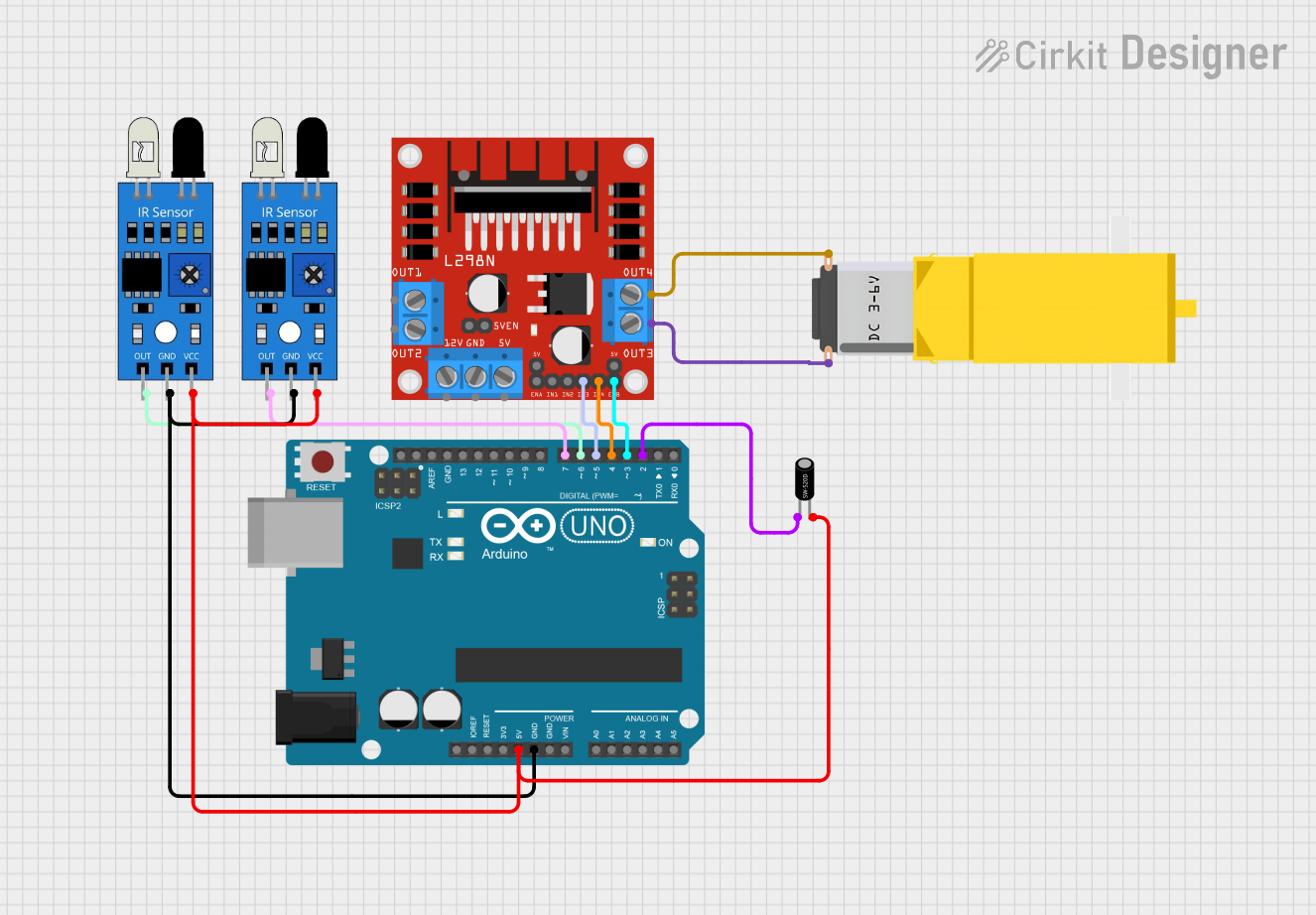
Circuit Documentation
Summary
This circuit is designed to control a DC gearmotor using an Arduino UNO microcontroller in conjunction with an L298N DC motor driver. The system also includes two IR sensors and a tilt sensor to provide input signals to the Arduino, which then processes these signals to control the motor's operation based on the sensor readings.
Component List
Arduino UNO
- Microcontroller board based on the ATmega328P
- It has 14 digital input/output pins, 6 analog inputs, a 16 MHz quartz crystal, a USB connection, a power jack, an ICSP header, and a reset button.
L298N DC Motor Driver
- A high-power motor driver module that can drive up to two DC motors.
- It has inputs for motor control signals and power supply connections for the motors.
Gearmotor DC / Motorreductor
- A DC motor with a gearbox attached to increase torque.
- It has two pins for power connection.
IR Sensor (2x)
- An infrared sensor capable of detecting obstacles or changes in surface reflectivity.
- Each sensor has an output pin, a ground pin, and a power pin.
Tilt Sensor
- A sensor that detects orientation or inclination.
- It has two pins that change state when tilted.
Wiring Details
Arduino UNO
5Vpin is connected to the VCC pins of both IR sensors and the pin2 of the tilt sensor.GNDpin is connected to the GND pins of both IR sensors.D7pin is connected to the OUT pin of the first IR sensor.D6pin is connected to the OUT pin of the second IR sensor.D5pin is connected to the IN3 pin of the L298N motor driver.D4pin is connected to the IN4 pin of the L298N motor driver.D3pin is connected to the ENB pin of the L298N motor driver.D2pin is connected to the pin1 of the tilt sensor.
L298N DC Motor Driver
IN3andIN4pins are controlled by the Arduino to set the direction of the motor.ENBpin is controlled by the Arduino to enable or disable the motor.OUT3andOUT4pins are connected to the two pins of the Gearmotor DC.
Gearmotor DC / Motorreductor
Pin1andPin2are connected to the OUT3 and OUT4 pins of the L298N motor driver, respectively.
IR Sensors
VCCpins are connected to the 5V supply from the Arduino.GNDpins are connected to the ground on the Arduino.OUTpins are connected to digital pins D7 and D6 on the Arduino to read the sensor output.
Tilt Sensor
Pin1is connected to digital pin D2 on the Arduino to read the tilt status.Pin2is connected to the 5V supply from the Arduino.
Documented Code
// Define pin connections
int tiltPin = 2;
int irSensor1Pin = 7;
int irSensor2Pin = 6;
int motorEnPin = 3;
int motorIn3Pin = 5;
int motorIn4Pin = 4;

// Variables to store sensor states
bool IsTilt = false;
bool OnlyOneIR = false;

void setup() {
  // Initialize serial communication
  Serial.begin(9600);

  // Configure pin modes
  pinMode(tiltPin, INPUT);
  pinMode(irSensor1Pin, INPUT);
  pinMode(irSensor2Pin, INPUT);
  pinMode(motorEnPin, OUTPUT);
  pinMode(motorIn3Pin, OUTPUT);
  pinMode(motorIn4Pin, OUTPUT);

  // Ensure motor is off initially
  digitalWrite(motorEnPin, LOW);
  digitalWrite(motorIn3Pin, LOW);
  digitalWrite(motorIn4Pin, LOW);
}

void loop() {
  // Read sensor values
  int tiltValue = digitalRead(tiltPin);
  int irSensor1Value = digitalRead(irSensor1Pin);
  int irSensor2Value = digitalRead(irSensor2Pin);

  // Update sensor state variables
  IsTilt = (tiltValue == HIGH);
  OnlyOneIR = (irSensor1Value != irSensor2Value);

  // Print sensor states to serial monitor
  Serial.print("Tilt: ");
  Serial.print(tiltValue);
  Serial.print(" IR1: ");
  Serial.print(irSensor1Value);
  Serial.print(" IR2: ");
  Serial.print(irSensor2Value);
  Serial.print(" IsTilt: ");
  Serial.print(IsTilt);
  Serial.print(" OnlyOneIR: ");
  Serial.println(OnlyOneIR);

  // Control motor based on sensor states
  if (IsTilt && OnlyOneIR) {
    digitalWrite(motorEnPin, HIGH);
    digitalWrite(motorIn3Pin, HIGH);
    digitalWrite(motorIn4Pin, LOW);
  } else {
    digitalWrite(motorEnPin, LOW);
    digitalWrite(motorIn3Pin, LOW);
    digitalWrite(motorIn4Pin, LOW);
  }
}
This code is designed to read the states of the tilt sensor and the two IR sensors. If the tilt sensor is activated and only one of the IR sensors is triggered, the motor is turned on in one direction. Otherwise, the motor remains off. The sensor states and the logic result are printed to the serial monitor for debugging purposes.