
Arduino Bluetooth-Controlled Car with L298N Motor Driver and Four Motors
View and Edit Project In Cirkit Designer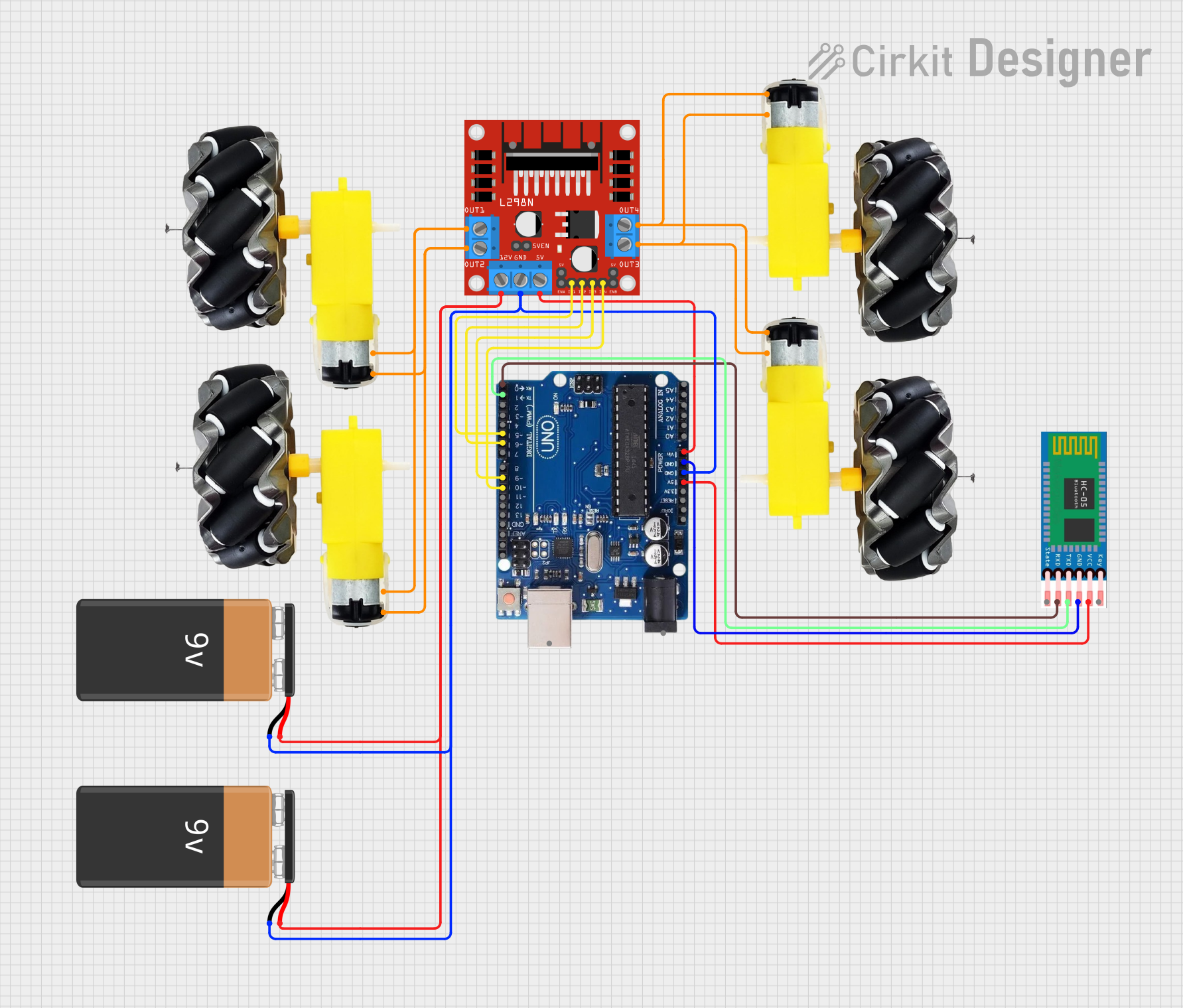
Circuit Documentation
Summary
This document provides a detailed overview of a Bluetooth-controlled car circuit using an Arduino Uno R3, an L298N motor driver, four motors with wheels, an HC-05 Bluetooth module, and two 9V batteries. The car can move forward, backward, turn left, turn right, and stop based on commands received via Bluetooth.
Component List
9V Battery
- Description: Provides power to the circuit.
- Pins:
+,-
Motor and Wheels
- Description: Drives the car's movement.
- Pins:
vcc,GND
Arduino Uno R3
- Description: Microcontroller that controls the car's movement based on Bluetooth commands.
- Pins:
USB Port,Power Jack,Not Connected,IOREF,RESET,3.3V,5V,GND,VIN,A0,A1,A2,A3,A4/SDA,A5/SCL,SCL,SDA,AREF,13,12,11,10,9,8,7,6,5,4,3,2,1,0
HC-05 Bluetooth Module
- Description: Receives Bluetooth commands to control the car.
- Pins:
EN,VCC,GND,TXD,RXD,STATE
L298N DC Motor Driver
- Description: Controls the motors based on signals from the Arduino.
- Pins:
OUT1,OUT2,12V,GND,5V,OUT3,OUT4,5V-ENA-JMP-I,5V-ENA-JMP-O,+5V-J1,+5V-J2,ENA,IN1,IN2,IN3,IN4,ENB
Wiring Details
9V Battery
Pin
+is connected to:12Vpin of the L298N DC motor driver
Pin
-is connected to:GNDpin of the Arduino Uno R3GNDpin of the L298N DC motor driver
Motor and Wheels
Pin
vccis connected to:OUT2pin of the L298N DC motor driverOUT4pin of the L298N DC motor driver
Pin
GNDis connected to:OUT1pin of the L298N DC motor driverOUT3pin of the L298N DC motor driver
Arduino Uno R3
Pin
5Vis connected to:VCCpin of the HC-05 Bluetooth module
Pin
GNDis connected to:GNDpin of the HC-05 Bluetooth moduleGNDpin of the 9V BatteryGNDpin of the L298N DC motor driver
Pin
VINis connected to:5Vpin of the L298N DC motor driver
Pin
10is connected to:IN4pin of the L298N DC motor driver
Pin
9is connected to:IN3pin of the L298N DC motor driver
Pin
6is connected to:IN2pin of the L298N DC motor driver
Pin
5is connected to:IN1pin of the L298N DC motor driver
Pin
1is connected to:TXDpin of the HC-05 Bluetooth module
Pin
0is connected to:RXDpin of the HC-05 Bluetooth module
HC-05 Bluetooth Module
Pin
VCCis connected to:5Vpin of the Arduino Uno R3
Pin
GNDis connected to:GNDpin of the Arduino Uno R3
Pin
TXDis connected to:1pin of the Arduino Uno R3
Pin
RXDis connected to:0pin of the Arduino Uno R3
L298N DC Motor Driver
Pin
12Vis connected to:+pin of the 9V Battery
Pin
GNDis connected to:GNDpin of the Arduino Uno R3-pin of the 9V Battery
Pin
5Vis connected to:VINpin of the Arduino Uno R3
Pin
OUT1is connected to:GNDpin of the Motor and Wheels
Pin
OUT2is connected to:vccpin of the Motor and Wheels
Pin
OUT3is connected to:GNDpin of the Motor and Wheels
Pin
OUT4is connected to:vccpin of the Motor and Wheels
Pin
IN1is connected to:5pin of the Arduino Uno R3
Pin
IN2is connected to:6pin of the Arduino Uno R3
Pin
IN3is connected to:9pin of the Arduino Uno R3
Pin
IN4is connected to:10pin of the Arduino Uno R3
Code Documentation
/*
 * Arduino Sketch for a Bluetooth-controlled car using an L298N motor driver
 * and four motors. The car can move forward, backward, turn left, turn right,
 * and stop based on commands received via Bluetooth.
 */

char t;

void setup() {
  pinMode(5, OUTPUT);   // IN1
  pinMode(6, OUTPUT);   // IN2
  pinMode(9, OUTPUT);   // IN3
  pinMode(10, OUTPUT);  // IN4
  pinMode(13, OUTPUT);  // LED
  Serial.begin(9600);
}

void loop() {
  if (Serial.available()) {
    t = Serial.read();
    Serial.println(t);
  }

  if (t == 'F') {            // Move forward
    digitalWrite(5, HIGH);
    digitalWrite(6, LOW);
    digitalWrite(9, HIGH);
    digitalWrite(10, LOW);
  } else if (t == 'B') {     // Move backward
    digitalWrite(5, LOW);
    digitalWrite(6, HIGH);
    digitalWrite(9, LOW);
    digitalWrite(10, HIGH);
  } else if (t == 'L') {     // Turn left
    digitalWrite(5, LOW);
    digitalWrite(6, HIGH);
    digitalWrite(9, HIGH);
    digitalWrite(10, LOW);
  } else if (t == 'R') {     // Turn right
    digitalWrite(5, HIGH);
    digitalWrite(6, LOW);
    digitalWrite(9, LOW);
    digitalWrite(10, HIGH);
  } else if (t == 'S') {     // Stop
    digitalWrite(5, LOW);
    digitalWrite(6, LOW);
    digitalWrite(9, LOW);
    digitalWrite(10, LOW);
  } else if (t == 'W') {     // Turn LED on
    digitalWrite(13, HIGH);
  } else if (t == 'w') {     // Turn LED off
    digitalWrite(13, LOW);
  }

  delay(100);
}
This code is an Arduino sketch for controlling a car via Bluetooth. The car can move forward, backward, turn left, turn right, and stop based on commands received from the HC-05 Bluetooth module. The commands are processed in the loop function, and the corresponding motor control signals are sent to the L298N motor driver.