
Circuit Documentation
Summary
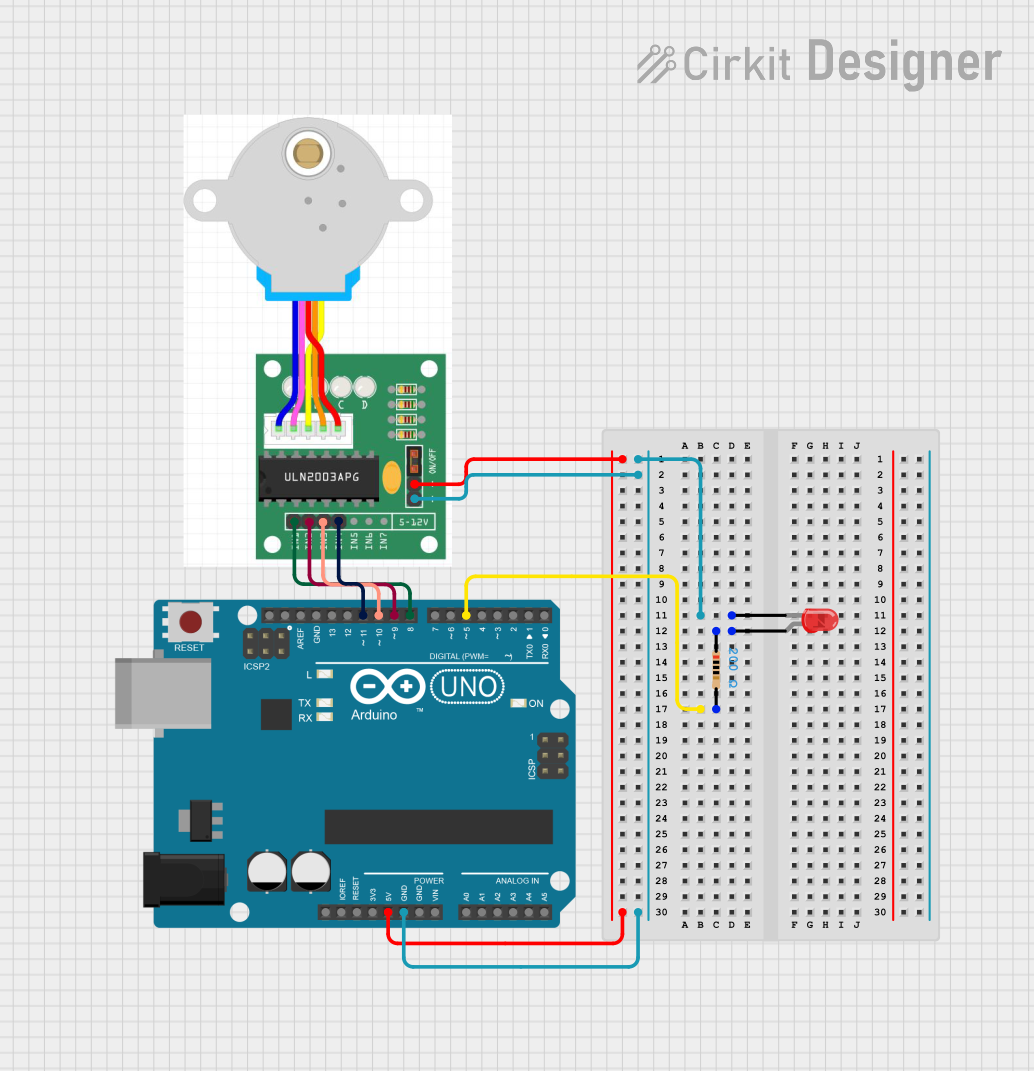
This circuit consists of an Arduino UNO microcontroller, a red LED, a 200 Ohm resistor, and a stepper motor. The Arduino UNO controls the LED and the stepper motor, providing power and signal connections to these components.
Component List
Arduino UNO
- Description: A microcontroller board based on the ATmega328P.
- Pins: UNUSED, IOREF, Reset, 3.3V, 5V, GND, Vin, A0, A1, A2, A3, A4, A5, SCL, SDA, AREF, D13, D12, D11, D10, D9, D8, D7, D6, D5, D4, D3, D2, D1, D0
LED: Two Pin (red)
- Description: A red LED with two pins: anode and cathode.
- Pins: cathode, anode
Resistor
- Description: A resistor with a resistance of 200 Ohms.
- Pins: pin1, pin2
- Properties:
- Resistance: 200 Ohms
Stepper Motor
- Description: A stepper motor with four input pins and two power pins.
- Pins: IN1, IN2, IN3, IN4, +, -
Wiring Details
Arduino UNO
- GND: Connected to the cathode of the LED and the negative terminal of the stepper motor.
- 5V: Connected to the positive terminal of the stepper motor.
- D5: Connected to pin2 of the resistor.
- D11: Connected to IN4 of the stepper motor.
- D10: Connected to IN3 of the stepper motor.
- D9: Connected to IN2 of the stepper motor.
- D8: Connected to IN1 of the stepper motor.
LED: Two Pin (red)
- cathode: Connected to GND of the Arduino UNO and the negative terminal of the stepper motor.
- anode: Connected to pin1 of the resistor.
Resistor
- pin1: Connected to the anode of the LED.
- pin2: Connected to D5 of the Arduino UNO.
Stepper Motor
- -: Connected to GND of the Arduino UNO and the cathode of the LED.
- +: Connected to 5V of the Arduino UNO.
- IN4: Connected to D11 of the Arduino UNO.
- IN3: Connected to D10 of the Arduino UNO.
- IN2: Connected to D9 of the Arduino UNO.
- IN1: Connected to D8 of the Arduino UNO.
Code Documentation
Arduino UNO Code
void setup() {
  // put your setup code here, to run once:

}

void loop() {
  // put your main code here, to run repeatedly:

}
This code is a basic template for the Arduino UNO. The setup() function is where you initialize your components and settings, and the loop() function is where you place the main code that runs repeatedly. Currently, both functions are empty and need to be filled with the appropriate logic to control the LED and stepper motor.