
Arduino UNO RFID Door Access Control with Ultrasonic Trigger and I2C LCD Feedback
View and Edit Project In Cirkit Designer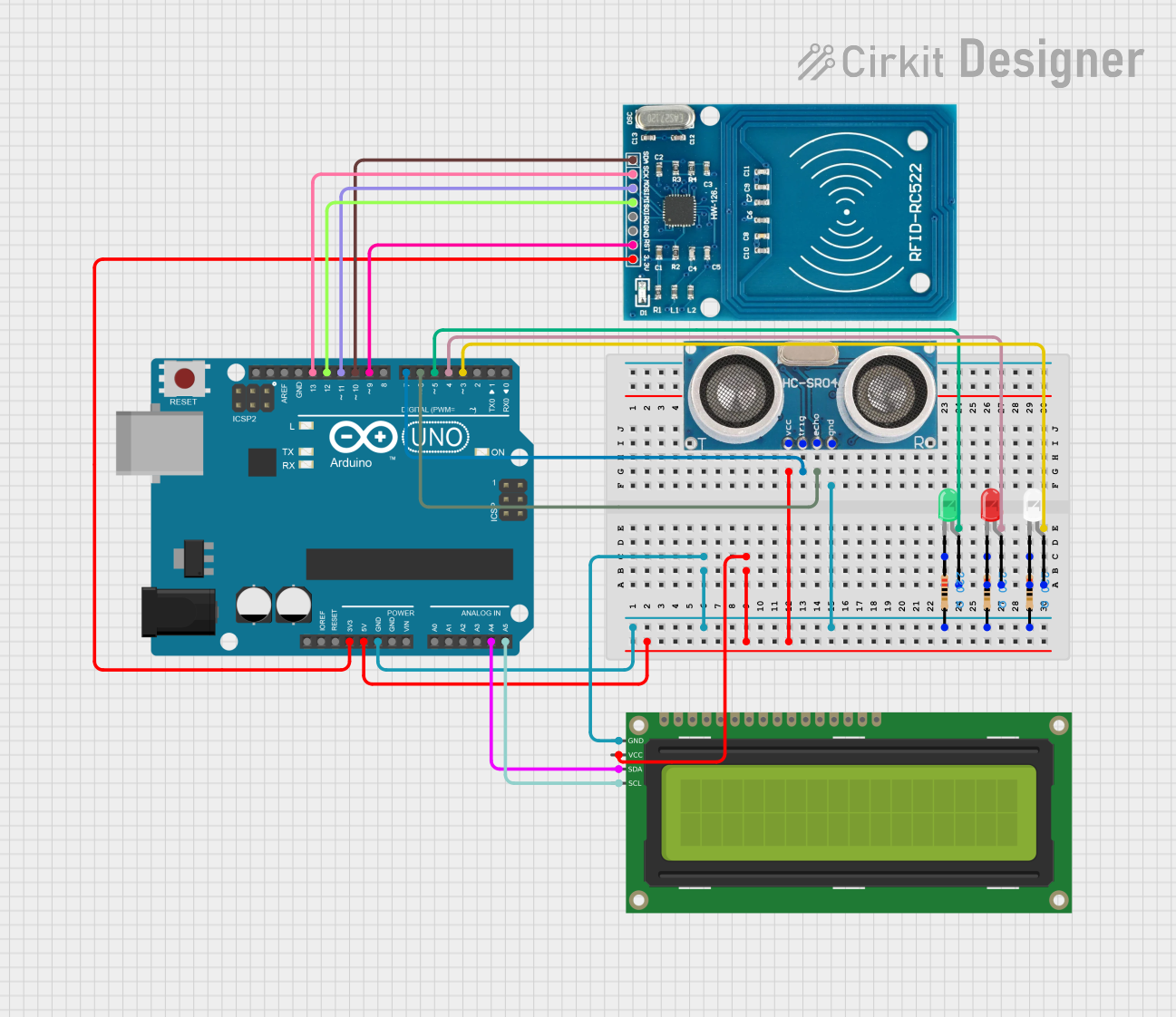
Circuit Documentation
Summary
This circuit is designed to interface an Arduino UNO with a variety of components including LEDs, resistors, an I2C LCD, an RFID-RC522 module, and an ultrasonic sensor. The purpose of the circuit is to create an access control system that authenticates RFID cards and displays messages on an LCD screen. The system also includes visual indicators (LEDs) and an audible alert (buzzer) to signal access granted or denied. The ultrasonic sensor is used to detect the presence of an object or person at a certain distance, prompting the user to scan their RFID card.
Component List
LEDs
- Green LED: A two-pin green LED used as an indicator.
- Red LED: A two-pin red LED used as an indicator.
- White LED: A two-pin white LED used as an additional indicator.
Resistors
- 220 Ohm Resistors: Three resistors each with a resistance of 220 Ohms, used to limit current to the LEDs.
Arduino UNO
- Arduino UNO: A microcontroller board based on the ATmega328P, used as the central processing unit of the circuit.
16x2 I2C LCD
- 16x2 I2C LCD: A 16-character by 2-line display that communicates with the Arduino over the I2C bus.
RFID-RC522
- RFID-RC522: An RFID reader/writer module that operates at 13.56 MHz.
Ultrasonic Sensor
- Ultrasonic Sensor: A sensor that measures distance by emitting ultrasonic waves and measuring the time taken for the echo to return.
Wiring Details
Green LED
- Anode: Connected to Arduino UNO's digital pin D5.
- Cathode: Connected to one end of a 220 Ohm resistor, whose other end is connected to the common ground.
Red LED
- Anode: Connected to Arduino UNO's digital pin D4.
- Cathode: Connected to one end of a 220 Ohm resistor, whose other end is connected to the common ground.
White LED
- Anode: Connected to Arduino UNO's digital pin D3.
- Cathode: Connected to one end of a 220 Ohm resistor, whose other end is connected to the common ground.
Arduino UNO
- GND: Connected to the common ground.
- 5V: Provides power to the 16x2 I2C LCD and the Ultrasonic Sensor.
- 3.3V: Provides power to the RFID-RC522 module.
- Digital Pins (D3, D4, D5): Connected to the anodes of the white, red, and green LEDs respectively.
- Digital Pins (D6, D7): Connected to the Echo and Trigger pins of the Ultrasonic Sensor respectively.
- Digital Pins (D9, D10, D11, D12, D13): Connected to the RST, SDA, MOSI, MISO, and SCK pins of the RFID-RC522 module respectively.
- Analog Pins (A4, A5): Connected to the SDA and SCL pins of the 16x2 I2C LCD respectively.
16x2 I2C LCD
- GND: Connected to the common ground.
- VCC: Connected to the 5V supply from the Arduino UNO.
- SDA: Connected to Arduino UNO's analog pin A4.
- SCL: Connected to Arduino UNO's analog pin A5.
RFID-RC522
- VCC (3.3V): Connected to the 3.3V supply from the Arduino UNO.
- RST: Connected to Arduino UNO's digital pin D9.
- GND: Connected to the common ground.
- IRQ: Not connected.
- MISO: Connected to Arduino UNO's digital pin D12.
- MOSI: Connected to Arduino UNO's digital pin D11.
- SCK: Connected to Arduino UNO's digital pin D13.
- SDA: Connected to Arduino UNO's digital pin D10.
Ultrasonic Sensor
- +VCC: Connected to the 5V supply from the Arduino UNO.
- Trigger: Connected to Arduino UNO's digital pin D7.
- Echo: Connected to Arduino UNO's digital pin D6.
- GND: Connected to the common ground.
Documented Code
#include <SPI.h>
#include <MFRC522.h>
#include <LiquidCrystal_I2C.h>

#define RST_PIN         9
#define SDA_PIN         10
#define echo_Pin        6
#define trig_Pin        7

MFRC522 RFID (SDA_PIN, RST_PIN);
LiquidCrystal_I2C lcd(0x27, 16, 2);
String authenticatedCard = " 93 B9 B5 29";
bool doorStatus = 0;
int Duration;
int Distance;
int greenLED = 5;
int redLED = 4;
int Light = 3;
const int buzzer = 8;
int numTones = 3;
int correctTones[] = {262, 294, 330};
int wrongTones[] = {330, 294, 262};

void setup() {
  pinMode(echo_Pin, INPUT);
  pinMode(trig_Pin, OUTPUT);
  Serial.begin(9600);
  lcd.init();
  lcd.backlight();
  lcd.clear();
  while (!Serial);
  SPI.begin();
  RFID.PCD_Init();
  delay(4);
  pinMode(greenLED, OUTPUT);
  pinMode(redLED, OUTPUT);
  pinMode(Light, OUTPUT);
  pinMode(buzzer, OUTPUT);
}

void loop() {
  digitalWrite(trig_Pin, 1);
  delayMicroseconds(10);
  digitalWrite(trig_Pin, 0);
  Duration = pulseIn(echo_Pin, 1);
  Distance = Duration * 0.017175;
  if (Distance <= 50){
   lcd.clear();
   lcd.print("Please scan the");
   lcd.setCursor(0, 1);
   lcd.print("card");
   Serial.println(F("Please scan the card"));
   Serial.println();
   if ( ! RFID.PICC_IsNewCardPresent()) {
      return;
   }

   if ( ! RFID.PICC_ReadCardSerial()) {
      return;
   }

   String scannedCard = "";
   Serial.print(F("Card UID:"));
   for (byte i = 0; i < RFID.uid.size; i++) {
    Serial.print(RFID.uid.uidByte[i] < 0x10 ? " 0" : " ");
    Serial.print(RFID.uid.uidByte[i], HEX);

   if (RFID.uid.uidByte[i] < 0x10) {
         scannedCard += " 0";
     } else {
         scannedCard += " ";
     }
     scannedCard += String(RFID.uid.uidByte[i], HEX);
  }

   if (scannedCard.equalsIgnoreCase(authenticatedCard)){
     if(doorStatus == 0){
       Serial.println();
       Serial.print(F("Scanning....."));
       Serial.println();
       lcd.clear();
       lcd.print("Scanning.....");
       delay(2000);
       Serial.print(F("Authenticated"));
       Serial.println();
       lcd.clear();
       lcd.print("Authenticated");
       delay(2000);
       lcd.clear();
       lcd.blink();
       delay(2000);
       lcd.noBlink();
       lcd.print("Door is opened");
       delay(2000);
       lcd.clear();
       lcd.blink();
       delay(2000);
       lcd.noBlink();
       lcd.print("VVelcome~~~");
       delay(2000);
       lcd.clear();
       digitalWrite(greenLED, 1);
       for (int j = 0; j <=numTones; j++){
        tone(buzzer, correctTones[j]);
        delay(500);
       }
       noTone(buzzer);
       digitalWrite(greenLED, 0);
       digitalWrite(Light, 1);
       doorStatus = 1;
     }

     else {
       Serial.println();
       Serial.print(F("Scanning....."));
       Serial.println();
       lcd.clear();
       lcd.print("Scanning.....");
       delay(2000);
       Serial.print(F("Authenticated"));
       Serial.println();
       lcd.clear();
       lcd.print("Authenticated");
       delay(2000);
       lcd.clear();
       lcd.blink();
       delay(2000);
       lcd.noBlink();
       lcd.print("Door is closed");
       delay(2000);
       lcd.clear();
       lcd.blink();
       delay(2000);
       lcd.noBlink();
       lcd.print("Thank you~~~");
       delay(2000);
       lcd.clear();
       digitalWrite(greenLED, 1); // Turn on the green LED
       for (int j = 0; j <=numTones; j++){
        tone(buzzer, correctTones[j]);
        delay(500);
       }
       noTone(buzzer);
       digitalWrite(greenLED, 0);
       digitalWrite(Light, 0);
       doorStatus = 0;
       }
   }
   else {
     Serial.println();
     Serial.print(F("Scanning....."));
     Serial.println();
     lcd.clear();