
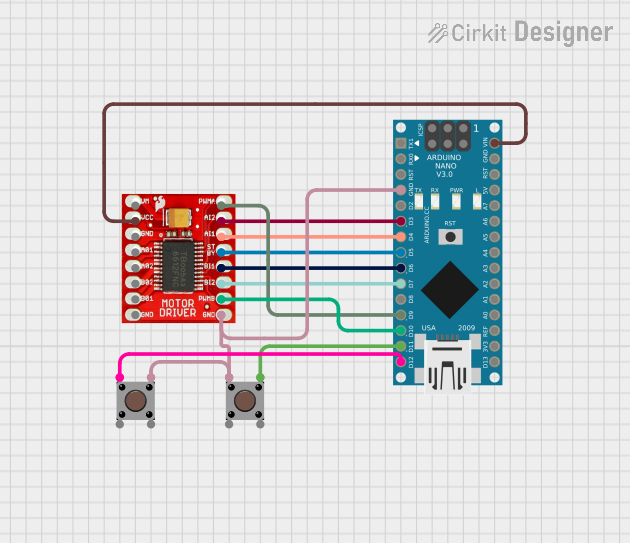
Circuit Documentation
Summary
This document provides a detailed overview of a circuit that includes an Arduino Nano microcontroller, a TB6612FNG motor driver, and two pushbuttons. The circuit is designed to control motors using the motor driver, with inputs from the pushbuttons and the Arduino Nano.
Component List
Arduino Nano
- Description: A small, complete, and breadboard-friendly board based on the ATmega328P.
- Pins: D1/TX, D0/RX, RESET, GND, D2, D3, D4, D5, D6, D7, D8, D9, D10, D11/MOSI, D12/MISO, VIN, 5V, A7, A6, A5, A4, A3, A2, A1, A0, AREF, 3V3, D13/SCK
TB6612FNG Motor Driver
- Description: A dual motor driver that can drive two DC motors or one stepper motor.
- Pins: GND, B01, B02, A02, A01, VCC, VM, PWMB, BI2, BI1, STBY, AI1, AI2, PWMA
Pushbutton (1)
- Description: A simple pushbutton used for user input.
- Pins: Pin 3 (out), Pin 4 (out), Pin 1 (in), Pin 2 (in)
Pushbutton (2)
- Description: Another simple pushbutton used for user input.
- Pins: Pin 3 (out), Pin 4 (out), Pin 1 (in), Pin 2 (in)
Wiring Details
Arduino Nano
- GND: Connected to GND of TB6612FNG Motor Driver and Pin 1 (in) of Pushbutton (1)
- D3: Connected to AI2 of TB6612FNG Motor Driver
- D4: Connected to AI1 of TB6612FNG Motor Driver
- D5: Connected to STBY of TB6612FNG Motor Driver
- D6: Connected to BI1 of TB6612FNG Motor Driver
- D7: Connected to BI2 of TB6612FNG Motor Driver
- D9: Connected to PWMA of TB6612FNG Motor Driver
- D10: Connected to PWMB of TB6612FNG Motor Driver
- D11/MOSI: Connected to Pin 3 (out) of Pushbutton (1)
- D12/MISO: Connected to Pin 1 (in) of Pushbutton (2)
- VIN: Connected to VCC of TB6612FNG Motor Driver
TB6612FNG Motor Driver
- GND: Connected to GND of Arduino Nano and Pin 1 (in) of Pushbutton (1)
- AI2: Connected to D3 of Arduino Nano
- AI1: Connected to D4 of Arduino Nano
- STBY: Connected to D5 of Arduino Nano
- BI1: Connected to D6 of Arduino Nano
- BI2: Connected to D7 of Arduino Nano
- PWMA: Connected to D9 of Arduino Nano
- PWMB: Connected to D10 of Arduino Nano
- VCC: Connected to VIN of Arduino Nano
Pushbutton (1)
- Pin 1 (in): Connected to GND of Arduino Nano and GND of TB6612FNG Motor Driver
- Pin 3 (out): Connected to D11/MOSI of Arduino Nano
Pushbutton (2)
- Pin 1 (in): Connected to D12/MISO of Arduino Nano
- Pin 3 (out): Connected to Pin 1 (in) of Pushbutton (1)
Documented Code
Arduino Nano Code
void setup() {
  // put your setup code here, to run once:

}

void loop() {
  // put your main code here, to run repeatedly:

}
Additional Documentation
// This file is intended for additional documentation purposes.
This document provides a comprehensive overview of the circuit, including the components used, their connections, and the code running on the Arduino Nano.