
Arduino UNO-Based Smart Traffic Light System with RFID Ambulance Priority and I2C LCD Display
View and Edit Project In Cirkit Designer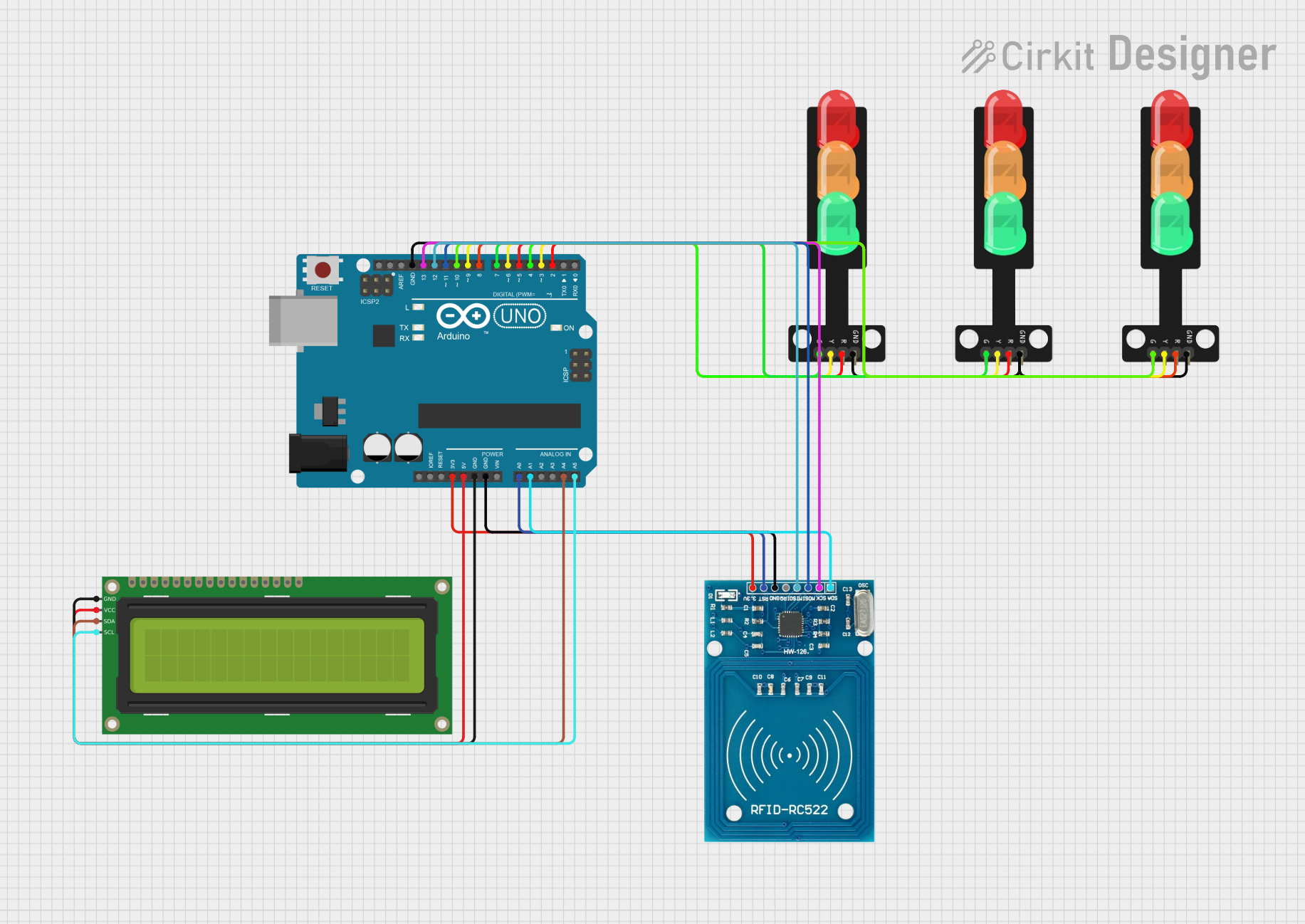
Circuit Documentation
Summary
This circuit is designed to manage a traffic light system with priority given to ambulances detected via an RFID reader. The system uses an Arduino UNO microcontroller to control three traffic lights and an I2C LCD display to provide status updates. The RFID reader detects authorized ambulance tags and adjusts the traffic lights accordingly to prioritize the ambulance's route.
Component List
Arduino UNO
- Description: A microcontroller board based on the ATmega328P.
- Pins: UNUSED, IOREF, Reset, 3.3V, 5V, GND, Vin, A0, A1, A2, A3, A4, A5, SCL, SDA, AREF, D13, D12, D11, D10, D9, D8, D7, D6, D5, D4, D3, D2, D1, D0
16x2 I2C LCD
- Description: A 16x2 character LCD display with I2C interface.
- Pins: GND, VCC, SDA, SCL
Traffic Light (North)
- Description: A traffic light with three LEDs (Green, Yellow, Red) and a ground pin.
- Pins: Green, Yellow, Red, GND
Traffic Light (South)
- Description: A traffic light with three LEDs (Green, Yellow, Red) and a ground pin.
- Pins: Green, Yellow, Red, GND
Traffic Light (East)
- Description: A traffic light with three LEDs (Green, Yellow, Red) and a ground pin.
- Pins: Green, Yellow, Red, GND
RFID-RC522
- Description: An RFID reader module.
- Pins: VCC (3.3V), RST, GND, IRQ, MISO, MOSI, SCK, SDA
Wiring Details
Arduino UNO
- 3.3V: Connected to RFID-RC522 VCC (3.3V)
- 5V: Connected to 16x2 I2C LCD VCC
- GND: Connected to 16x2 I2C LCD GND, RFID-RC522 GND, and all Traffic Light GND pins
- A0: Connected to RFID-RC522 RST
- A1: Connected to RFID-RC522 SDA
- A4: Connected to 16x2 I2C LCD SDA
- A5: Connected to 16x2 I2C LCD SCL
- D13: Connected to RFID-RC522 SCK
- D12: Connected to RFID-RC522 MISO
- D11: Connected to RFID-RC522 MOSI
- D10: Connected to North Traffic Light Green
- D9: Connected to North Traffic Light Yellow
- D8: Connected to North Traffic Light Red
- D7: Connected to South Traffic Light Green
- D6: Connected to South Traffic Light Yellow
- D5: Connected to South Traffic Light Red
- D4: Connected to East Traffic Light Green
- D3: Connected to East Traffic Light Yellow
- D2: Connected to East Traffic Light Red
16x2 I2C LCD
- GND: Connected to Arduino UNO GND
- VCC: Connected to Arduino UNO 5V
- SDA: Connected to Arduino UNO A4
- SCL: Connected to Arduino UNO A5
Traffic Light (North)
- Green: Connected to Arduino UNO D10
- Yellow: Connected to Arduino UNO D9
- Red: Connected to Arduino UNO D8
- GND: Connected to Arduino UNO GND
Traffic Light (South)
- Green: Connected to Arduino UNO D7
- Yellow: Connected to Arduino UNO D6
- Red: Connected to Arduino UNO D5
- GND: Connected to Arduino UNO GND
Traffic Light (East)
- Green: Connected to Arduino UNO D4
- Yellow: Connected to Arduino UNO D3
- Red: Connected to Arduino UNO D2
- GND: Connected to Arduino UNO GND
RFID-RC522
- VCC (3.3V): Connected to Arduino UNO 3.3V
- RST: Connected to Arduino UNO A0
- GND: Connected to Arduino UNO GND
- SCK: Connected to Arduino UNO D13
- MISO: Connected to Arduino UNO D12
- MOSI: Connected to Arduino UNO D11
- SDA: Connected to Arduino UNO A1
Documented Code
#include <SPI.h>
#include <MFRC522.h>
#include <Wire.h>
#include <LiquidCrystal_I2C.h>

// Pin assignments for RFID
#define SS_PIN A1
#define RST_PIN A0
MFRC522 mfrc522(SS_PIN, RST_PIN);

// Pin assignments for traffic lights (LEDs)
const int redN = 2, yellowN = 3, greenN = 4;    // North traffic light
const int redS = 5, yellowS = 6, greenS = 7;   // South traffic light
const int redE = 8, yellowE = 9, greenE = 10;  // East traffic light

// Define ambulance RFID tag UID
byte authorizedUID[4] = {0x43, 0x89, 0x6C, 0xFA};

// Initialize I2C LCD (address 0x27, 16 columns, 2 rows)
LiquidCrystal_I2C lcd(0x27, 16, 2);

void setup() {
  // Initialize traffic lights
  pinMode(redN, OUTPUT);
  pinMode(yellowN, OUTPUT);
  pinMode(greenN, OUTPUT);
  pinMode(redS, OUTPUT);
  pinMode(yellowS, OUTPUT);
  pinMode(greenS, OUTPUT);
  pinMode(redE, OUTPUT);
  pinMode(yellowE, OUTPUT);
  pinMode(greenE, OUTPUT);

  // Initialize Serial Monitor, RFID reader, and LCD
  Serial.begin(9600);
  SPI.begin();
  mfrc522.PCD_Init();

  lcd.init(); // Initialize the LCD
  lcd.backlight(); // Turn on the backlight
  lcd.setCursor(0, 0);
  lcd.print("Place RFID tag...");
}

void loop() {
  // Check if RFID card is present
  if (mfrc522.PICC_IsNewCardPresent() && mfrc522.PICC_ReadCardSerial()) {
    if (isAmbulanceDetected()) {
      handleAmbulancePriority();
    }
    mfrc522.PICC_HaltA(); // Stop reading the card
  }

  // Normal traffic light sequence
  normalTrafficSequence();
}

// Function to check if the scanned tag matches the ambulance tag
bool isAmbulanceDetected() {
  for (byte i = 0; i < 4; i++) {
    if (mfrc522.uid.uidByte[i] != authorizedUID[i]) {
      return false;
    }
  }
  return true;
}

// Function to handle ambulance priority
void handleAmbulancePriority() {
  Serial.println("Ambulance detected! Prioritizing North road...");
  lcd.clear();
  lcd.setCursor(0, 0);
  lcd.print("Ambulance Detected");
  lcd.setCursor(0, 1);
  lcd.print("North: Green");

  // Set all lights to red
  digitalWrite(yellowN, LOW);
  digitalWrite(yellowS, LOW);
  digitalWrite(yellowE, LOW);
  digitalWrite(greenN, LOW);
  digitalWrite(greenS, LOW);
  digitalWrite(greenE, LOW);
  digitalWrite(redN, HIGH);
  digitalWrite(redS, HIGH);
  digitalWrite(redE, HIGH);
  delay(500);
  digitalWrite(redN, LOW);
  digitalWrite(redS, LOW);
  digitalWrite(redE, LOW);
  delay(500);
  digitalWrite(redN, HIGH);
  digitalWrite(redS, HIGH);
  digitalWrite(redE, HIGH);
  delay(500);
  digitalWrite(redN, LOW);
  digitalWrite(redS, LOW);
  digitalWrite(redE, LOW);
  delay(500);
  digitalWrite(redN, HIGH);
  digitalWrite(redS, HIGH);
  digitalWrite(redE, HIGH);
  delay(500);
  digitalWrite(redN, LOW);
  digitalWrite(redS, LOW);
  digitalWrite(redE, LOW);


  // Set North green light
  digitalWrite(redN, LOW);
  digitalWrite(greenN, HIGH);

  // Keep North light green for 10 seconds
  delay(10000);

  // Set North light back to red
  digitalWrite(greenN, LOW);
  digitalWrite(redN, HIGH);

  lcd.clear();
}

// Function for normal traffic light sequence
void normalTrafficSequence() {
  lcd.clear();
  lcd