
Arduino MKR WiFi 1010 Temperature Monitoring System with LED Indicator
View and Edit Project In Cirkit Designer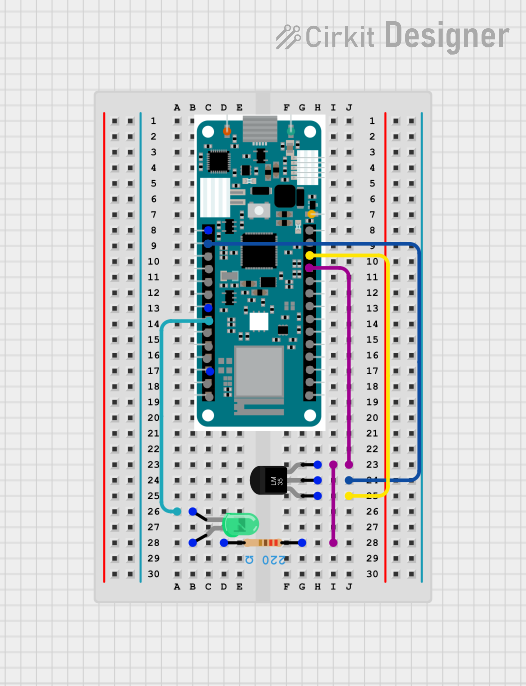
Circuit Documentation
Summary
This circuit involves an Arduino MKR WiFi 1010 microcontroller, a temperature sensor (LM35), a green LED, and a resistor. The temperature sensor measures the ambient temperature and sends the data to the Arduino. The Arduino processes this data and can control the LED based on the temperature readings.
Component List
Arduino MKR WiFi 1010
- Description: A microcontroller board with built-in WiFi capabilities.
- Pins: A0, A1, A2, A3, A4, A5, A6, D0, D1, D2, D3, D4, D5, D6, D7, MOSI, SCK, MISO, SDA, SCL, RX, TX, RESET, GND, VCC, VIN, 5V
Resistor
- Description: A passive electrical component that implements electrical resistance as a circuit element.
- Pins: pin1, pin2
- Properties:
- Resistance: 220 Ohms
Temperature Sensor (LM35)
- Description: A precision integrated-circuit temperature sensor, whose output voltage is linearly proportional to the Celsius temperature.
- Pins: +Vs, Vout, GND
LED: Two Pin (green)
- Description: A light-emitting diode that emits green light.
- Pins: cathode, anode
Wiring Details
Arduino MKR WiFi 1010
GND is connected to:
- GND of the Temperature Sensor (LM35)
- pin1 of the Resistor
A1 is connected to:
- Vout of the Temperature Sensor (LM35)
VCC is connected to:
- +Vs of the Temperature Sensor (LM35)
D0 is connected to:
- cathode of the LED: Two Pin (green)
Resistor
pin1 is connected to:
- GND of the Temperature Sensor (LM35)
- GND of the Arduino MKR WiFi 1010
pin2 is connected to:
- anode of the LED: Two Pin (green)
Temperature Sensor (LM35)
GND is connected to:
- GND of the Arduino MKR WiFi 1010
- pin1 of the Resistor
Vout is connected to:
- A1 of the Arduino MKR WiFi 1010
+Vs is connected to:
- VCC of the Arduino MKR WiFi 1010
LED: Two Pin (green)
cathode is connected to:
- D0 of the Arduino MKR WiFi 1010
anode is connected to:
- pin2 of the Resistor
Code
No code is provided for this circuit.