
Arduino-Controlled Automated Irrigation System with Soil Moisture Monitoring
View and Edit Project In Cirkit Designer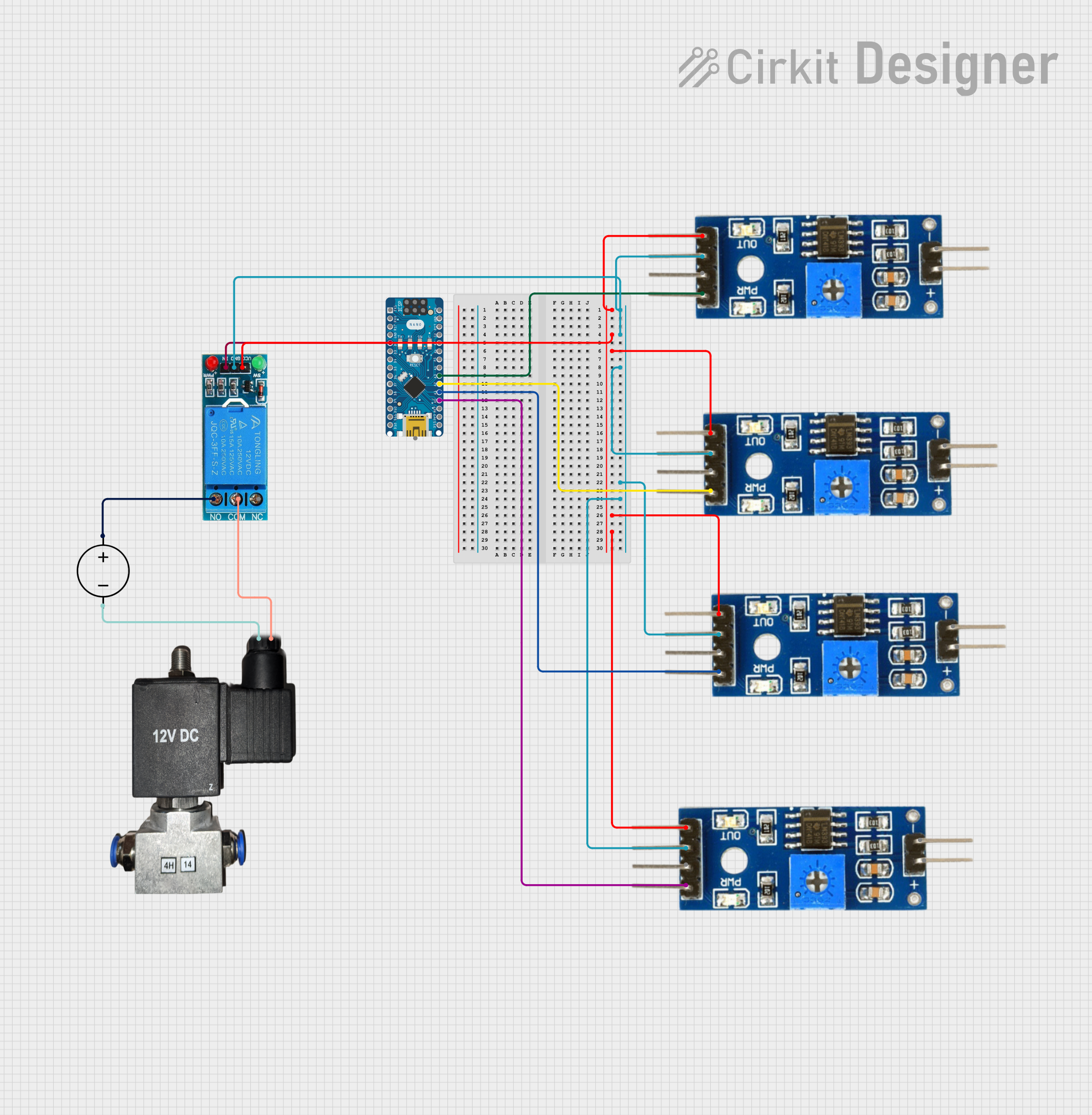
Soil Moisture Monitoring and Solenoid Valve Control Circuit Documentation
Summary
This circuit is designed to monitor the moisture level of soil using four soil moisture sensors and control a solenoid valve through a relay. The Arduino Nano microcontroller reads the analog values from the soil moisture sensors, calculates the average moisture level, and activates the solenoid valve if the average moisture level falls below a predefined threshold. The solenoid valve is controlled via a 12V single-channel relay, which is in turn powered by a DC power source. The relay ensures safe and effective switching of the high-power solenoid valve by the low-power microcontroller signal.
Component List
Arduino Nano
- Description: A compact microcontroller board based on the ATmega328P.
- Pins: D1/TX, D0/RX, RESET, GND, D2 to D13, VIN, 5V, A0 to A7, AREF, 3V3.
Soil Moisture Module (x4)
- Description: A sensor module used to measure the moisture content in soil.
- Pins: positive, negative, Analog, Digital, Ground, VCC.
12V Single Channel Relay
- Description: An electromechanical switch used for controlling high power devices.
- Pins: NC (Normally Closed), COM (Common), NO (Normally Open), IN (Input), GND (Ground), VCC (Voltage Common Collector).
12v Pneumatic Solenoid Valve
- Description: An electrically-controlled valve used for controlling the flow of air.
- Pins: VCC, GND.
DC Power Source
- Description: A power supply unit that provides a 12V output.
- Pins: Ground, Positive.
Wiring Details
Arduino Nano
- A3 connected to Soil Moisture Module Analog pin.
- D2 connected to 12V Single Channel Relay IN pin.
- A2 connected to Soil Moisture Module Analog pin.
- A1 connected to Soil Moisture Module Analog pin.
- A0 connected to Soil Moisture Module Analog pin.
Soil Moisture Module
- VCC pins of all modules connected together and to 12V Single Channel Relay VCC.
- Ground pins of all modules connected together and to 12V Single Channel Relay GND.
- Analog pins individually connected to Arduino Nano A0, A1, A2, and A3.
12V Single Channel Relay
- VCC connected to Soil Moisture Module VCC pins.
- GND connected to Soil Moisture Module Ground pins.
- IN connected to Arduino Nano D2.
- COM connected to 12v Pneumatic Solenoid Valve GND.
- NO connected to DC Power Source Positive.
12v Pneumatic Solenoid Valve
- GND connected to 12V Single Channel Relay COM.
- VCC connected to DC Power Source Ground.
DC Power Source
- Positive connected to 12V Single Channel Relay NO.
- Ground connected to 12v Pneumatic Solenoid Valve VCC.
Documented Code
/*
 * This Arduino Sketch reads data from four soil moisture sensors and controls
 * a solenoid valve via a relay based on the average soil moisture level.
 */

// Pin definitions
const int soilMoisturePins[] = {A0, A1, A2, A3};
const int relayPin = 2;

// Variables to store sensor readings
int soilMoistureValues[4];

void setup() {
  // Initialize serial communication
  Serial.begin(9600);

  // Initialize soil moisture sensor pins
  for (int i = 0; i < 4; i++) {
    pinMode(soilMoisturePins[i], INPUT);
  }

  // Initialize relay pin
  pinMode(relayPin, OUTPUT);
  digitalWrite(relayPin, LOW); // Ensure relay is off initially
}

void loop() {
  // Read soil moisture sensor values
  int totalMoisture = 0;
  for (int i = 0; i < 4; i++) {
    soilMoistureValues[i] = analogRead(soilMoisturePins[i]);
    totalMoisture += soilMoistureValues[i];
  }

  // Calculate average soil moisture level
  int avgMoisture = totalMoisture / 4;

  // Print sensor values to serial monitor
  Serial.print("Soil Moisture Values: ");
  for (int i = 0; i < 4; i++) {
    Serial.print(soilMoistureValues[i]);
    Serial.print(" ");
  }
  Serial.print("| Avg: ");
  Serial.println(avgMoisture);

  // Control relay based on average soil moisture level
  if (avgMoisture < 500) { // Threshold value for soil moisture
    // Turn on relay to activate solenoid valve
    digitalWrite(relayPin, HIGH);
  } else {
    // Turn off relay to deactivate solenoid valve
    digitalWrite(relayPin, LOW);
  }

  // Wait for a second before next reading
  delay(1000);
}
This code is designed to be uploaded to the Arduino Nano microcontroller. It initializes the input pins connected to the soil moisture sensors and the output pin connected to the relay. The loop function reads the moisture levels, calculates the average, and controls the relay accordingly. The serial output can be used for debugging and monitoring the sensor values.