
Arduino UNO-Based Humidity Monitor with 16x2 LCD and Joystick Control
View and Edit Project In Cirkit Designer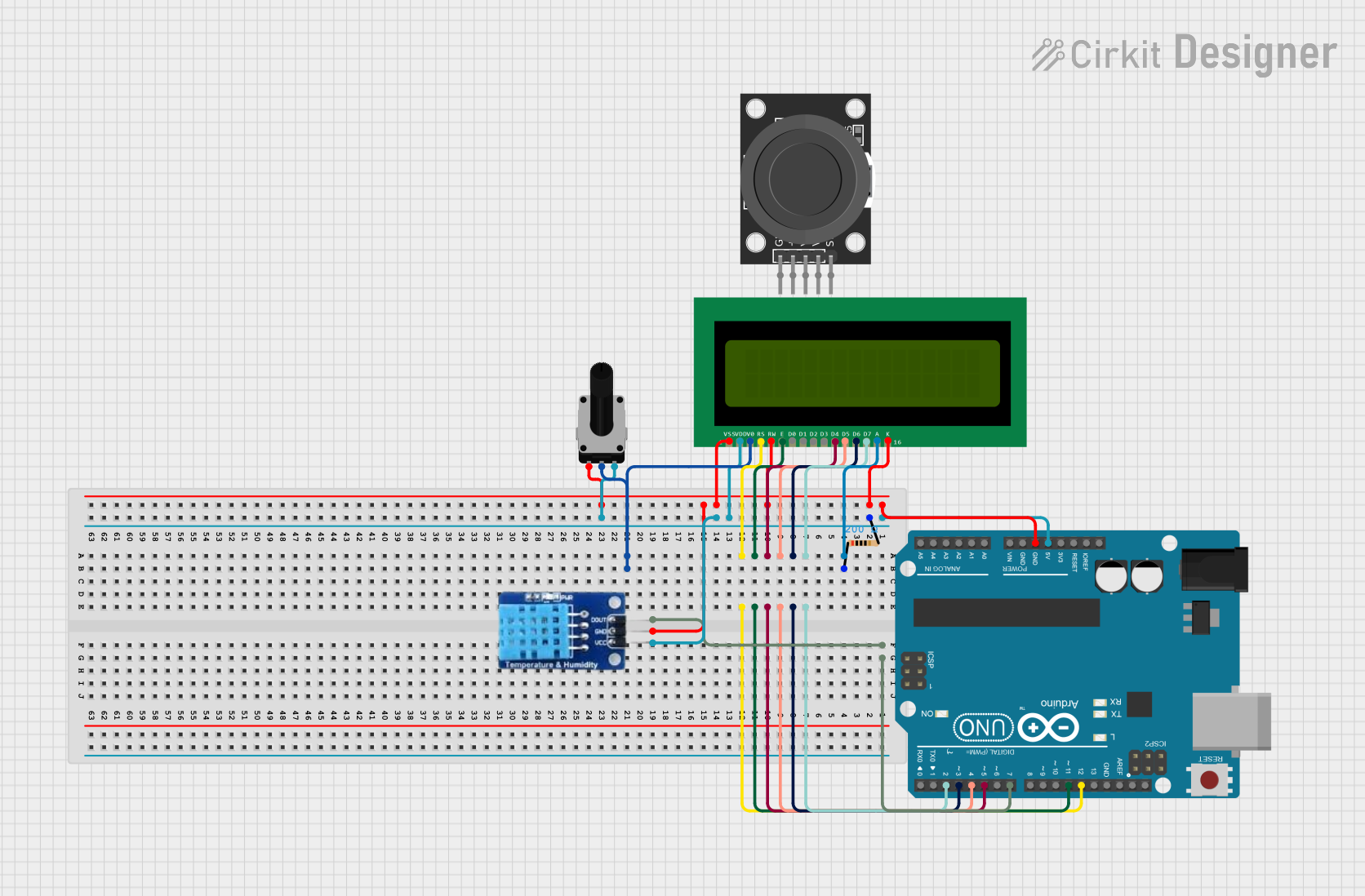
Circuit Documentation
Summary
This circuit interfaces a 16x2 LCD, a DHT11 humidity sensor, and a KY-023 joystick module with an Arduino UNO. The joystick is used to navigate and control the display of humidity data on the LCD. The circuit also includes a rotary potentiometer to adjust the LCD contrast and a resistor for current limiting.
Component List
Arduino UNO
- Description: A microcontroller board based on the ATmega328P.
- Pins: UNUSED, IOREF, Reset, 3.3V, 5V, GND, Vin, A0, A1, A2, A3, A4, A5, SCL, SDA, AREF, D13, D12, D11, D10, D9, D8, D7, D6, D5, D4, D3, D2, D1, D0
16x2 LCD
- Description: A 16x2 character LCD display.
- Pins: VSS, VDD, V0, RS, RW, E, D1, D0, D2, D3, D4, D6, D5, D7, A, K
DHT11
- Description: A digital temperature and humidity sensor.
- Pins: DATA, GND, VCC
KY-023 Dual Axis Joystick Module
- Description: A joystick module with X and Y axis analog outputs and a button.
- Pins: GND, +5V, VRx, VRy, SW
Rotary Potentiometer
- Description: A variable resistor used to adjust the LCD contrast.
- Pins: leg1, wiper, leg2
- Properties: Resistance: 10k Ohms
Resistor
- Description: A resistor used for current limiting.
- Pins: pin1, pin2
- Properties: Resistance: 200 Ohms
Wiring Details
Arduino UNO
- GND: Connected to 16x2 LCD (K, RW, VSS), DHT11 (GND), Rotary Potentiometer (leg1)
- 5V: Connected to Resistor (pin2), 16x2 LCD (VDD), DHT11 (VCC), Rotary Potentiometer (leg2)
- D7: Connected to DHT11 (DATA)
- D2: Connected to 16x2 LCD (D7)
- D3: Connected to 16x2 LCD (D6)
- D4: Connected to 16x2 LCD (D5)
- D5: Connected to 16x2 LCD (D4)
- D11: Connected to 16x2 LCD (E)
- D12: Connected to 16x2 LCD (RS)
16x2 LCD
- VSS: Connected to Arduino UNO (GND)
- VDD: Connected to Arduino UNO (5V)
- V0: Connected to Rotary Potentiometer (wiper)
- RS: Connected to Arduino UNO (D12)
- RW: Connected to Arduino UNO (GND)
- E: Connected to Arduino UNO (D11)
- D4: Connected to Arduino UNO (D5)
- D5: Connected to Arduino UNO (D4)
- D6: Connected to Arduino UNO (D3)
- D7: Connected to Arduino UNO (D2)
- A: Connected to Resistor (pin1)
- K: Connected to Arduino UNO (GND)
DHT11
- DATA: Connected to Arduino UNO (D7)
- GND: Connected to Arduino UNO (GND)
- VCC: Connected to Arduino UNO (5V)
KY-023 Dual Axis Joystick Module
- GND: Not connected in the provided net list
- +5V: Not connected in the provided net list
- VRx: Not connected in the provided net list
- VRy: Not connected in the provided net list
- SW: Not connected in the provided net list
Rotary Potentiometer
- leg1: Connected to Arduino UNO (GND)
- wiper: Connected to 16x2 LCD (V0)
- leg2: Connected to Arduino UNO (5V)
Resistor
- pin1: Connected to 16x2 LCD (A)
- pin2: Connected to Arduino UNO (5V)
Code Documentation
/*
 * This Arduino sketch interfaces a 16x2 LCD, a DHT11 humidity sensor, and a
 * KY-023 joystick module with an Arduino UNO. The joystick is used to navigate
 * and control the display of humidity data on the LCD.
 */

#include <LiquidCrystal.h>
#include <DHT.h>

// LCD pin configuration
const int rs = 12, en = 11, d4 = 5, d5 = 4, d6 = 3, d7 = 2;
LiquidCrystal lcd(rs, en, d4, d5, d6, d7);

// DHT11 sensor configuration
#define DHTPIN 7
#define DHTTYPE DHT11
DHT dht(DHTPIN, DHTTYPE);

// Joystick pin configuration
const int VRx = A0;
const int VRy = A1;
const int SW = 2;

void setup() {
  // Initialize the LCD
  lcd.begin(16, 2);
  lcd.print("Initializing...");

  // Initialize the DHT sensor
  dht.begin();

  // Initialize the joystick
  pinMode(VRx, INPUT);
  pinMode(VRy, INPUT);
  pinMode(SW, INPUT_PULLUP);

  // Clear the LCD
  lcd.clear();
}

void loop() {
  // Read humidity from DHT11 sensor
  float humidity = dht.readHumidity();

  // Read joystick position
  int xPosition = analogRead(VRx);
  int yPosition = analogRead(VRy);
  int buttonState = digitalRead(SW);

  // Display humidity on LCD
  lcd.setCursor(0, 0);
  lcd.print("Humidity: ");
  lcd.print(humidity);
  lcd.print("%");

  // Display joystick position on LCD
  lcd.setCursor(0, 1);
  lcd.print("X: ");
  lcd.print(xPosition);
  lcd.print(" Y: ");
  lcd.print(yPosition);

  // Check if joystick button is pressed
  if (buttonState == LOW) {
    lcd.clear();
    lcd.setCursor(0, 0);
    lcd.print("Button Pressed!");
    delay(1000);
    lcd.clear();
  }

  delay(2000); // Update every 2 seconds
}
This code initializes the LCD, DHT11 sensor, and joystick module. It reads the humidity from the DHT11 sensor and the joystick position, then displays this information on the LCD. If the joystick button is pressed, a message is displayed on the LCD. The display is updated every 2 seconds.