
Raspberry Pi Zero-Based Audio Visualizer with OLED Display and INMP441 Microphone
View and Edit Project In Cirkit Designer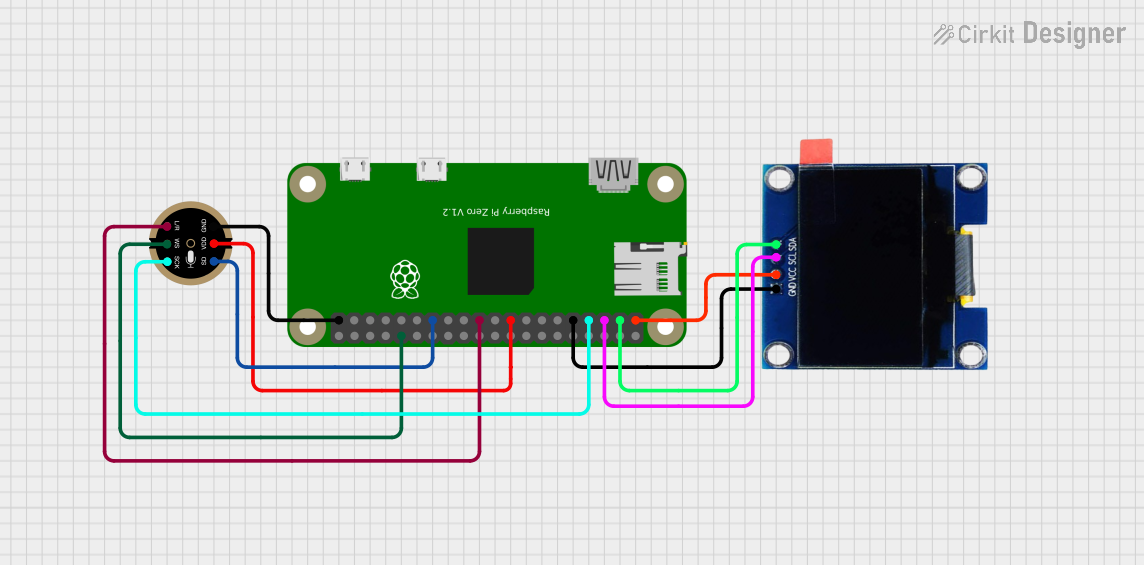
Circuit Documentation
Summary of the Circuit
This circuit integrates a Raspberry Pi Zero with an INMP441 MEMS microphone and an OLED 1.3" display. The Raspberry Pi Zero serves as the central processing unit, controlling the OLED display via I2C communication and interfacing with the INMP441 microphone to capture audio data. The OLED display is powered by the 3.3V supply from the Raspberry Pi Zero and communicates with it through the SDA and SCL lines. The INMP441 microphone is also powered by the 3.3V supply and is connected to the Raspberry Pi Zero through I2S interface pins for audio data transmission.
Component List
Raspberry Pi Zero
- Description: A low-cost, compact version of the Raspberry Pi featuring a Broadcom BCM2835 SoC, with a 1GHz ARM11 core and on-board wireless LAN/Bluetooth.
- Purpose: Acts as the main controller for the circuit, handling data processing, I2C communication with the OLED display, and I2S communication with the INMP441 microphone.
INMP441 Front Mic
- Description: A high-performance, low power, digital output, omnidirectional MEMS microphone with an I2S interface.
- Purpose: Captures audio signals to be processed by the Raspberry Pi Zero.
OLED 1.3"
- Description: A small OLED display with 128x64 pixel resolution, capable of displaying graphics and text.
- Purpose: Provides a visual interface for the user, displaying information processed by the Raspberry Pi Zero.
Wiring Details
Raspberry Pi Zero
- 3.3V to OLED 1.3" VCC and INMP441 VDD
- GND to OLED 1.3" GND and INMP441 GND
- GPIO2 (SDA) to OLED 1.3" SDA
- GPIO3 (SCL) to OLED 1.3" SCL
- GPIO4 to INMP441 SCK
- GPIO9 to INMP441 L/R
- ID_SD to INMP441 SD
- GPIO12 to INMP441 WS
INMP441 Front Mic
- VDD to Raspberry Pi Zero 3.3V
- GND to Raspberry Pi Zero GND
- SCK to Raspberry Pi Zero GPIO4
- SD to Raspberry Pi Zero ID_SD
- WS to Raspberry Pi Zero GPIO12
- L/R to Raspberry Pi Zero GPIO9
OLED 1.3"
- VCC to Raspberry Pi Zero 3.3V
- GND to Raspberry Pi Zero GND
- SCL to Raspberry Pi Zero GPIO3 (SCL)
- SDA to Raspberry Pi Zero GPIO2 (SDA)
Documented Code
No code has been provided for the microcontrollers in the circuit. The Raspberry Pi Zero would typically be programmed using a high-level language such as Python, C++, or using shell scripts, depending on the functionality required. The code would handle initializing and communicating with the OLED display and the INMP441 microphone, as well as processing and responding to the data received from these peripherals.
Since no specific code has been provided, we cannot document the code for this circuit. However, when the code becomes available, it should be included in this section with appropriate comments and explanations for each function and routine.