
Circuit Documentation
Summary
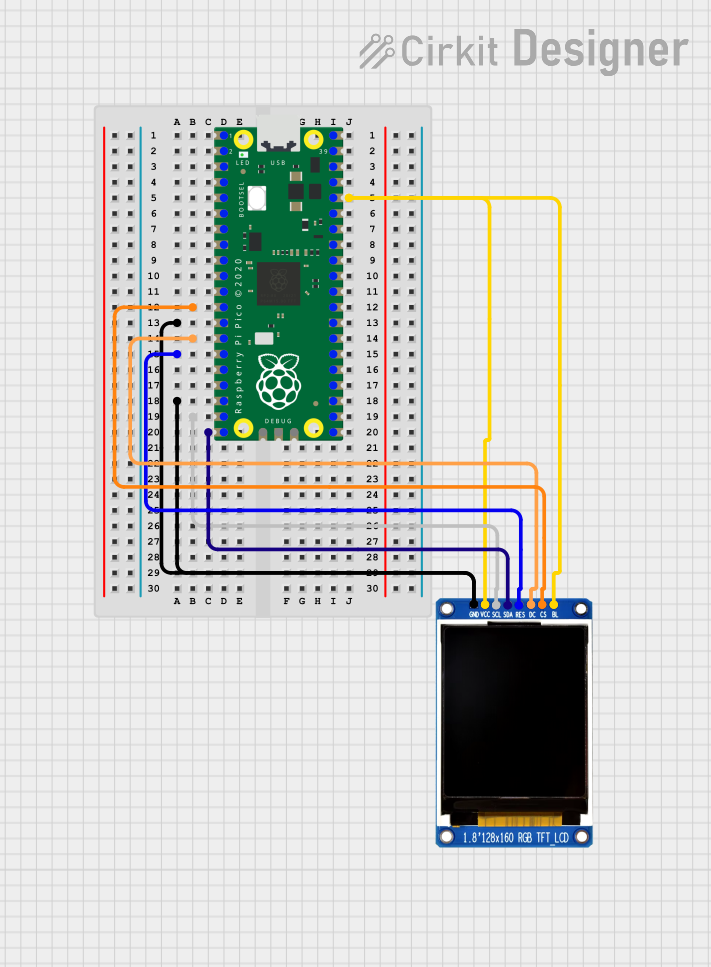
This document provides a detailed overview of a circuit that integrates a Raspberry Pi Pico microcontroller with a China ST7735S 160x128 display module. The Raspberry Pi Pico is responsible for controlling the display module, which is capable of showing graphics and text. The circuit connections are established to power the display, control its backlight, and facilitate communication between the microcontroller and the display via SPI (Serial Peripheral Interface).
Component List
Raspberry Pi Pico
- Description: A microcontroller board based on the RP2040 microcontroller chip.
- Pins: 43 GPIO pins, including SPI, UART, I2C, and digital/analog pins.
- Purpose: Acts as the main controller for the circuit, interfacing with the display module.
China ST7735S 160x128 Display Module
- Description: A 1.8-inch TFT LCD display module with a resolution of 160x128 pixels.
- Pins: GND, VCC, SCL, SDA, RES, DC, CS, BL.
- Purpose: Displays the output from the Raspberry Pi Pico.
Wiring Details
Raspberry Pi Pico to China ST7735S 160x128 Display Module
VCC (Power)
- Raspberry Pi Pico
pin 36to Display ModuleVCC - Raspberry Pi Pico
pin 36to Display ModuleBL(Backlight)
- Raspberry Pi Pico
Ground (GND)
- Raspberry Pi Pico
pin 13to Display ModuleGND - Raspberry Pi Pico
pin 18(Additional Ground)
- Raspberry Pi Pico
SPI Communication
- Raspberry Pi Pico
pin 19(SCL) to Display ModuleSCL - Raspberry Pi Pico
pin 20(SDA) to Display ModuleSDA
- Raspberry Pi Pico
Control Signals
- Raspberry Pi Pico
pin 12to Display ModuleCS(Chip Select) - Raspberry Pi Pico
pin 14to Display ModuleDC(Data/Command) - Raspberry Pi Pico
pin 15to Display ModuleRES(Reset)
- Raspberry Pi Pico
Documented Code
Raspberry Pi Pico - sketch.ino
void setup() {
  // put your setup code here, to run once:

}

void loop() {
  // put your main code here, to run repeatedly:

}
Raspberry Pi Pico - documentation.txt
(No additional documentation provided)
This concludes the documentation for the circuit integrating the Raspberry Pi Pico with the China ST7735S 160x128 display module. The code provided is a template and should be expanded to initialize the display and implement the desired functionality.