
ESP32-Based Smart Plant Monitoring and Watering System with Soil Moisture Sensing and Wi-Fi Control
View and Edit Project In Cirkit Designer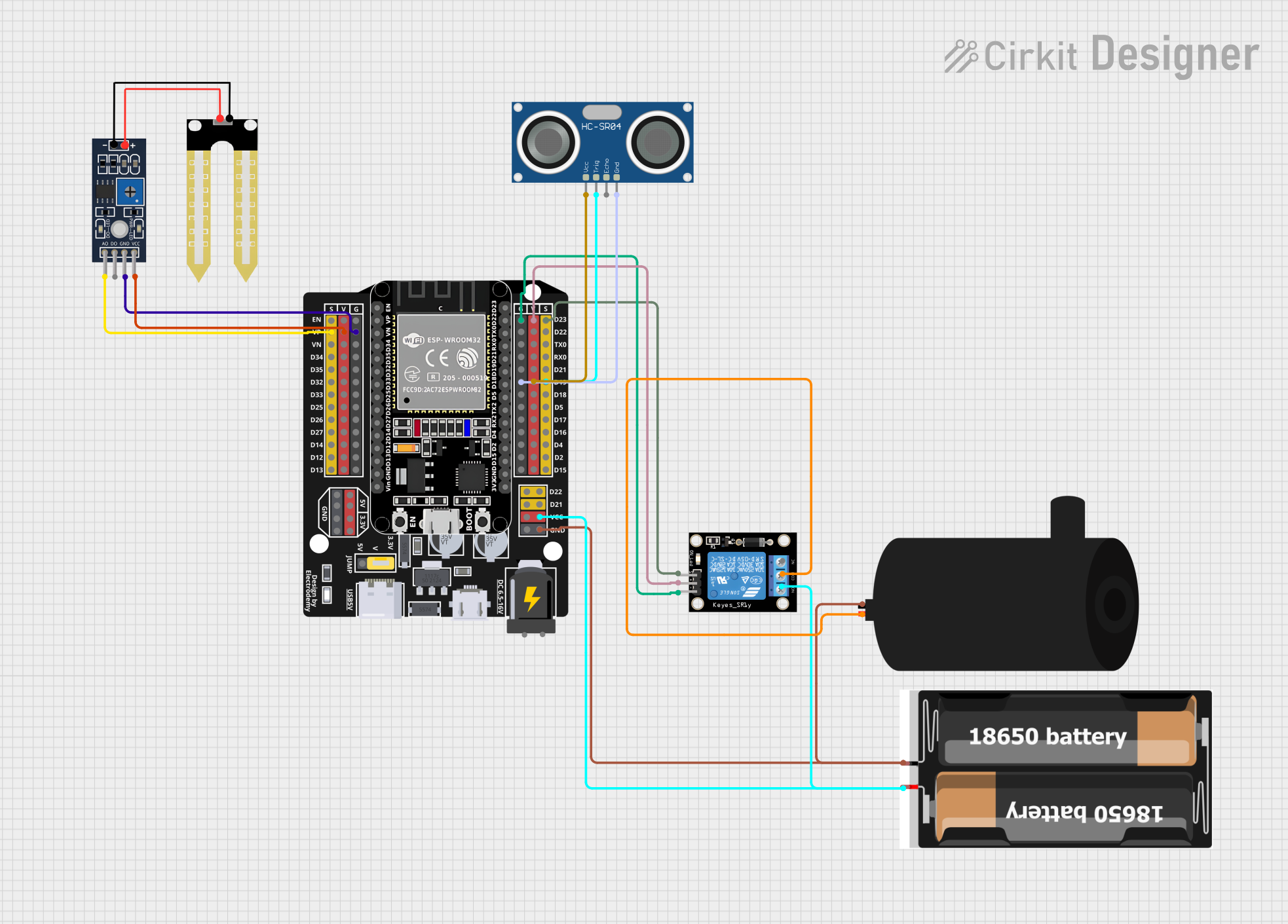
Circuit Documentation
Summary
This circuit is designed to monitor plant health by measuring soil moisture and environmental conditions. It uses an ESP32 microcontroller to read data from a humidity sensor and an ultrasonic sensor, control a water pump via a relay module, and communicate with a Blynk application for remote monitoring. The system is powered by a 2x 18650 battery pack.
Component List
Humidity Sensor (YL-69)
- Measures the moisture level in the soil.
- Pins: A0 (Analog Output), D0 (Digital Output), GND (Ground), VCC (Power Supply).
Water Pump
- Pumps water to the plant when activated.
- Pins: Positive (Power Supply), Negative (Ground).
Relay Module (1 Channel)
- Acts as an electrically operated switch to control the water pump.
- Pins: S (Signal), 5V (Power Supply), GND (Ground), NC (Normally Closed), COM (Common), NO (Normally Open).
ESP32 - Expansion Board
- The main microcontroller unit that controls the sensors, relay, and communicates with the Blynk app.
- Pins: Numerous GPIOs, Power (3.3V, 5V), Ground (G), Enable (EN), Voltage (VP, VN), Serial (TX0, RX0).
2x 18650 Battery Pack
- Provides power to the circuit.
- Pins: VCC (Power Supply), GND (Ground).
HC-SR04 Ultrasonic Sensor
- Measures the distance to an object, used here for additional plant monitoring.
- Pins: VCC (Power Supply), TRIG (Trigger), ECHO (Echo), GND (Ground).
Wiring Details
Humidity Sensor (YL-69)
- A0 -> ESP32 VP (Analog Pin)
- VCC -> ESP32 V (Power Supply)
- GND -> ESP32 G (Ground)
Water Pump
- Positive -> Relay Module COM (Common)
- Negative -> ESP32 G (Ground)
Relay Module (1 Channel)
- S -> ESP32 D23 (Digital Pin)
- 5V -> ESP32 V (Power Supply)
- GND -> ESP32 G (Ground)
- NO -> ESP32 VCC (Power Supply)
- COM -> Water Pump Positive
ESP32 - Expansion Board
- VP -> Humidity Sensor A0
- D23 -> Relay Module S
- D19 -> HC-SR04 TRIG
- VCC -> 2x 18650 VCC
- G -> Water Pump Negative, Relay Module GND, HC-SR04 GND, Humidity Sensor GND
- V -> Humidity Sensor VCC, Relay Module 5V, HC-SR04 VCC
2x 18650 Battery Pack
- VCC -> ESP32 VCC
- GND -> ESP32 G
HC-SR04 Ultrasonic Sensor
- VCC -> ESP32 V (Power Supply)
- TRIG -> ESP32 D19 (Digital Pin)
- ECHO -> Not connected in this configuration
- GND -> ESP32 G (Ground)
Documented Code
#define BLYNK_TEMPLATE_ID "TMPL6rlQf3Kxk"
#define BLYNK_TEMPLATE_NAME "plant monitoring sistem"

/* Connections
Relay: GPIO23
Btn:   GPIO27
Soil:  GPIO36 (VP)
PIR:   GPIO18
SDA:   GPIO21
SCL:   GPIO22
Temp:  GPIO19
*/

// Include the library files
#include <LiquidCrystal_I2C.h>
#define BLYNK_PRINT Serial
#include <WiFi.h>
#include <BlynkSimpleEsp32.h>
#include <DHT.h>

// Initialize the LCD display
LiquidCrystal_I2C lcd(0x3F, 16, 2);

char auth[] = "YourAuthToken";  // Enter your Blynk Auth token
char ssid[] = "YourSSID";  // Enter your WIFI SSID
char pass[] = "YourPassword";  // Enter your WIFI Password

DHT dht(19, DHT22);  // (DHT sensor pin, sensor type) GPIO19 DHT22 Temperature Sensor
BlynkTimer timer;

// Define component pins
#define soil 36  // GPIO36 (VP) for Soil Moisture Sensor
#define PIR 18   // GPIO18 for PIR Motion Sensor
int PIR_ToggleValue;

void checkPhysicalButton();
int relay1State = LOW;
int pushButton1State = HIGH;
#define RELAY_PIN_1 23       // GPIO23 for Relay
#define PUSH_BUTTON_1 27     // GPIO27 for Button
#define VPIN_BUTTON_1 V12

// Create three variables for pressure
double T, P;
char status;

void setup() {
  Serial.begin(9600);
  lcd.begin(16, 2);  // Initialize the LCD with 16 columns and 2 rows
  lcd.backlight();
  pinMode(PIR, INPUT);

  pinMode(RELAY_PIN_1, OUTPUT);
  digitalWrite(RELAY_PIN_1, LOW);
  pinMode(PUSH_BUTTON_1, INPUT_PULLUP);
  digitalWrite(RELAY_PIN_1, relay1State);

  Blynk.begin(auth, ssid, pass, "blynk.cloud", 80);
  dht.begin();

  lcd.setCursor(0, 0);
  lcd.print("  Initializing  ");
  for (int a = 5; a <= 10; a++) {
    lcd.setCursor(a, 1);
    lcd.print(".");
    delay(500);
  }
  lcd.clear();
  lcd.setCursor(11, 1);
  lcd.print("W:OFF");

  // Call the function
  timer.setInterval(100L, soilMoistureSensor);
  timer.setInterval(100L, DHT22sensor);
  timer.setInterval(500L, checkPhysicalButton);
}

// Get the DHT22 sensor values
void DHT22sensor() {
  float h = dht.readHumidity();
  float t = dht.readTemperature();

  if (isnan(h) || isnan(t)) {
    Serial.println("Failed to read from DHT sensor!");
    return;
  }
  Blynk.virtualWrite(V0, t);
  Blynk.virtualWrite(V1, h);

  lcd.setCursor(0, 0);
  lcd.print("T:");
  lcd.print(t);

  lcd.setCursor(8, 0);
  lcd.print("H:");
  lcd.print(h);
}

// Get the soil moisture values
void soilMoistureSensor() {
  int value = analogRead(soil);
  value = map(value, 0, 4095, 0, 100);  // ESP32 has a 12-bit ADC
  value = (value - 100) * -1;

  Blynk.virtualWrite(V3, value);
  lcd.setCursor(0, 1);
  lcd.print("S:");
  lcd.print(value);
  lcd.print(" ");
}

// Get the PIR sensor values
void PIRsensor() {
  bool value = digitalRead(PIR);
  if (value) {
    Blynk.logEvent("pirmotion", "WARNING! Motion Detected!"); // Enter your Event Name
    WidgetLED LED(V5);
    LED.on();
  } else {
    WidgetLED LED(V5);
    LED.off();
  }
}

BLYNK_WRITE(V6)
{
 PIR_ToggleValue = param.asInt();
}

BLYNK_CONNECTED() {
  // Request the latest state from the server
  Blynk.syncVirtual(VPIN_BUTTON_1);
}

BLYNK_WRITE(VPIN_BUTTON_1) {
  relay1State = param.asInt();
  digitalWrite(RELAY_PIN_1, relay1State);
}

void checkPhysicalButton() {
  if (digitalRead(PUSH_BUTTON_1) == LOW) {
    // pushButton1State is used to avoid sequential toggles
    if (pushButton1State != LOW) {
      // Toggle Relay state
      relay1State = !relay1State;
      digitalWrite(RELAY_PIN_1, relay1State);
      // Update Button Widget
      Blynk.virtualWrite(VPIN_BUTTON_1, relay1State);
    }
    pushButton1State = LOW;
  } else {
    pushButton1State = HIGH;
  }
}

void loop() {
  if (PIR_ToggleValue == 1) {
    lcd.setCursor(5, 1);
    lcd.print("M:ON ");
    PIRsensor();
  } else {
    lcd.setCursor(5, 1);
    lcd.print("M:OFF");
    WidgetLED LED(V5);
    LED.off();
  }

  if (relay1State == HIGH) {
    lcd.setCursor(11, 1);
    lcd.print("W:ON ");
  } else if (relay1State == LOW) {
    lcd.setCursor(11, 1);
    lcd.print("W:OFF");
  }

  Blynk.run();  // Run the Blynk library
  timer.run();  // Run the Blynk timer
}
Note: Replace YourAuthToken, YourSSID, and YourPassword with your actual Blynk Auth token, WiFi SSID, and WiFi password, respectively.