
Arduino UNO-Based Robotic System with Ultrasonic Sensor and Motor Control
View and Edit Project In Cirkit Designer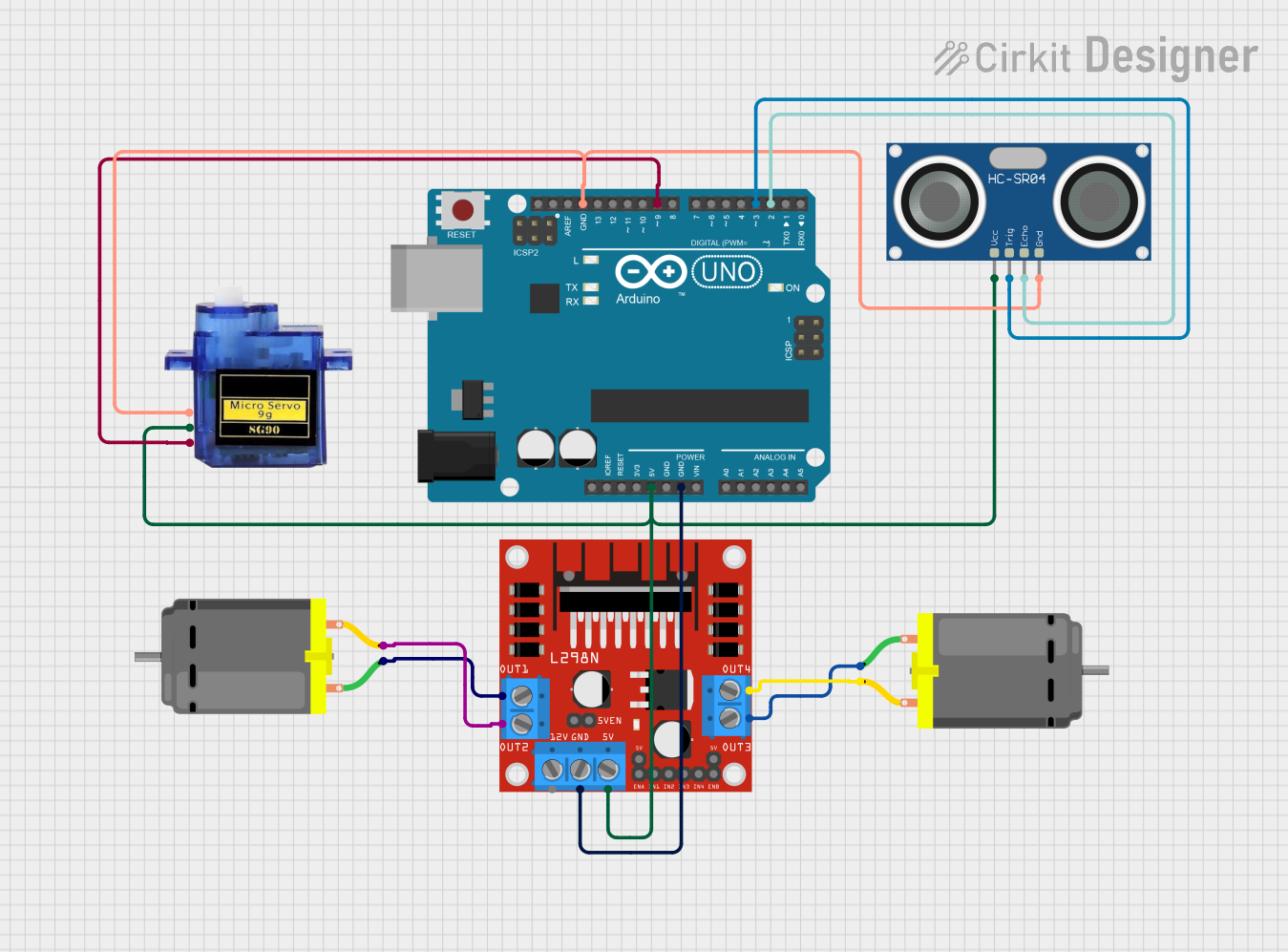
Circuit Documentation
Summary
This circuit involves an Arduino UNO microcontroller controlling two DC motors, a micro servo motor, and an HC-SR04 ultrasonic sensor. The DC motors are driven by an L298N motor driver. The ultrasonic sensor measures distance, and based on the distance detected, an LED will blink for a specified duration. The servo motor is controlled directly by the Arduino and moves to various angles as specified in the code.
Component List
Arduino UNO
- Description: A microcontroller board based on the ATmega328P.
- Pins: UNUSED, IOREF, Reset, 3.3V, 5V, GND, Vin, A0, A1, A2, A3, A4, A5, SCL, SDA, AREF, D13, D12, D11, D10, D9, D8, D7, D6, D5, D4, D3, D2, D1, D0
Micro servo 9G
- Description: A small servo motor used for precise control of angular position.
- Pins: GND, +5V, PWM
DC Motor
- Description: A motor that converts electrical energy into mechanical motion.
- Pins: pin 1, pin 2
L298N DC motor driver
- Description: A dual H-bridge motor driver that allows control of two DC motors.
- Pins: OUT1, OUT2, 12V, GND, 5V, OUT3, OUT4, 5V-ENA-JMP-I, 5V-ENA-JMP-O, +5V-J1, +5V-J2, ENA, IN1, IN2, IN3, IN4, ENB
HC-SR04 Ultrasonic Sensor
- Description: A sensor that measures distance by using ultrasonic waves.
- Pins: VCC, TRIG, ECHO, GND
Wiring Details
Arduino UNO
5V connected to:
- L298N DC motor driver (5V)
- HC-SR04 Ultrasonic Sensor (VCC)
- Micro servo 9G (+5V)
GND connected to:
- L298N DC motor driver (GND)
- HC-SR04 Ultrasonic Sensor (GND)
- Micro servo 9G (GND)
D9 connected to:
- Micro servo 9G (PWM)
D3 connected to:
- HC-SR04 Ultrasonic Sensor (TRIG)
D2 connected to:
- HC-SR04 Ultrasonic Sensor (ECHO)
Micro servo 9G
GND connected to:
- Arduino UNO (GND)
+5V connected to:
- Arduino UNO (5V)
PWM connected to:
- Arduino UNO (D9)
DC Motor 1
pin 1 connected to:
- L298N DC motor driver (OUT1)
pin 2 connected to:
- L298N DC motor driver (OUT2)
DC Motor 2
pin 1 connected to:
- L298N DC motor driver (OUT3)
pin 2 connected to:
- L298N DC motor driver (OUT4)
L298N DC motor driver
5V connected to:
- Arduino UNO (5V)
GND connected to:
- Arduino UNO (GND)
OUT1 connected to:
- DC Motor 1 (pin 1)
OUT2 connected to:
- DC Motor 1 (pin 2)
OUT3 connected to:
- DC Motor 2 (pin 1)
OUT4 connected to:
- DC Motor 2 (pin 2)
HC-SR04 Ultrasonic Sensor
VCC connected to:
- Arduino UNO (5V)
GND connected to:
- Arduino UNO (GND)
TRIG connected to:
- Arduino UNO (D3)
ECHO connected to:
- Arduino UNO (D2)
Code Documentation
/*
 * This Arduino sketch controls two DC motors, a servo motor, and an ultrasonic
 * sensor. The DC motors are driven by an L298N motor driver, and the servo
 * motor is controlled directly by the Arduino. The ultrasonic sensor measures
 * distance, and if an object is detected within 6-8 cm, an LED will blink for 3
 * seconds. If an object is detected within 8-12 cm, the LED will blink for 1
 * second. The code performs the following sequence:
 * 1. Both motors move forward for 2 seconds.
 * 2. Both motors stop for 0.5 seconds.
 * 3. Both motors move in reverse for 2 seconds.
 * 4. Both motors stop for 0.5 seconds.
 * 5. Motor 1 moves forward and Motor 2 moves in reverse for 2 seconds.
 * 6. Both motors stop, and the sequence repeats.
 * 7. The servo motor moves to 25 degrees, then back to 0 degrees.
 * 8. The servo motor moves to 90 degrees, then back to 0 degrees.
 * 9. The servo motor moves to 155 degrees, then back to 0 degrees.
 */

#include <Servo.h>

// Pin definitions
const int motor1Pin1 = 7; // IN1 on L298N
const int motor1Pin2 = 8; // IN2 on L298N
const int motor2Pin1 = 9; // IN3 on L298N
const int motor2Pin2 = 10; // IN4 on L298N
const int enablePinA = 5; // ENA on L298N
const int enablePinB = 6; // ENB on L298N
const int servoPin = 9; // Servo PWM pin
const int trigPin = 3; // TRIG pin on HC-SR04
const int echoPin = 2; // ECHO pin on HC-SR04
const int ledPin = 13; // LED pin

Servo myServo;

void setup() {
  // Set motor pins as outputs
  pinMode(motor1Pin1, OUTPUT);
  pinMode(motor1Pin2, OUTPUT);
  pinMode(motor2Pin1, OUTPUT);
  pinMode(motor2Pin2, OUTPUT);
  pinMode(enablePinA, OUTPUT);
  pinMode(enablePinB, OUTPUT);
  pinMode(trigPin, OUTPUT);
  pinMode(echoPin, INPUT);
  pinMode(ledPin, OUTPUT);

  // Initialize servo
  myServo.attach(servoPin);

  // Enable motors
  digitalWrite(enablePinA, HIGH);
  digitalWrite(enablePinB, HIGH);
}

void loop() {
  // Move both motors forward
  digitalWrite(motor1Pin1, HIGH);
  digitalWrite(motor1Pin2, LOW);
  digitalWrite(motor2Pin1, HIGH);
  digitalWrite(motor2Pin2, LOW);
  delay(2000);

  // Stop both motors
  digitalWrite(motor1Pin1, LOW);
  digitalWrite(motor1Pin2, LOW);
  digitalWrite(motor2Pin1, LOW);
  digitalWrite(motor2Pin2, LOW);
  delay(500);

  // Move both motors in reverse
  digitalWrite(motor1Pin1, LOW);
  digitalWrite(motor1Pin2, HIGH);
  digitalWrite(motor2Pin1, LOW);
  digitalWrite(motor2Pin2, HIGH);
  delay(2000);

  // Stop both motors
  digitalWrite(motor1Pin1, LOW);
  digitalWrite(motor1Pin2, LOW);
  digitalWrite(motor2Pin1, LOW);
  digitalWrite(motor2Pin2, LOW);
  delay(500);

  // Motor 1 forward, Motor 2 reverse
  digitalWrite(motor1Pin1, HIGH);
  digitalWrite(motor1Pin2, LOW);
  digitalWrite(motor2Pin1, LOW);
  digitalWrite(motor2Pin2, HIGH);
  delay(2000);

  // Stop both motors
  digitalWrite(motor1Pin1, LOW);
  digitalWrite(motor1Pin2, LOW);
  digitalWrite(motor2Pin1, LOW);
  digitalWrite(motor2Pin2, LOW);
  delay(500);

  // Measure distance
  long duration, distance;
  digitalWrite(trigPin, LOW);
  delayMicroseconds(2);
  digitalWrite(trigPin, HIGH);
  delayMicroseconds(10);
  digitalWrite(trigPin, LOW);
  duration = pulseIn(echoPin, HIGH);
  distance = (duration / 2) / 29.1;

  // If distance is less than 6-8 cm, blink LED for 3 seconds
  if (distance >= 6 && distance < 8) {
    for (int i = 0; i < 6; i++) {
      digitalWrite(ledPin, HIGH);
      delay(