
Arduino UNO Controlled Water Pump with 5V Relay and Battery Power
View and Edit Project In Cirkit Designer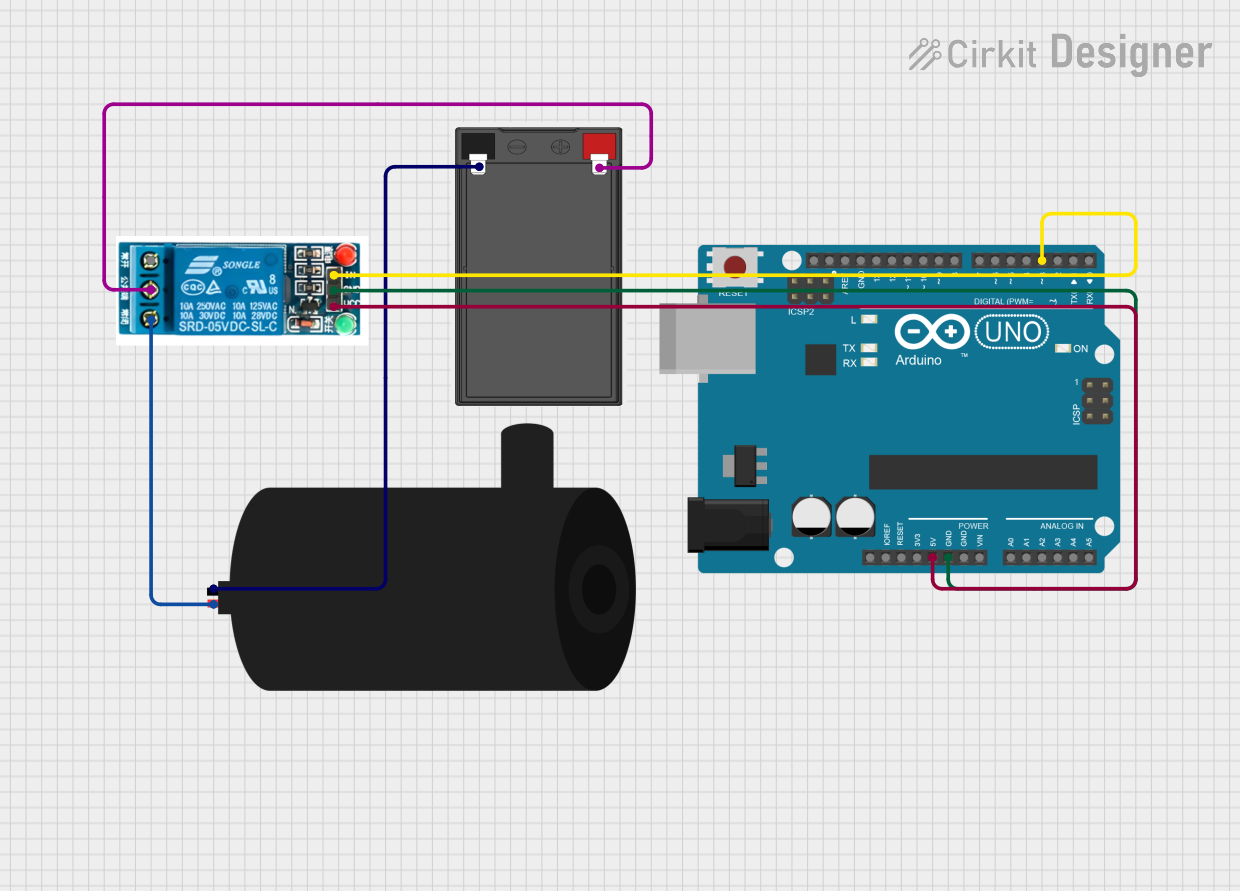
Circuit Documentation
Summary
This circuit is designed to control a water pump using a 5V relay and an Arduino UNO. The relay is toggled on and off every second by the Arduino, which in turn controls the water pump. The power for the circuit is supplied by a battery.
Component List
5V Relay
- Pins: Normally Open, Common terminal, Normally Closed, In, GND, VCC
- Description: A relay that operates at 5V to control high-power devices.
- Purpose in Circuit: To control the water pump based on signals from the Arduino.
Battery
- Pins: -, +
- Description: A power source for the circuit.
- Purpose in Circuit: To provide power to the water pump and relay.
Water Pump
- Pins: positive, negative
- Description: A pump used to move water.
- Purpose in Circuit: The device being controlled by the relay.
Arduino UNO
- Pins: UNUSED, IOREF, Reset, 3.3V, 5V, GND, Vin, A0, A1, A2, A3, A4, A5, SCL, SDA, AREF, D13, D12, D11, D10, D9, D8, D7, D6, D5, D4, D3, D2, D1, D0
- Description: A microcontroller board based on the ATmega328P.
- Purpose in Circuit: To control the relay based on the programmed code.
Wiring Details
5V Relay
- Common terminal is connected to the + pin of the Battery.
- Normally Closed is connected to the positive pin of the Water Pump.
- In is connected to the D3 pin of the Arduino UNO.
- GND is connected to the GND pin of the Arduino UNO.
- VCC is connected to the 5V pin of the Arduino UNO.
Battery
- + is connected to the Common terminal of the 5V Relay.
- - is connected to the negative pin of the Water Pump.
Water Pump
- positive is connected to the Normally Closed pin of the 5V Relay.
- negative is connected to the - pin of the Battery.
Arduino UNO
- D3 is connected to the In pin of the 5V Relay.
- GND is connected to the GND pin of the 5V Relay.
- 5V is connected to the VCC pin of the 5V Relay.
Code Documentation
/*
 * This Arduino sketch controls a 5V relay connected to pin D3 of the Arduino UNO.
 * The relay is toggled on and off every 1 second, causing the connected water pump
 * to turn on and off at the same interval.
 */

const int relayPin = 3; // Pin connected to the relay

void setup() {
  pinMode(relayPin, OUTPUT); // Set relay pin as an output
}

void loop() {
  digitalWrite(relayPin, HIGH); // Turn relay on
  delay(1000); // Wait for 1 second
  digitalWrite(relayPin, LOW); // Turn relay off
  delay(1000); // Wait for 1 second
}
- File Name: sketch.ino
- Description: This code sets up the Arduino to control the relay connected to pin D3. The relay is turned on and off every second, which in turn controls the water pump.