
ESP8266 Fitness Band with OLED Display and Heart Rate Monitoring
View and Edit Project In Cirkit Designer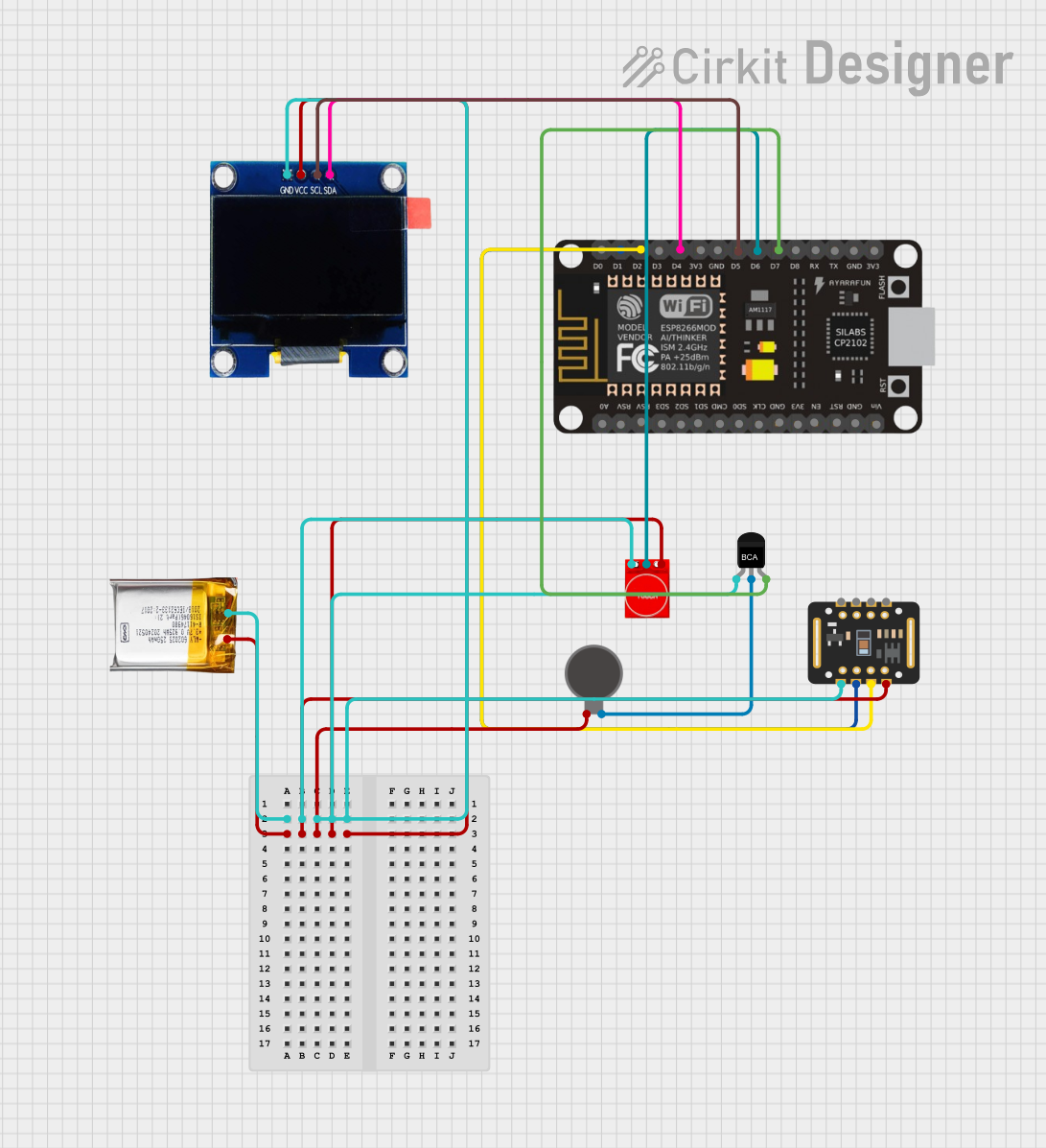
Circuit Documentation
Summary
This document provides a detailed overview of a fitness band circuit. The circuit includes an ESP8266 NodeMCU microcontroller, an OLED display, a MAX30102 heart rate sensor, a touch sensor, a vibration motor, an NPN transistor, and a 3.7V LiPo battery. The microcontroller is programmed to display heart rate and workout information on the OLED screen and control the vibration motor based on touch sensor input.
Component List
OLED 1.3"
- Description: 1.3-inch OLED display
- Pins: GND, VCC, SCL, SDA
ESP8266 NodeMCU
- Description: Wi-Fi enabled microcontroller
- Pins: D0, D1, D2, D3, D4, 3V3, GND, D5, D6, D7, D8, RX, TX, A0, RSV, SD3, SD2, SD1, CMD, SD0, CLK, EN, RST, VIN
3.7V LiPo
- Description: 3.7V Lithium Polymer battery
- Pins: +Ve, GND
Vibration Motor
- Description: Small vibration motor
- Pins: +, -
Touch Sensor TTP233
- Description: Capacitive touch sensor
- Pins: GND, I/O, VCC
MAX30102
- Description: Heart rate and SpO2 sensor
- Pins: VIN, SDA, SCL, GND, RD, IRD, INT
NPN Transistor
- Description: General-purpose NPN transistor
- Pins: E, C, B
Wiring Details
OLED 1.3"
- GND: Connected to GND of 3.7V LiPo
- VCC: Connected to +Ve of 3.7V LiPo
- SCL: Connected to D5 of ESP8266 NodeMCU
- SDA: Connected to D4 of ESP8266 NodeMCU
ESP8266 NodeMCU
- D5: Connected to SCL of OLED 1.3"
- D4: Connected to SDA of OLED 1.3"
- D1: Connected to SCL of MAX30102
- D2: Connected to SDA of MAX30102
- D6: Connected to I/O of Touch Sensor TTP233
- D7: Connected to B of NPN Transistor
3.7V LiPo
- GND: Connected to GND of NPN Transistor, GND of MAX30102, GND of Touch Sensor TTP233, and GND of OLED 1.3"
- +Ve: Connected to + of Vibration Motor, VIN of MAX30102, VCC of Touch Sensor TTP233, and VCC of OLED 1.3"
Vibration Motor
- +: Connected to +Ve of 3.7V LiPo
- -: Connected to C of NPN Transistor
Touch Sensor TTP233
- GND: Connected to GND of 3.7V LiPo
- I/O: Connected to D6 of ESP8266 NodeMCU
- VCC: Connected to +Ve of 3.7V LiPo
MAX30102
- VIN: Connected to +Ve of 3.7V LiPo
- SDA: Connected to D2 of ESP8266 NodeMCU
- SCL: Connected to D1 of ESP8266 NodeMCU
- GND: Connected to GND of 3.7V LiPo
NPN Transistor
- E: Connected to GND of 3.7V LiPo
- C: Connected to - of Vibration Motor
- B: Connected to D7 of ESP8266 NodeMCU
Documented Code
#include <Wire.h>
#include <Adafruit_Sensor.h>
#include <MAX30105.h>
#include <Adafruit_SSD1306.h>
#include <Adafruit_GFX.h>

#define SCREEN_WIDTH 128
#define SCREEN_HEIGHT 64
#define OLED_RESET    -1

MAX30105 particleSensor;
Adafruit_SSD1306 display(SCREEN_WIDTH, SCREEN_HEIGHT, &Wire, OLED_RESET);

#define TOUCH_PIN D6 // Touch sensor input
#define VIBRATION_PIN D7 // Vibration motor control pin

int workoutSets = 5; // Predefined number of sets for the workout
int workoutReps = 10; // Predefined number of reps for each set

void setup() {
  Serial.begin(115200);

  // Initialize sensor and OLED
  Wire.begin();
  particleSensor.begin(Wire, I2C_SPEED_FAST);
  display.begin(SSD1306_I2C_ADDRESS, OLED_RESET);
  display.display();

  // Set up touch sensor pin
  pinMode(TOUCH_PIN, INPUT);
  pinMode(VIBRATION_PIN, OUTPUT);

  // Display welcome message
  display.clearDisplay();
  display.setTextSize(1);
  display.setTextColor(SSD1306_WHITE);
  display.setCursor(0, 0);
  display.print("Fitness Band Ready");
  display.display();
}

void loop() {
  // Read the touch sensor
  if (digitalRead(TOUCH_PIN) == HIGH) {
    startWorkout();
  }

  // Update the sensor data (e.g., heart rate)
  int heartRate = getHeartRate();

  // Update display with workout and sensor info
  display.clearDisplay();
  display.setCursor(0, 0);
  display.print("Heart Rate: ");
  display.print(heartRate);
  display.print(" BPM");
  display.setCursor(0, 10);
  display.print("Workout Sets: ");
  display.print(workoutSets);
  display.setCursor(0, 20);
  display.print("Reps per Set: ");
  display.print(workoutReps);
  display.display();

  delay(500);
}

void startWorkout() {
  // Start workout tracking
  for (int i = 0; i < workoutSets; i++) {
    // Display each set
    display.clearDisplay();
    display.setCursor(0, 0);
    display.print("Set ");
    display.print(i + 1);
    display.print(" / ");
    display.print(workoutSets);
    display.display();

    // Vibration alert at start
    digitalWrite(VIBRATION_PIN, HIGH);
    delay(500); // Vibration for 0.5s
    digitalWrite(VIBRATION_PIN, LOW);

    // Wait for user to complete reps
    for (int j = 0; j < workoutReps; j++) {
      // Display rep number
      display.setCursor(0, 10);
      display.print("Rep ");
      display.print(j + 1);
      display.print(" / ");
      display.print(workoutReps);
      display.display();

      delay(1000); // Wait for user to perform rep (1s per rep)
    }

    // Rest after each set (e.g., 60 seconds)
    display.setCursor(0, 20);
    display.print("Rest: 60s");
    display.display();
    delay(60000); // Rest for 60 seconds
  }

  // End of workout
  display.clearDisplay();
  display.setCursor(0, 0);
  display.print("Workout Complete!");
  display.display();
  delay(2000); // Show complete message for 2 seconds
}

int getHeartRate() {
  // Simulated heart rate for now
  return 72;
}
This code initializes the OLED display and the MAX30102 sensor, sets up the touch sensor and vibration motor, and provides functionality to start a workout session when the touch sensor is activated. The heart rate is simulated and displayed along with workout information on the OLED screen.