
Circuit Documentation
Summary of the Circuit
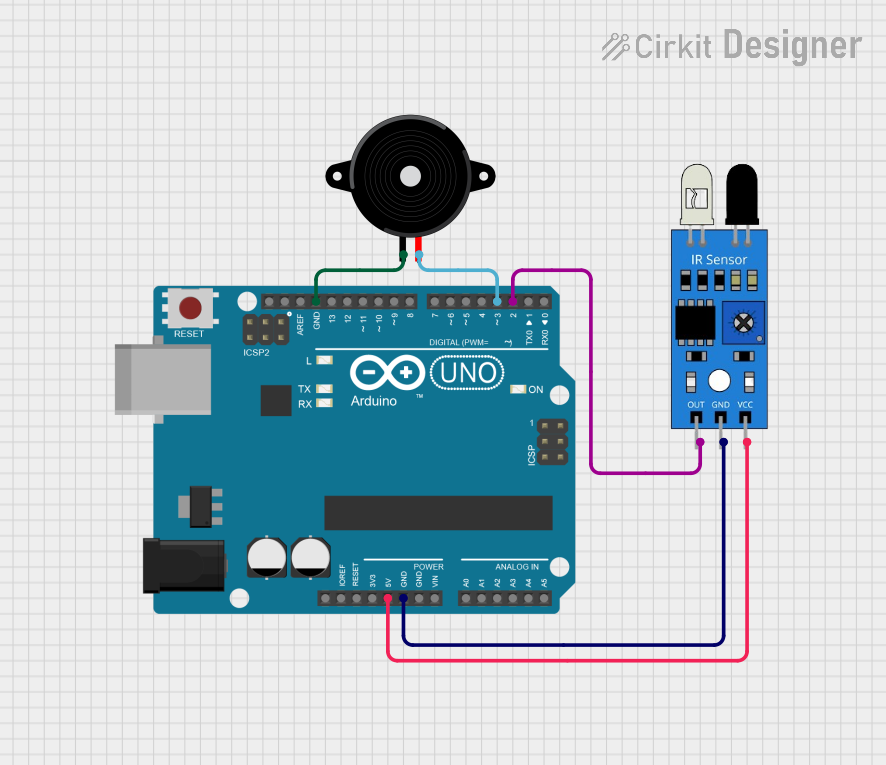
The circuit in question consists of an Arduino UNO microcontroller, an infrared (IR) sensor, and a Piezo Speaker. The Arduino UNO serves as the central processing unit, controlling the behavior of the IR sensor and the Piezo Speaker. The IR sensor is used to detect the presence or absence of objects based on the infrared light reflecting off them. The Piezo Speaker is an output device that can generate sound at different frequencies.
Component List
Arduino UNO
- Description: A microcontroller board based on the ATmega328P.
- Purpose: Acts as the central processing unit for the circuit, interfacing with the IR sensor and driving the Piezo Speaker.
- Pins: UNUSED, IOREF, Reset, 3.3V, 5V, GND, Vin, A0-A5, SCL, SDA, AREF, D0-D13.
IR Sensor
- Description: A sensor that detects infrared light to sense the presence of objects.
- Purpose: To provide input to the Arduino UNO based on the detection of objects.
- Pins: out, gnd, vcc.
Piezo Speaker
- Description: An electronic device that emits sound when an electric current is applied.
- Purpose: To produce an audible alert or signal in response to the IR sensor's detection.
- Pins: pin1, pin2.
Wiring Details
Arduino UNO
- 5V connected to IR Sensor vcc.
- GND connected to IR Sensor gnd and Piezo Speaker pin1.
- D2 connected to IR Sensor out.
- D3 connected to Piezo Speaker pin2.
IR Sensor
- vcc connected to Arduino UNO 5V.
- gnd connected to Arduino UNO GND.
- out connected to Arduino UNO D2.
Piezo Speaker
- pin1 connected to Arduino UNO GND.
- pin2 connected to Arduino UNO D3.
Documented Code
Arduino UNO Code (sketch.ino)
void setup() {
  // put your setup code here, to run once:

}

void loop() {
  // put your main code here, to run repeatedly:

}
Additional Notes
- The provided code is a template and does not contain any functional code specific to the operation of the IR sensor or the Piezo Speaker.
- The user is expected to write the necessary code to read the IR sensor output from pin D2 and to control the Piezo Speaker using pin D3.
- The documentation file associated with the Arduino UNO is empty and does not provide additional information.
This documentation provides an overview of the circuit components, their wiring, and the initial code setup. Further development of the code is required to achieve the desired functionality of the circuit.