
Arduino UNO-Based Smart Soil Moisture and Vibration Monitoring System with MPU6050
View and Edit Project In Cirkit Designer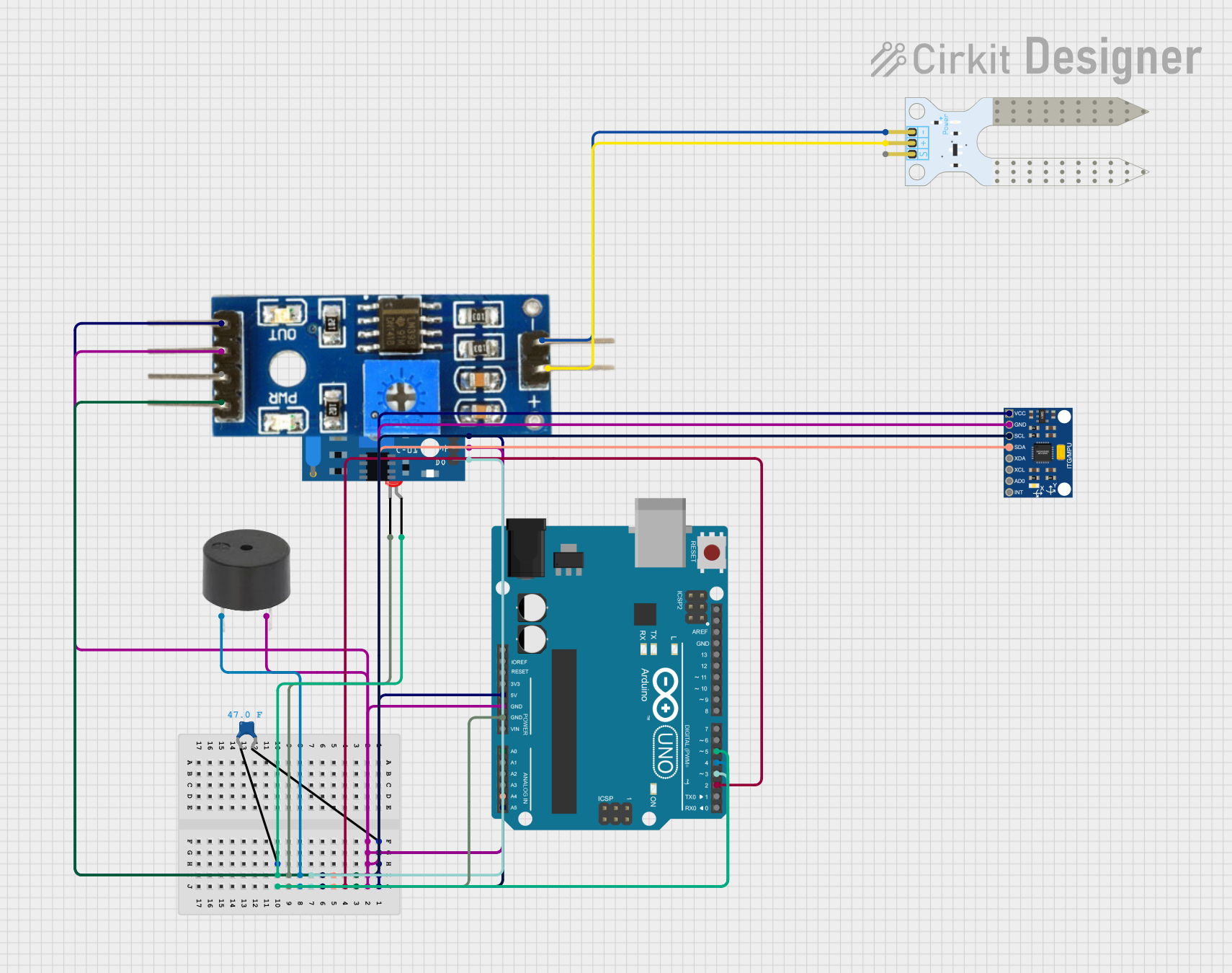
Circuit Documentation
Summary
This circuit integrates multiple sensors and actuators with an Arduino UNO microcontroller. The components include an MPU6050 accelerometer, a soil moisture sensor and module, a vibration sensor, a buzzer, and an LED. The Arduino UNO reads data from the sensors and controls the buzzer and LED based on the sensor inputs.
Component List
InvenSense MPU6050
- Description: 6-axis accelerometer and gyroscope sensor.
- Pins: VCC, GND, SCL, SDA, XDA, XCL, AD0, INT
LED: Two Pin (red)
- Description: Standard red LED.
- Pins: Cathode, Anode
Arduino UNO
- Description: Microcontroller board based on the ATmega328P.
- Pins: UNUSED, IOREF, Reset, 3.3V, 5V, GND, Vin, A0, A1, A2, A3, A4, A5, SCL, SDA, AREF, D13, D12, D11, D10, D9, D8, D7, D6, D5, D4, D3, D2, D1, D0
Soil Moisture Sensor
- Description: Sensor to measure soil moisture levels.
- Pins: VCC, GND, SIG
SW-420 Vibration Sensor
- Description: Vibration sensor module.
- Pins: VCC, Ground, Digital output
Buzzer
- Description: Simple piezoelectric buzzer.
- Pins: PIN, GND
Soil Moisture Module
- Description: Module to interface with the soil moisture sensor.
- Pins: Positive, Negative, Analog, Digital, Ground, VCC
Ceramic Capacitor
- Description: Capacitor with a capacitance of 47 Farads.
- Pins: Pin0, Pin1
Wiring Details
InvenSense MPU6050
- VCC: Connected to Arduino UNO 5V
- GND: Connected to Arduino UNO GND
- SCL: Connected to Arduino UNO A5
- SDA: Connected to Arduino UNO A4
LED: Two Pin (red)
- Cathode: Connected to Arduino UNO GND
- Anode: Connected to Ceramic Capacitor Pin0
Arduino UNO
- 5V: Connected to InvenSense MPU6050 VCC, SW-420 Vibration Sensor VCC, Soil Moisture Module VCC, Ceramic Capacitor Pin1
- GND: Connected to InvenSense MPU6050 GND, SW-420 Vibration Sensor Ground, Buzzer GND, Soil Moisture Module Ground, LED Cathode
- A0: Connected to Soil Moisture Module Analog
- A4: Connected to InvenSense MPU6050 SDA
- A5: Connected to InvenSense MPU6050 SCL
- D2: Not connected
- D3: Connected to SW-420 Vibration Sensor Digital output
- D4: Connected to Buzzer PIN
- D5: Connected to Ceramic Capacitor Pin0
- D6: Not connected
- D7: Not connected
- D8: Not connected
- D9: Not connected
- D10: Not connected
- D11: Not connected
- D12: Not connected
- D13: Not connected
Soil Moisture Sensor
- VCC: Connected to Soil Moisture Module Positive
- GND: Connected to Soil Moisture Module Negative
SW-420 Vibration Sensor
- VCC: Connected to Arduino UNO 5V
- Ground: Connected to Arduino UNO GND
- Digital output: Connected to Arduino UNO D3
Buzzer
- PIN: Connected to Arduino UNO D4
- GND: Connected to Arduino UNO GND
Soil Moisture Module
- Positive: Connected to Soil Moisture Sensor VCC
- Negative: Connected to Soil Moisture Sensor GND
- Analog: Connected to Arduino UNO A0
- Ground: Connected to Arduino UNO GND
- VCC: Connected to Arduino UNO 5V
Ceramic Capacitor
- Pin0: Connected to LED Anode, Arduino UNO D5
- Pin1: Connected to Arduino UNO 5V
Code Documentation
#include <Wire.h>
#include <Adafruit_MPU6050.h>
#include <Adafruit_Sensor.h>

// Pin definitions
const int soilMoisturePin = A0; // Analog pin for soil moisture sensor
const int vibrationSensorPin = D3; // Digital pin for vibration sensor
const int buzzerPin = D4; // Digital pin for buzzer
const int ledPin = D5; // Digital pin for LED

// MPU6050 Accelerometer object
Adafruit_MPU6050 mpu;

void setup() {
  // Initialize serial communication
  Serial.begin(9600);

  // Initialize pin modes
  pinMode(vibrationSensorPin, INPUT);
  pinMode(buzzerPin, OUTPUT);
  pinMode(ledPin, OUTPUT);

  // Initialize MPU6050
  if (!mpu.begin()) {
    Serial.println("Failed to find MPU6050 chip");
    while (1);
  }
  Serial.println("MPU6050 initialized!");

  // Optional: Configure MPU6050 settings
  mpu.setAccelerometerRange(MPU6050_RANGE_8_G);
}

void loop() {
  // Read soil moisture
  int soilMoistureValue = analogRead(soilMoisturePin);
  int moisturePercent = map(soilMoistureValue, 1023, 0, 0, 100);

  // Read vibration sensor
  int vibrationDetected = digitalRead(vibrationSensorPin);

  // Read accelerometer data
  sensors_event_t a, g, temp;
  mpu.getEvent(&a, &g, &temp);

  // Display soil moisture
  Serial.print("Soil Moisture: ");
  Serial.print(moisturePercent);
  Serial.println("%");

  // Display vibration status
  if (vibrationDetected == HIGH) {
    Serial.println("Vibration Detected!");
    digitalWrite(buzzerPin, HIGH); // Activate buzzer
    digitalWrite(ledPin, HIGH);   // Turn on LED
  } else {
    digitalWrite(buzzerPin, LOW); // Deactivate buzzer
    digitalWrite(ledPin, LOW);   // Turn off LED
  }

  // Display accelerometer data
  Serial.print("Accel X: "); Serial.print(a.acceleration.x); Serial.print(" m/s^2, ");
  Serial.print("Y: "); Serial.print(a.acceleration.y); Serial.print(" m/s^2, ");
  Serial.print("Z: "); Serial.println(a.acceleration.z); Serial.println(" m/s^2");

  delay(1000);
}
This code initializes the sensors and reads data from them in the loop. It displays the soil moisture level, vibration status, and accelerometer data on the serial monitor. The buzzer and LED are activated when vibration is detected.