
Arduino UNO Controlled BLDC Motor Stabilization System with MPU-6050 IMU
View and Edit Project In Cirkit Designer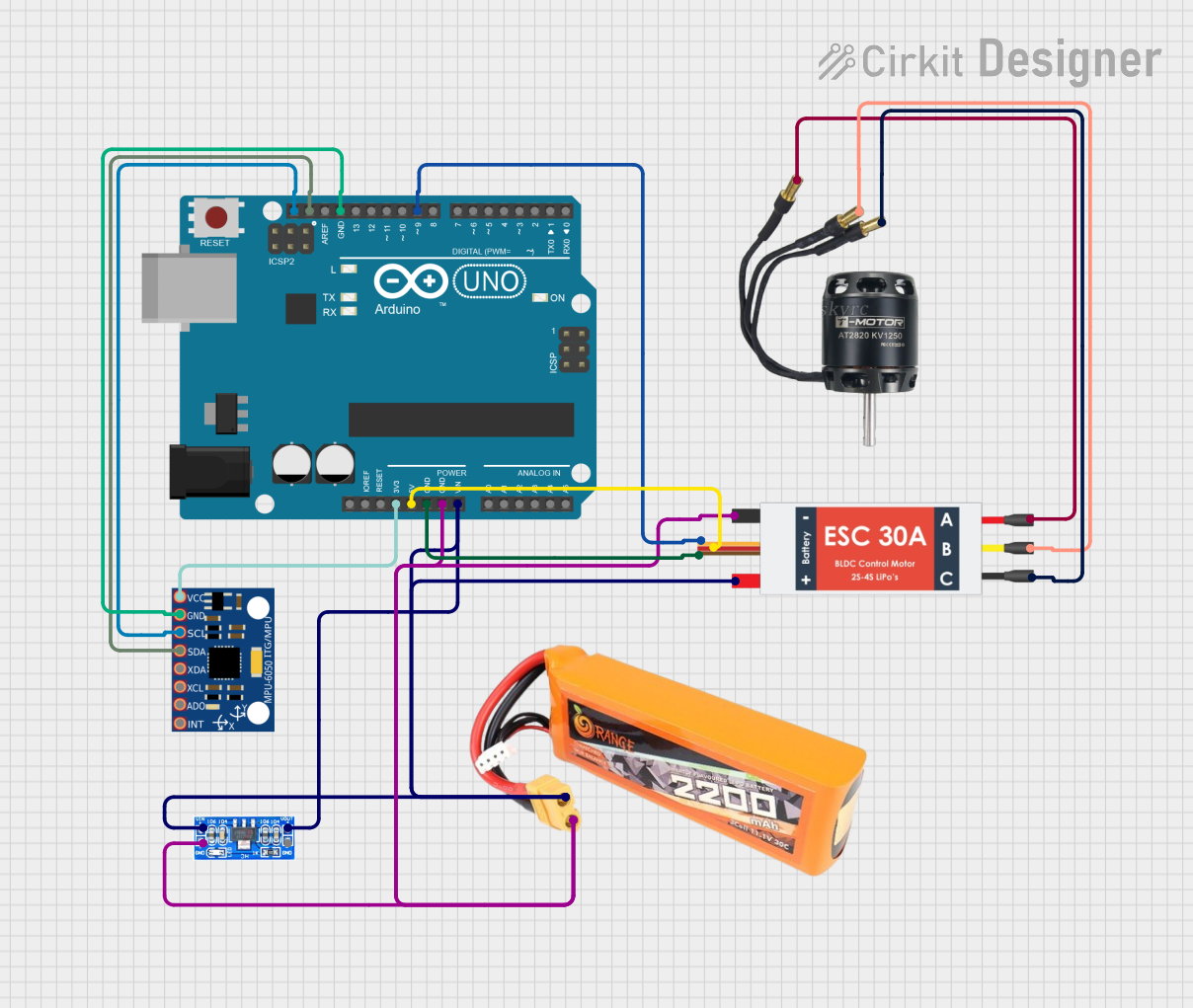
Circuit Documentation
Summary of the Circuit
This circuit is designed to control a Brushless DC (BLDC) motor via an Electronic Speed Controller (ESC) to stabilize a cube using an MPU-6050 Inertial Measurement Unit (IMU) sensor. The system reads the orientation of the cube and adjusts the motor speed to maintain the original position. The Arduino UNO serves as the central microcontroller unit, interfacing with the MPU-6050 for orientation data and controlling the ESC, which in turn drives the BLDC motor. A lipo battery provides power to the system, and an AMS1117 voltage regulator ensures stable voltage supply to the Arduino UNO.
Component List
Arduino UNO
- Microcontroller board based on the ATmega328P
- Provides I/O pins and communication interfaces
Lipo Battery 2200mAh 30C
- Provides power to the circuit
- 2200mAh capacity for extended operation
BLDC Motor
- Three-phase motor used for actuation
- Controlled by the ESC based on input from the Arduino UNO
Electronic Speed Controller (ESC)
- Interfaces between the Arduino UNO and the BLDC motor
- Regulates the speed of the motor based on the signal from the Arduino UNO
MPU-6050
- A 6-axis IMU sensor
- Measures acceleration and angular rates to determine orientation
AMS1117
- Voltage regulator
- Provides stable voltage to the Arduino UNO from the lipo battery
Wiring Details
Arduino UNO
3.3Vconnected to MPU-6050VCC5Vconnected to ESC5v outGNDconnected to ESCGND out, AMS1117GND, lipo batteryGND, MPU-6050GNDVinconnected to AMS1117Volt Out, lipo batteryVCC, ESCBattery VCCSCLconnected to MPU-6050SCLSDAconnected to MPU-6050SDAD9connected to ESCSignal
Lipo Battery 2200mAh 30C
VCCconnected to AMS1117Volt In, ESCBattery VCCGNDconnected to AMS1117GND, ESCBattery GND
BLDC Motor
Wire Aconnected to ESCM1Wire Bconnected to ESCM2Wire Cconnected to ESCM3
Electronic Speed Controller (ESC)
Battery VCCconnected to lipo batteryVCCBattery GNDconnected to lipo batteryGNDSignalconnected to Arduino UNOD95v outconnected to Arduino UNO5VGND outconnected to Arduino UNOGNDM1,M2,M3connected to respective wires of the BLDC Motor
MPU-6050
VCCconnected to Arduino UNO3.3VGNDconnected to Arduino UNOGNDSCLconnected to Arduino UNOSCLSDAconnected to Arduino UNOSDA
AMS1117
Volt Outconnected to Arduino UNOVinGNDconnected to Arduino UNOGNDVolt Inconnected to lipo batteryVCC
Documented Code
/*
 * Reaction Flywheel Stabilization System
 * This code is designed to control a BLDC motor via an ESC to stabilize a cube
 * using an MPU-6050 IMU sensor. The system will read the orientation of the cube
 * and adjust the motor speed to maintain the original position.
 */

#include <Wire.h>
#include <MPU6050.h>

MPU6050 mpu;

const int escPin = 9; // ESC signal connected to pin D9
int16_t ax, ay, az;
int16_t gx, gy, gz;

void setup() {
  // Initialize serial communication
  Serial.begin(9600);

  // Initialize MPU-6050
  Wire.begin();
  mpu.initialize();
  if (!mpu.testConnection()) {
    Serial.println("MPU6050 connection failed");
    while (1);
  }

  // Initialize ESC pin
  pinMode(escPin, OUTPUT);
  analogWrite(escPin, 0); // Start with motor off
}

void loop() {
  // Read raw accelerometer and gyroscope data
  mpu.getMotion6(&ax, &ay, &az, &gx, &gy, &gz);

  // Process sensor data to determine orientation
  float angleX = atan2(ay, az) * 180 / PI;
  float angleY = atan2(ax, az) * 180 / PI;

  // Calculate motor speed based on orientation
  int motorSpeed = map(angleX, -90, 90, 0, 255);
  motorSpeed = constrain(motorSpeed, 0, 255);

  // Write motor speed to ESC
  analogWrite(escPin, motorSpeed);

  // Print data for debugging
  Serial.print("AngleX: "); Serial.print(angleX);
  Serial.print(" AngleY: "); Serial.println(angleY);
  Serial.print(" Motor Speed: "); Serial.println(motorSpeed);

  // Delay for stability
  delay(100);
}
This code is responsible for initializing the MPU-6050 sensor and reading its data to determine the orientation of the cube. It then calculates the motor speed required to maintain the cube's position and sends the corresponding signal to the ESC, which controls the BLDC motor. The serial output can be used for debugging and monitoring the system's performance.