
Arduino Nano Controlled Robot with IR Sensors and Ultrasonic Obstacle Detection
View and Edit Project In Cirkit Designer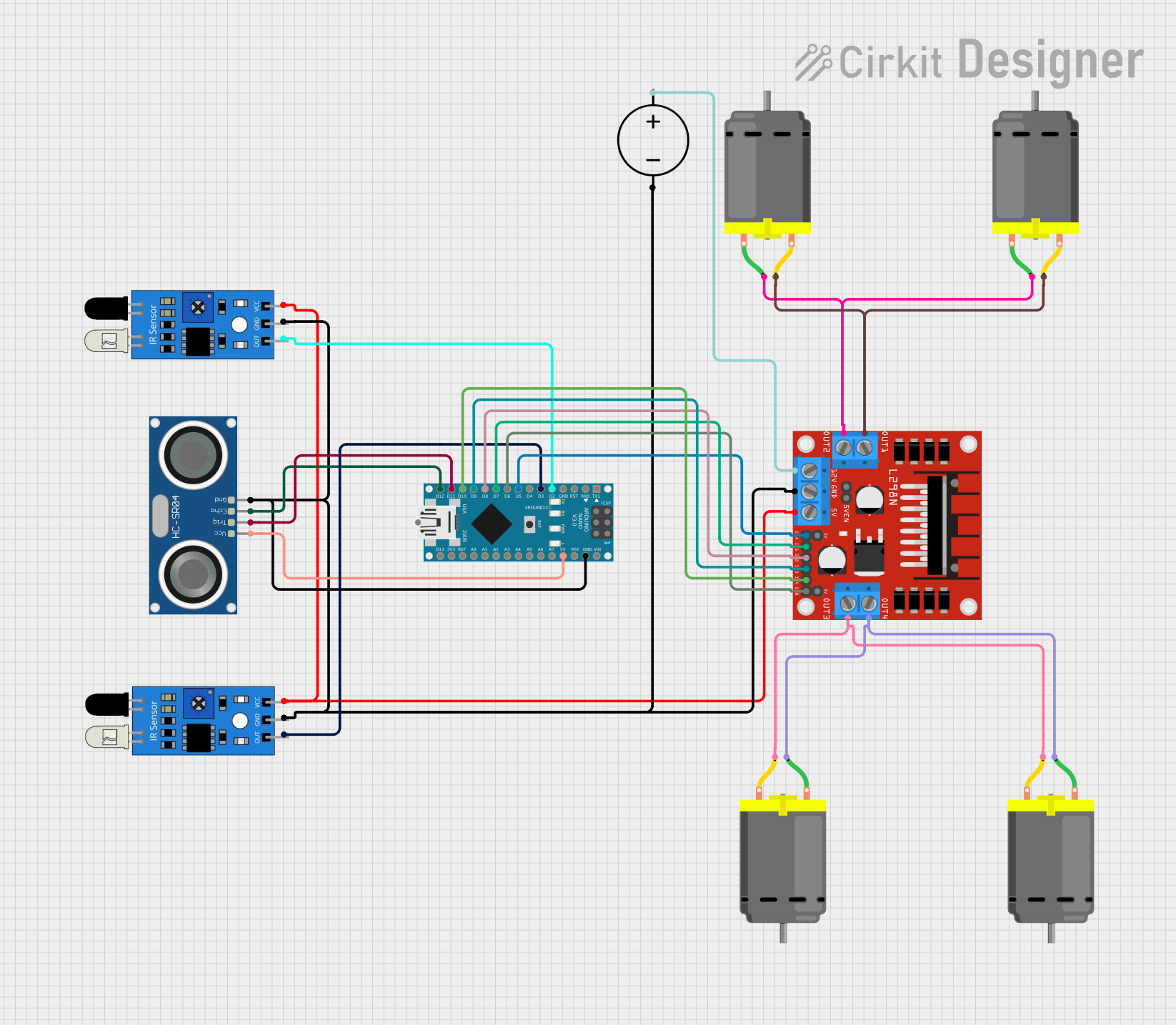
Circuit Documentation
Summary
The circuit in question is designed to interface an Arduino Nano microcontroller with a pair of IR sensors, an HC-SR04 ultrasonic sensor, four DC motors, and an L298N DC motor driver. The circuit is powered by a DC power source. The Arduino Nano is responsible for processing signals from the IR sensors and the ultrasonic sensor, and controlling the DC motors via the L298N motor driver based on the sensor inputs.
Component List
IR Sensors
- Component Name: IR Sensor
- Description: Infrared sensors used for detecting obstacles or for line tracking.
- Pins:
out,gnd,vcc
Arduino Nano
- Component Name: Arduino Nano
- Description: A small, complete, and breadboard-friendly microcontroller board based on the ATmega328P.
- Pins:
D1/TX,D0/RX,RESET,GND,D2toD13/SCK,VIN,5V,A0toA7,AREF,3V3
HC-SR04 Ultrasonic Sensor
- Component Name: HC-SR04 Ultrasonic Sensor
- Description: An ultrasonic distance sensor capable of measuring distances from 2cm to 400cm.
- Pins:
VCC,TRIG,ECHO,GND
DC Motors
- Component Name: DC Motor
- Description: Electric motors that run on direct current (DC) electricity.
- Pins:
pin 1,pin 2
L298N DC Motor Driver
- Component Name: L298N DC Motor Driver
- Description: A motor driver module capable of driving two DC motors or one stepper motor.
- Pins:
OUT1,OUT2,12V,GND,5V,OUT3,OUT4,5V-ENA-JMP-I,5V-ENA-JMP-O,+5V-J1,+5V-J2,ENA,IN1,IN2,IN3,IN4,ENB
DC Power Source
- Component Name: DC Power Source
- Description: Provides the necessary power to the circuit.
- Pins:
Ground,Positive
Wiring Details
IR Sensors
- IR Sensor 1:
outconnected to Arduino NanoD2gndconnected to common groundvccconnected to L298N DC motor driver5V
- IR Sensor 2:
outconnected to Arduino NanoD3gndconnected to common groundvccconnected to L298N DC motor driver5V
Arduino Nano
D2connected to IR Sensor 1outD3connected to IR Sensor 2outD5connected to L298N DC motor driverENAD6connected to L298N DC motor driverENBD7connected to L298N DC motor driverIN1D8connected to L298N DC motor driverIN2D9connected to L298N DC motor driverIN3D10connected to L298N DC motor driverIN4D11/MOSIconnected to HC-SR04 Ultrasonic SensorTRIGD12/MISOconnected to HC-SR04 Ultrasonic SensorECHO5Vconnected to HC-SR04 Ultrasonic SensorVCCGNDconnected to common ground
HC-SR04 Ultrasonic Sensor
TRIGconnected to Arduino NanoD11/MOSIECHOconnected to Arduino NanoD12/MISOVCCconnected to Arduino Nano5VGNDconnected to common ground
DC Motors
- DC Motor Pair 1:
pin 1of both motors connected to L298N DC motor driverOUT2pin 2of both motors connected to L298N DC motor driverOUT1
- DC Motor Pair 2:
pin 1of both motors connected to L298N DC motor driverOUT4pin 2of both motors connected to L298N DC motor driverOUT3
L298N DC Motor Driver
ENAconnected to Arduino NanoD5ENBconnected to Arduino NanoD6IN1connected to Arduino NanoD7IN2connected to Arduino NanoD8IN3connected to Arduino NanoD9IN4connected to Arduino NanoD10OUT1andOUT2connected to DC Motor Pair 1OUT3andOUT4connected to DC Motor Pair 25Vconnected to IR SensorsvccGNDconnected to common ground12Vconnected to DC Power SourcePositive
DC Power Source
Groundconnected to common groundPositiveconnected to L298N DC motor driver12V
Documented Code
Arduino Nano Code (sketch.ino)
void setup() {
  // put your setup code here, to run once:

}

void loop() {
  // put your main code here, to run repeatedly:

}
Note: The provided code is a template and does not contain any functional code. It is expected that the user will fill in the setup and loop functions with code to control the motors based on the sensor inputs.