
Arduino Nano Controlled Dual Motor Driver with Array Sensor and Pushbutton Interface
View and Edit Project In Cirkit Designer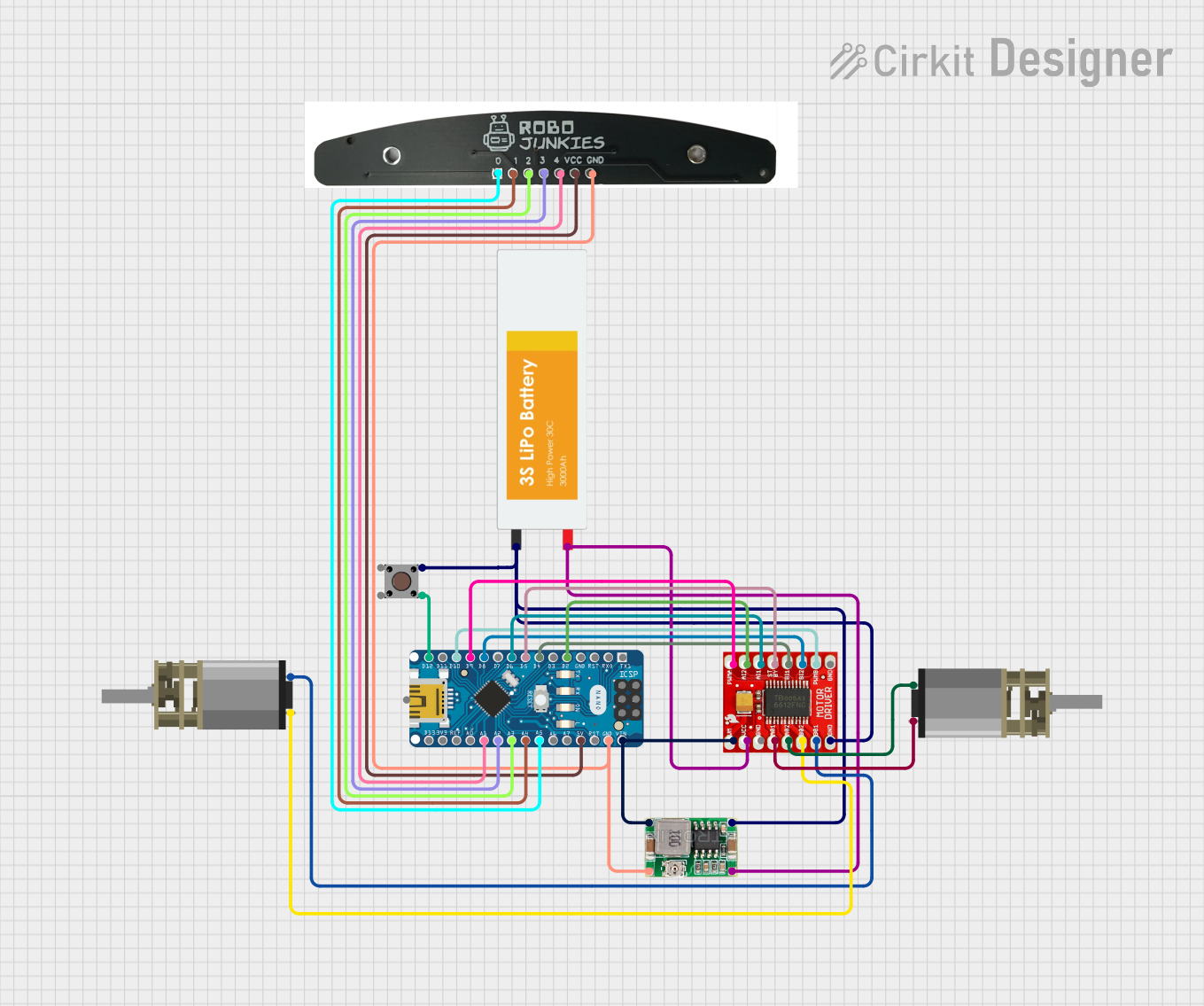
Circuit Documentation
Summary
This circuit integrates various components controlled by an Arduino Nano microcontroller to perform a set of functions. The Arduino Nano interfaces with a TB6612FNG Motor Driver to control two DC Mini Metal Gear Motors. A Mini 360 Buck Converter is used to step down the voltage from a Lipo Battery to power the system. An Array Sensor is connected to the Arduino Nano for input sensing, and a Pushbutton is included for user interaction.
Component List
Arduino Nano
- Microcontroller board based on the ATmega328P
- It has a variety of digital and analog I/O pins.
TB6612FNG Motor Driver
- A motor driver capable of driving two DC motors.
- It has inputs for motor control signals and power supply connections.
Mini 360 Buck Converter
- A DC-DC step-down (buck) converter module.
- It steps down voltage from a higher level to a lower level.
DC Mini Metal Gear Motor (x2)
- Small DC motors with gear reduction for increased torque.
- Each motor has two input terminals for control.
Pushbutton
- A simple pushbutton switch for user input.
- It has four pins, two of which are used for the switch operation.
Lipo Battery
- A rechargeable lithium polymer battery.
- It provides the power source for the circuit.
Array Sensor
- A sensor array with multiple sensing elements.
- It is used for detecting patterns or measuring signals.
Wiring Details
Arduino Nano
D2connected to TB6612FNG Motor Driver AI2D4connected to TB6612FNG Motor Driver BI1D5connected to TB6612FNG Motor Driver STBYD6connected to TB6612FNG Motor Driver AI1D8connected to TB6612FNG Motor Driver BI2D9connected to TB6612FNG Motor Driver PWMAD10connected to TB6612FNG Motor Driver PWMBD12/MISOconnected to Pushbutton Pin 2 (in)VINconnected to Mini 360 Buck Converter OUT+GNDconnected to Mini 360 Buck Converter OUT-5Vconnected to Array Sensor VCCA5connected to Array Sensor 0A4connected to Array Sensor 1A3connected to Array Sensor 2A2connected to Array Sensor 3A1connected to Array Sensor 4
TB6612FNG Motor Driver
AI2,BI1,STBY,AI1,BI2,PWMA,PWMBconnected to Arduino Nano as described above.VMconnected to Mini 360 Buck Converter OUT+GNDconnected to Mini 360 Buck Converter OUT-VCCconnected to Mini 360 Buck Converter IN-B01connected to DC Mini Metal Gear Motor IN2B02connected to DC Mini Metal Gear Motor IN1A02connected to DC Mini Metal Gear Motor IN1 (second motor)A01connected to DC Mini Metal Gear Motor IN2 (second motor)
Mini 360 Buck Converter
IN+connected to Lipo Battery VCC and Pushbutton Pin 4 (out)IN-connected to Lipo Battery GNDOUT+connected to TB6612FNG Motor Driver VM and Arduino Nano VINOUT-connected to TB6612FNG Motor Driver GND and Arduino Nano GND
DC Mini Metal Gear Motor
- Two motors with
IN1andIN2connected to TB6612FNG Motor Driver B01/B02 and A01/A02 respectively.
Pushbutton
Pin 2 (in)connected to Arduino Nano D12/MISOPin 4 (out)connected to Mini 360 Buck Converter IN+
Lipo Battery
VCCconnected to Mini 360 Buck Converter IN+GNDconnected to Mini 360 Buck Converter IN-
Array Sensor
VCCconnected to Arduino Nano 5VGNDconnected to Mini 360 Buck Converter OUT-0connected to Arduino Nano A51connected to Arduino Nano A42connected to Arduino Nano A33connected to Arduino Nano A24connected to Arduino Nano A1
Documented Code
Arduino Nano Code (sketch.ino)
void setup() {
  // put your setup code here, to run once:

}

void loop() {
  // put your main code here, to run repeatedly:

}
This code is a template for the Arduino Nano and does not contain any functional code. It provides the basic structure for an Arduino sketch with setup() and loop() functions where the user can add initialization code and the main code to be executed repeatedly.