
Arduino-Controlled Bidirectional DC Motor Circuit with Pushbutton Interface
View and Edit Project In Cirkit Designer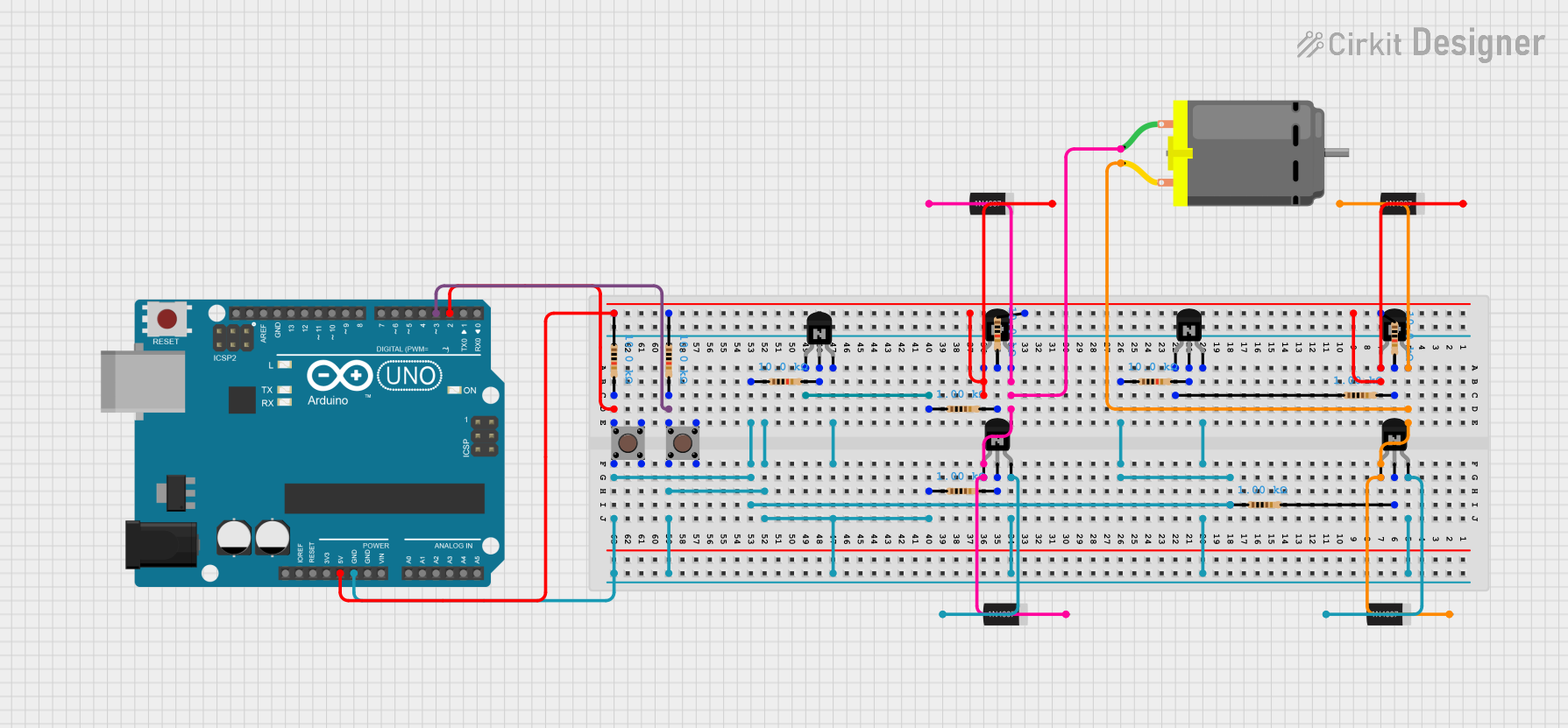
Circuit Documentation
Summary
The circuit in question appears to be a motor control circuit that uses an Arduino UNO microcontroller to drive a DC motor in forward or reverse directions based on the state of two pushbuttons. The circuit includes a series of 1N4007 rectifier diodes, PNP and NPN transistors, resistors, and pushbuttons. The diodes are likely used for flyback protection, and the transistors are used to switch the motor on and off. The resistors are used for base current limiting for the transistors and pull-up resistors for the pushbuttons.
Component List
1N4007 Rectifier Diode
- Description: A general-purpose rectifier diode with a high maximum current and reverse voltage rating.
- Pins: Cathode, Anode
DC Motor
- Description: A motor that runs on direct current (DC) electricity.
- Pins: pin 1, pin 2
PNP Transistor (EBC)
- Description: A PNP bipolar junction transistor with emitter, base, and collector pins.
- Pins: emitter, base, collector
NPN Transistor (EBC)
- Description: An NPN bipolar junction transistor with emitter, base, and collector pins.
- Pins: emitter, base, collector
Pushbutton
- Description: A momentary pushbutton switch with four pins.
- Pins: Pin 3 (out), Pin 4 (out), Pin 1 (in), Pin 2 (in)
Resistor
- Description: A passive two-terminal electrical component that implements electrical resistance as a circuit element.
- Pins: pin1, pin2
- Values: Various (1000 Ohms, 10000 Ohms)
Arduino UNO
- Description: A microcontroller board based on the ATmega328P.
- Pins: Various (including I/O pins and power supply pins)
Wiring Details
1N4007 Rectifier Diode
- Anode connected to the collector of a PNP transistor and the emitter of an NPN transistor.
- Cathode connected to the DC motor and another diode's anode.
DC Motor
- pin 1 connected to a diode's cathode and an NPN transistor's emitter.
- pin 2 connected to a diode's cathode and a PNP transistor's collector.
PNP Transistor (EBC)
- emitter connected to a diode's cathode and various resistors.
- base connected to resistors.
- collector connected to a diode's anode and the DC motor.
NPN Transistor (EBC)
- emitter connected to a diode's anode and various resistors.
- base connected to resistors.
- collector connected to a diode's anode, resistors, and the Arduino UNO's GND.
Pushbutton
- Pin 1 (in) connected to the Arduino UNO's digital pins and resistors.
- Pin 2 (in) connected to resistors and the Arduino UNO's GND.
Resistor
- pin1 connected to transistors, other resistors, and diodes.
- pin2 connected to the Arduino UNO's digital pins, GND, and transistors.
Arduino UNO
- Digital pins connected to pushbuttons and resistors.
- Power pins (5V, GND) connected to transistors and resistors.
Documented Code
// Define pins
const int forwardControlPin = 9; // Control pin for forward
const int backwardControlPin = 10; // Control pin for backward
const int forwardButtonPin = 2; // Button for forward
const int backwardButtonPin = 3; // Button for backward

void setup() {
  // Set control pins as outputs
  pinMode(forwardControlPin, OUTPUT);
  pinMode(backwardControlPin, OUTPUT);

  // Set button pins as inputs with pull-up resistors
  pinMode(forwardButtonPin, INPUT_PULLUP);
  pinMode(backwardButtonPin, INPUT_PULLUP);
}

void loop() {
  // Check if the forward button is pressed
  if (digitalRead(forwardButtonPin) == LOW) { // Button pressed (active low)
    moveForward();
  }
  // Check if the backward button is pressed
  else if (digitalRead(backwardButtonPin) == LOW) { // Button pressed (active low)
    moveBackward();
  }
  // If no buttons are pressed, stop the motors
  else {
    stopMotors();
  }
}

// Function to move forward
void moveForward() {
  digitalWrite(forwardControlPin, HIGH);  // Activate forward control
  digitalWrite(backwardControlPin, LOW);  // Deactivate backward control
}

// Function to move backward
void moveBackward() {
  digitalWrite(forwardControlPin, LOW);   // Deactivate forward control
  digitalWrite(backwardControlPin, HIGH); // Activate backward control
}

// Function to stop the motor
void stopMotors() {
  digitalWrite(forwardControlPin, LOW);
  digitalWrite(backwardControlPin, LOW);
}
This code is designed to control the DC motor's direction using the Arduino UNO. The forwardButtonPin and backwardButtonPin are connected to pushbuttons that, when pressed, trigger the motor to move in the corresponding direction. The forwardControlPin and backwardControlPin are likely connected to the base of transistors that control the motor's direction. The code uses internal pull-up resistors for the button inputs and controls the motor direction with simple digital writes to the control pins.