
How to Use HTU21D: Examples, Pinouts, and Specs
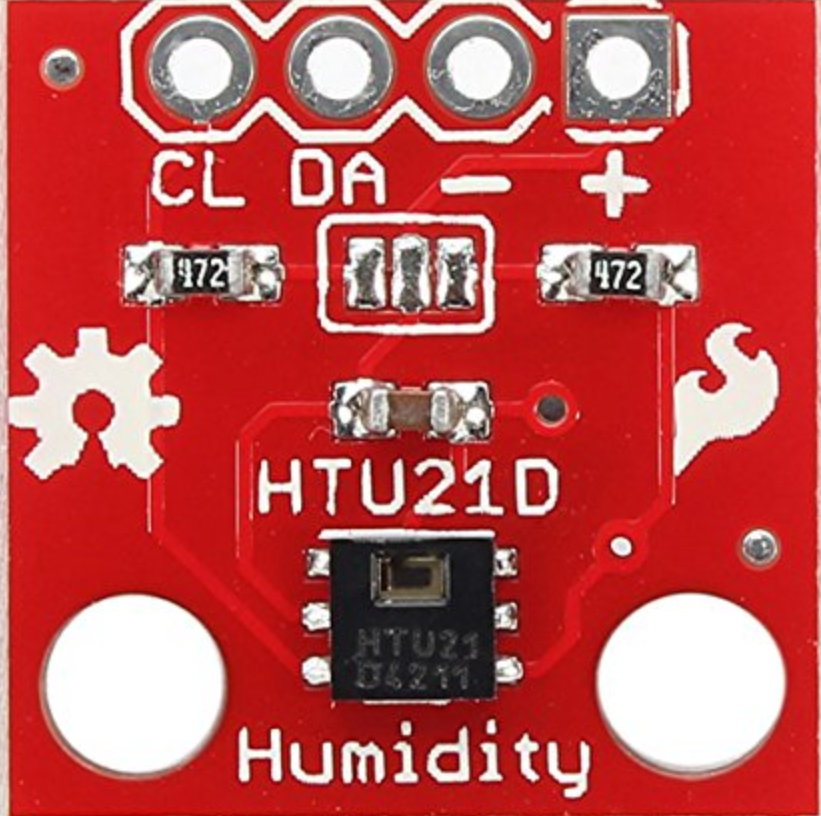
 Design with HTU21D in Cirkit Designer
Introduction
The HTU21D is a digital humidity and temperature sensor designed for precise environmental monitoring. It provides accurate measurements of relative humidity and temperature, making it ideal for applications requiring reliable environmental data. The sensor communicates via the I2C interface, ensuring easy integration with microcontrollers and other digital systems. Its compact size and low power consumption make it suitable for portable devices, weather stations, HVAC systems, and IoT applications.
Explore Projects Built with HTU21D
 Open Project in Cirkit Designer
 Open Project in Cirkit Designer
 Open Project in Cirkit Designer
 Open Project in Cirkit Designer
Explore Projects Built with HTU21D
Open Project in Cirkit DesignerOpen Project in Cirkit DesignerOpen Project in Cirkit DesignerOpen Project in Cirkit DesignerCommon Applications
- Weather monitoring systems
- HVAC (Heating, Ventilation, and Air Conditioning) control
- Industrial process monitoring
- IoT devices for environmental sensing
- Consumer electronics (e.g., smart thermostats, wearable devices)
Technical Specifications
The HTU21D offers high accuracy and reliability in a small form factor. Below are its key technical details:
| Parameter | Value |
|---|---|
| Supply Voltage (VDD) | 1.5V to 3.6V |
| Typical Operating Voltage | 3.0V |
| Current Consumption | 0.15 mA (measuring), 0.1 µA (idle) |
| Humidity Accuracy | ±2% RH (20% to 80% RH range) |
| Temperature Accuracy | ±0.3°C (at 25°C) |
| Humidity Range | 0% to 100% RH |
| Temperature Range | -40°C to +125°C |
| Communication Interface | I2C |
| I2C Address | 0x40 |
| Response Time (RH) | 5 ms |
| Dimensions | 3mm x 3mm x 0.9mm |
Pin Configuration
The HTU21D has four pins, as described in the table below:
| Pin | Name | Description |
|---|---|---|
| 1 | VDD | Power supply (1.5V to 3.6V) |
| 2 | GND | Ground |
| 3 | SDA | I2C data line |
| 4 | SCL | I2C clock line |
Usage Instructions
Connecting the HTU21D to a Microcontroller
To use the HTU21D, connect it to a microcontroller (e.g., Arduino UNO) via the I2C interface. Below is a typical wiring configuration:
| HTU21D Pin | Arduino UNO Pin |
|---|---|
| VDD | 3.3V |
| GND | GND |
| SDA | A4 (I2C Data Line) |
| SCL | A5 (I2C Clock Line) |
Sample Arduino Code
The following Arduino code demonstrates how to read temperature and humidity data from the HTU21D:
#include <Wire.h>

// HTU21D I2C address
#define HTU21D_ADDRESS 0x40

// Commands for HTU21D
#define TRIGGER_TEMP_MEASURE_HOLD 0xE3
#define TRIGGER_HUMD_MEASURE_HOLD 0xE5

void setup() {
  Wire.begin(); // Initialize I2C communication
  Serial.begin(9600); // Start serial communication
  Serial.println("HTU21D Sensor Test");
}

void loop() {
  float temperature = readTemperature();
  float humidity = readHumidity();

  // Print the results to the Serial Monitor
  Serial.print("Temperature: ");
  Serial.print(temperature);
  Serial.println(" °C");

  Serial.print("Humidity: ");
  Serial.print(humidity);
  Serial.println(" %");

  delay(2000); // Wait 2 seconds before the next reading
}

float readTemperature() {
  Wire.beginTransmission(HTU21D_ADDRESS);
  Wire.write(TRIGGER_TEMP_MEASURE_HOLD);
  Wire.endTransmission();
  delay(50); // Wait for the measurement to complete

  Wire.requestFrom(HTU21D_ADDRESS, 2);
  if (Wire.available() == 2) {
    uint16_t rawTemp = (Wire.read() << 8) | Wire.read();
    rawTemp &= 0xFFFC; // Clear the status bits
    return -46.85 + 175.72 * (rawTemp / 65536.0); // Convert to °C
  }
  return NAN; // Return NaN if reading fails
}

float readHumidity() {
  Wire.beginTransmission(HTU21D_ADDRESS);
  Wire.write(TRIGGER_HUMD_MEASURE_HOLD);
  Wire.endTransmission();
  delay(50); // Wait for the measurement to complete

  Wire.requestFrom(HTU21D_ADDRESS, 2);
  if (Wire.available() == 2) {
    uint16_t rawHum = (Wire.read() << 8) | Wire.read();
    rawHum &= 0xFFFC; // Clear the status bits
    return -6.0 + 125.0 * (rawHum / 65536.0); // Convert to %RH
  }
  return NAN; // Return NaN if reading fails
}
Important Considerations
- Power Supply: Ensure the HTU21D is powered within its operating voltage range (1.5V to 3.6V). Exceeding this range may damage the sensor.
- Pull-Up Resistors: The I2C lines (SDA and SCL) require pull-up resistors (typically 4.7kΩ). Some breakout boards include these resistors; check your board's documentation.
- Environmental Factors: Avoid exposing the sensor to extreme conditions (e.g., condensation, dust) to maintain accuracy and longevity.
- I2C Address Conflicts: Ensure no other devices on the I2C bus share the same address (0x40).
Troubleshooting and FAQs
Common Issues
No Data from the Sensor
- Cause: Incorrect wiring or loose connections.
- Solution: Double-check the wiring and ensure all connections are secure.
Incorrect Readings
- Cause: Environmental interference or sensor damage.
- Solution: Ensure the sensor is in a stable environment and free from contaminants. Replace the sensor if damaged.
I2C Communication Failure
- Cause: Missing pull-up resistors or incorrect I2C address.
- Solution: Verify that pull-up resistors are present on the SDA and SCL lines. Confirm the I2C address is set to 0x40.
FAQs
Can the HTU21D measure both temperature and humidity simultaneously?
- No, the HTU21D measures temperature and humidity sequentially. You must trigger separate commands for each measurement.
What is the typical lifespan of the HTU21D?
- The sensor is designed for long-term use under normal operating conditions. However, exposure to harsh environments may reduce its lifespan.
Can I use the HTU21D with a 5V microcontroller?
- Yes, but you must use a level shifter or voltage divider to ensure the I2C lines operate within the sensor's voltage range (1.5V to 3.6V).
By following this documentation, you can effectively integrate the HTU21D into your projects and achieve accurate environmental measurements.